Dylann24
Members
-
Joined
Everything posted by Dylann24
-
Okay, glad to hear you got it working! If you come across any further problems do not hesitate to ask! 👍
-
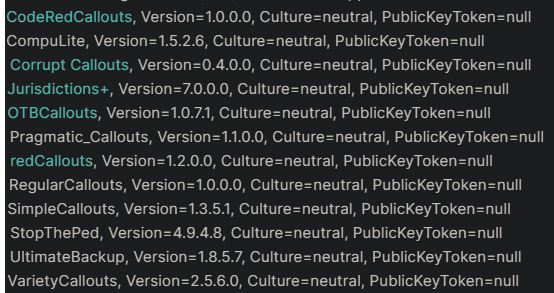
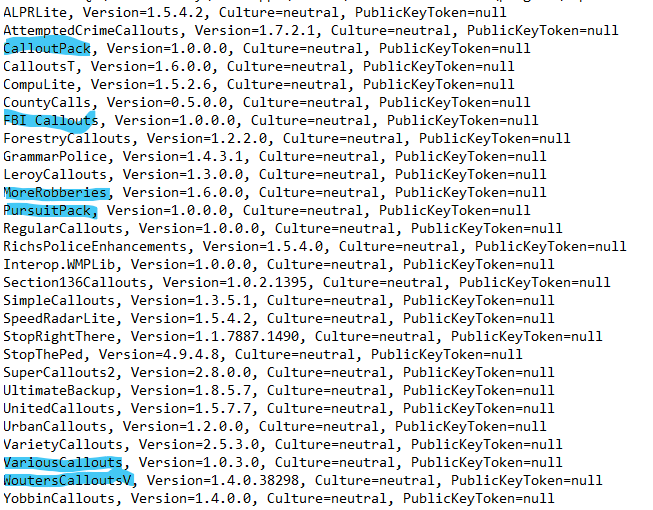
1. Remove all the blue ones. 2. Hold shift while launching Rage Plugin Hook and once the settings load go to the general tab and set the threshold to 60,000.
-
Remove the ones highlighted and try again 😄
-
Not at all 😀
-
It is a random crash from Yobbin callouts 👍
-
Greetings, this may be due to the mod you downloaded not being updated for the Tuners update as a quick look on the website and the author has revoked the access to download the mod and claims the beta version is on their Discord. As a result of this I would simply suggest you remove this mod the author releases a official update for their mod 🙂
-
Greetings, 1. Try launching GTA without RPH and load into story mode. 2. Once in story mode alt tab out and launch rage (while gta is running). Let me know if that works
-
Remove Computer+, this plugin is outdated. It can be replaced with CompuLite: https://www.bejoijo.com/post/compulite
-
Is your game crashing when you launch without RPH?
-
You need to install RageNativeUI, this can be acquired here: https://github.com/alexguirre/RAGENativeUI/releases drag both the xml and the dll file into your GTA main directory, then you are good to go 👍
-
 This is a random crash, there is no need to "fix it". As the S136 exception states "This exception didn't cause a crash"
- 422 comments
- 25 reviews
-
-

- 1
-
-
Hello! This is the wrong log file, please find the RagePluginHook.log file in your main directory and send that here 😄
-
There will be a file in your main directory called RagePluginHook.log, it will be a text document. Attach it here.
-
-