



1supermiguel
Members
-
Joined
-
Last visited
Everything posted by 1supermiguel
-
Dodge Charger, hands down. Here is an actual picture of one of my town's dodge chargers. We only use dodge chargers here as our police cars, well marked that is, both slicktop and not, both 2013 edition and older 2010 editions. Also for road blocks or snowy conditions I believe my town has these suv's, not sure what kind, they are rarely seen as they are rarely used. And as for unmarked cars, they have these undercover like not sure what they are, but the most common vehicles in this town, which for some reason one of the most comment vehicles here are like these old 2005 - 2007 Ford Taurus sedans. Not sure if they have other undercover/unmarked cars besides those, but only the detectives of the town police drive em, due to our town not necessarily being big/dangerous enough for an actual undercover division. But the detectives do wear undercover clothing. But anyways, here is a pic of my favorite one of the bunch, the dodge charger, slicktop edition: This image was actually taken by me during an old car show thing we hold annually in my town. But yeah, that car is a beast. Not bad if I may so myself, not bad at all! I approve! Interesting fact: The Dodge Charger is also my favorite type of car/dream car! I can only hope to own one one of these days! Dodge Chargers ftw!
-
Just a bunch of pictures of my police journeys using LCPDFR 1.0 and some mods I use. This album will just be a compilation of random images I captured throughout "just another day in Liberty City".
-
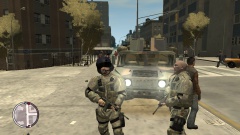
From the album: Just another day in Liberty City...
US Military Officials pose for pictures after completing an assignment which involved dealing with two armed suspects firing at each other. -
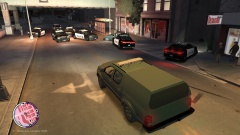
From the album: Just another day in Liberty City...
How do you know when you're really done for? When the military responds to the call. That is when you give up, or should, otherwise things could get ugly, and I mean real ugly, real fast. -
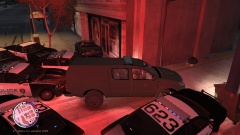
From the album: Just another day in Liberty City...
At this point the guy finally gave up, which was good, cause he was about to be taken out real ugly he was, and real messily as well. -
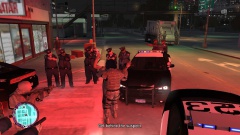
From the album: Just another day in Liberty City...
This guy is looking at hard time for a loooooooooooooooooooooooooooooooooooooooooooooooooooong time! -
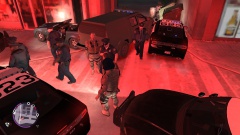
From the album: Just another day in Liberty City...
Another criminal scum out of Liberty City! Off he goes - no, not to normal jail, he is going to federal jail, rest in peace. -
Oh and don't forget to check out the Liberty State Edition of this screen, in case you want that one as well!:D '?do=embed' frameborder='0' data-embedContent>>
-
I AM accepting requests! Message me if you want a special one!:)
-
The NYPD Edition has finally been released! Here is the link: '?do=embed' frameborder='0' data-embedContent>> Enjoy! :D
- 4 comments
- 1 review
-
To those who have viewed this file: I just created an NYPD variation of this computer screen, completely NYPD. It has been submitted, I will post a link when it becomes publicly available. In the mean time, try to cope with this image. Thanks! :)
- 4 comments
- 1 review
-
ONLY USABLE WITH LCPDFR VERSION 1.0!!! Based on the original computer screen I made a little while ago representing Liberty State Police Department, i realized more people would prefer an actual NYPD computer screen so I decided to make one. This one. Here ya go! Now don't ever say I don't listen to the people! This is just a simple modification of the original police computer accessed in-game via pressing "E" when on-duty in a stopped police car. This will change the original computer screen shown when you press the "E" button to the one shown here, an NYPD one! Now this computer screen, unlike my original Liberty State one, actually features the NYPD motto on it under the one and only seal of New York with, but not limited too, the actual logo of the NYPD on the top-left part of the screen AND it actually says this time "New York City Police Department" rather than the original Liberty State one on the top-right part of the screen. I hope you enjoy! Notice: You DO have the right to edit this file in whatever ways you see fit and to redistribute it at your own discretion. However, this is an LCPDFR.com EXCLUSIVE modification and it MAY NOT be distributed ANYWHERE ELSE BUT LCPDFR.com. Also, should you indeed decide to create your own edit from this file and distribute it throughout LCPDFR, you MUST give me credit in your description for using my original file to create your edit of it AND you MUST also provide a link back to this or whichever one of my original works you base your edits off of. No exceptions. Thank you. HOW TO INSTALL: To install this file it is really simple. All you must do is access your GTA IV Directory through whichever way you normally access it, and then simply go to the folder labeled "lcpdfr" and click it. Once in that folder, replace the "mainmenu" file located within it with the one provided in this .zip archive and that's it! Then enjoy using your new NYPD Police Computer Screen every time you go to access your police computer! However, MAKE SURE you create a BACKUP of the original "mainmenu" file located in this folder so that if you decide to instead later on switch back to the original, you always have it with you so that you can! Enjoy! :smile:
-
-
ONLY USABLE WITH LCPDFR VERSION 1.0!!! This is just a simple modification of the original police computer screen accessed when pressing "E" in-game that changes it from the default screen to a newly modified screen that represents the Liberty State Police Department based on the New York State Police Department instead. It also features the New York motto of "Excelsior" represented by its actual image in the center of the screen. Enjoy! Notice: You do have the right to edit this file in whatever ways you wish and too redistribute it throughout LCPDFR.com exclusively as well so long as if you do so, you make sure to credit me in your description if you used this original file to make your edits and provide a link to this original file if used, as well! That is all. HOW TO INSTALL: Go to your GTA IV Directory, however you usually access it, and then click on the folder within the directory labeled "lcpdfr". Then, when in that folder, simply replace the image file in it named "mainmenu" with the one I provided and it will replace the screen seen when using the police computer in-game. However, make sure to make a copy of that original png file in case you wish to change back to the original one at any point in time. And that's it! Enjoy! :yes:
- 4 comments
- 1 review
-
Wow! This actually really is an awesome ped mod! I love it! It fits so well as an armored ped! Thanks! :D
- 4 comments
- 4 reviews
-
Wow...the one time I FINALLY find an EPIC Liberty County Sheriff Car Pack - The author no longer produces dowloads for LCPDFR. Oh well, have fun wherever it is that you go, and thanks for a great car pack! Enjoy life my friend! :)
- 27 comments
- 7 reviews
-
I've wanted to be an officer since my original dream of being a game developer died out due to the nearest colleges to me that teach it, which are still pretty damn far, a few hours per drive, had like 2% acceptance rates and given my grades in school they weren't the best so yeah i could tell at that point that, that dream was never going to occur. This was around 10th Grade. I am now a Senior, almost going on the 2nd half of the school year (a few months) and i decided back when i was a Sophomore that i would follow on my backup dream which was to become an officer of the law and currently still is. Due to a lot of my current relatives already being LEO's in different LEO fields, and also due to most my friends going off to become LEO's as well, i decided, "why not?", you know? So yeah. So that is what i am going to be going off into college for to hopefully one day be able to join a LEO field of some type. My current dream is becoming just a normal officer of my local town, why? Because they get these babies to drive, my dream car: http://www.youtube.com/watch?v=LXSqtGE5wHo My local town's PD ONLY has Chargers, from Sixth Generation (2006 - 2010) to Seventh Generation (2011 +) ones! Both slicktop and not! And also one police suv (not slicktop) primarily used for road blocks, should that ever be necessary and it works because streets here aren't that wide. But also because i like to help people out people and i want to help stop the crime in my local town. I wanna be a hero, you know? And that is what i find any LEO to be, a hero, no matter what field, for the valiant services they provide to the people. Maybe one day i'll get to fulfill that dream, but hopefully one soon... P.S. Would anyone mind making this into a custom vehicle for me to use? ELS as well, please? There are absolutely no vehicles out there about my town's PD and it's be greatly appreciate if anyone would be so kind as to do so, no one has too, but it'd just be a very kind thing to do and if anyone wanted to do it and send me the link to their finished work, that'd be appreciated. Thanks to anyone, if anyone, who decides they wish to create said thing! All right, that's it for this P.S.
-
OH MAI GAWD! I have been looking for a pack like this for AGES! It's....it's marvelous! Truly a beauty to the eye! I...i bow down to thee, oh mightiest of packs and to thee to...oh mightiest of pack creators! Thank you for such a creation of extreme enjoyment! I shall use this pack immediately! As soon as i can return to a computer! Thank you author of said pack, thank you! I HIGHLY 100% approve of your design!:D
- 154 comments
- 86 reviews
-
Doesn't look half bad at all! Now if only you could make an LCPD Version, that one i'd use right away! If you ever do so, make sure to contact me! Nice design and looking forward to using this vehicle soon! 5 stars!
- 20 comments
- 18 reviews
-
FINALLY a good vehicle i can use as a pstockade that DOESN'T bug out or give me a handling line that is NOT in the proper format, making my game crash every time i try to start it up! Thank you for being that guy finally!
- 22 comments
- 12 reviews
-
This looks like the PERFECT file to replace the pstockade! Thanks for the truck!
- 29 comments
- 12 reviews
-
FINALLY! I was looking for a Ford Taurus with this skin EXACTLY for AGES! Thank you for your great work, my friend!
- 40 comments
- 58 reviews
-
-
Nice van! Finally a van that does not bug out or need a new handling line or something! Thanks!
- 23 comments
- 14 reviews
-
Would of been better if it had those yellow/orange hazard lights most other ELS vehicles have, but oh well, i guess you cant have everything. Good truck i guess either way nonetheless.
- 8 comments
- 14 reviews
-
-

- 1
-

