



Alfie6906
Members
-
Joined
-
Last visited
Everything posted by Alfie6906
-
Two things for you to do: - Remove AmbientAICallouts, it hasn't been updated since Jan 2021 and therefore can be seen as outdated as it was for 0.4.8, causing your game to crash - go to commandline.txt in your GTA directory, remove "enableCustomLoadingBackgrounds-disableCustomLoadingScreen-disableCustomLoadingScreen" and save the file if it crashes again, send another RPH log.
-
Hello, I'm sorry to hear about your issues with your plugins not working, can you please post your Ragepluginhook.log file from your GTA directory here.
-
Could you please post your ragehookplugin.log in here so I can take a look🙂 this is found in your GTA Directory
-
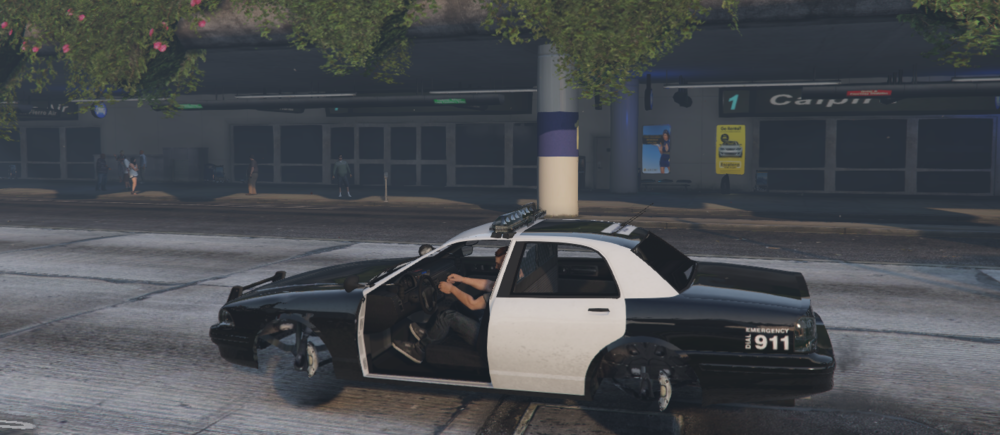
I replaced my vehicle in the police slot and now it looks like this, can I get some help please?
-
Ok no problem, glad its all working now... as far as I know, I'm not familiar with Dual shock controllers so maybe have a look at YouTube? apologies.
-
Please don't install any outdated mods, please check the compatibility before you download something. Can you please rename your mods folder to _mods in your GTA directory and launch with rage please?
-
Hello, as far as I can work out from this log, the only thing really specified to me is that DX11 is specified twice in your commandline, which could cause some issues with texture loss as DirectX11 is to do with graphics. Therefore, Go to your GTA Directory and go to "commandline.txt" then, delete everything in that text file and save, If you get another crash, please send a new log, Thank you.
-
Hello, I have read your log, and I understand to my knowledge that you may have installed some outdated plugins hence to why your game is crashing, please remove the following plugins: Heli Taxi SirenSetting Limit Adjuster Spotlight I believe that should be it. If you have any more crashes, send me a new log. Thanks!
-
Hello Demo, I understand your having some difficulty in installing LSPDFR, have you installed it via manual or automatic installation?
-
If your game has crashed, it should be in a text called RagePluginHook.log. Please send this, it's located in your GTA Directory. Regards, Alfie6906
-
no problem, if it works, no bother but I would suggest taking albo's mods out if not already 👍
-
Hey, I've looked at your rage plugin hook and here's some outdated plugins which you may wish to remove: All Of Albo's Mods are outdated due to him being a retired modder, remove albo1225 common if you have it and the following plugins: Traffic Policer PoliceSmartRadio As well as: Rich's Police Enhancements Traffic Callouts Yobbin Callouts SuperEvents2 Interop.WMPLib FayaCallouts FBI Callouts BetterEMS Officerporci Plugin Try Removing These and see if your game works. If not, feel free to send another log 😉
-
is grammar police installed via the latest update?
-
Heya, Have you added in any sound packs recently that changes sirens, weapons, or have you messed about with anything in your audio files? anywhere within that area??
-
salut pourriez-vous m'envoyer votre ragepluginhook.log situé dans votre répertoire principal GTA s'il vous plaît. Merci 🙂
-
I think you are having an issue with your network. Make sure you disable any web filters, anti-virus, and firewall software. If that doesn't work, try reinstalling your game, if then this doesn't work, try using a VPN. hope this works out for you 🙂
-
I'm not an LCPDFR player, however I recommend you watch this tutorial as it may be able to help 🙂 (20) How to Install LCPDFR for GTA IV: Complete Edition - YouTube
-
do you have stop the ped on the latest update, is it causing a crash or anything strange?
-
No problem, come back here if you need any more assistance 🙂 Thanks,
-
From the album: Running National Police Air Support (NPAS)
-
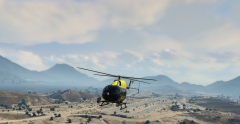
Here's a few pictures of me running NPAS, Helicopter Pursuit Support.
-
From the album: Running National Police Air Support (NPAS)
-
No remove albo's plugins, Bejojio's plugins are updated to work. As albo is a retired modder, most of his plugins are now outdated.
-
LML needs updating so that won't work and will crash your game if you use it I believe. I'd recommend using Bejojio's plugins for albo's mods, Bejojio's plugins can be found here: Home | BejoIjo Plugins
-
Open commandline.txt in your GTA V folder and remove everything in it. Save & close, the file is called "commandline.txt". Go Increase the Plugin Timeout Threshold to 60,000 in the RPH settings. Also, you have a significant amount of outdated plugins: Blaine County Callouts, Bribe, CalloutsT, CalloutsV, Quarantime Callouts, HeliAssist, Interactive Callouts, Felony Stop, FireCallouts, FirstCallouts, YobbinCallouts, CrunchBullet Callouts, LSPDFR update checker, Duty Callouts, CountyCalls, SanAndreas Callouts, TerrCall, NiceCallouts, OCspray, Inspired Callouts, SecondCallout. Try removing all of these, if your game is still crashing, come back here and send another Rage Log. Thanks,


