Twuben
Members
-
Joined
-
Last visited
Everything posted by Twuben
-
Did you mess with GrammarPolice.ini at all?
-
Wait what folder did you delete Slimdx from? I'm not really sure what plugin uses that
-
Well nice to know it's working like that, probably one of the plugins I'm assuming the Nightyields one can't really be loaded at startup. EUP and LSPDFR should work fine at startup. Glad to know it's all working out now, make sure to mark the post as solved! 🙂
-
Well I went over it and everything seems fine, however I had to set it up a bit different because it isn't supposed to be exactly equal to the defaultregions.xml But hey, now you have more jurisdictions 🙂 I divided each part of the map into jurisdictions meaning well, Blaine County can have their own set of vehicles, Los Santos Sheriff as well, Los Santos too, tbf you can even add Army jurisdiction and like Airport jurisdiction Just take a look at how i set it up. If you want to add more just follow the same template. But make sure to check the zones reference to add the zones you want. Other than that. I have no clue as of why the cars aren't working. Are you sure they have the exact file name, you can try the same name of the ELS file for the vehicle, the one you put in the ELS folder. CustomRegions.xml
-
Well you can provide the Default.xml however I do not recommend modifying it at all because that's what the Custom.xml is for. In case it gets corrupted/doesn't work it falls back to the defaul.xml allowing the plugin to function normally. You can literally copy and paste the default.xml and rename it to custom.xml But anyways yeah you can just provide the Default.xml no problem
-
No worries Well could provide your CustomRegions.xml file? Because like you might be only changing the cars in only a few regions and whenever you're out of that region its defaulting to the base cars, assuming you didn't change the vehicles for that region too
-
Have you added mods/plugins besides the essential ones like LSPDFR? If you did rename the mods folder to _mods And rename the plugins folder to _plugins Create a new plugins folder and move only lspdfr.dll/pdb into that new folder and the LSPDFR folder inside the plugins folder but empty, no plugins in it. Let me know if it still crashes
-
Well F11 conflicts with social club, if you have anything else installed via OpenIV I recommend that you change the mods folder name to _mods just to test and see if you can open the weapons wheel. If that works then try to reinstall EUP menu thats my best guess here. That it probably got installed wrong because normally it should work
-
Well if the cars are addons, you have to change their names in Ultimate backup accordingly I can send you a screenshot of how I did it. However you have the name the cars accordingly to their file names. Usually if you're using ultimate backup they should take over.
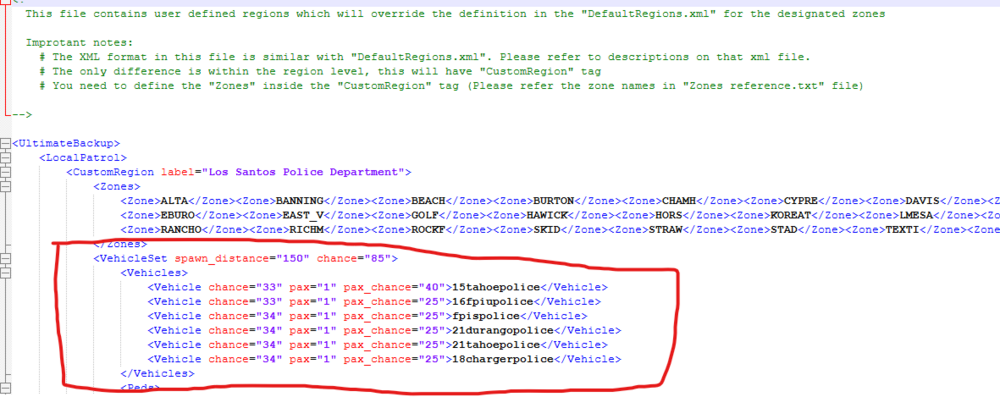
-
You mean the modified version of the map, or the actual GTA V map?
-
Thank you and I couldn't find what you mentioned in the log However I noticed it's the same crash error as your first log. You have LSPDFR+? If you do try to disable that for now, because the error happens after LSPDFR+ is trying to load stuff I'm not sure if LSPDFR+ uses SlimDX or not but it's clearly a plugin trying to use SlimDX from what I understand If that doesn't work try to rename your plugins folder to _plugins Create a new folder named plugins and only move the essential in. Meaning LSDPFR.dll/pdb and the LSPDFR folder inside plugins without anything in it.
-
Please provide a RPH.log, it would help a lot 🙂 You can find it on the root directory of GTA V just look for RagePluginHook.log
-
Hard to say without the proper .log file, could you provide that please?
-
I think there's no crash log because LSDPFR is soft crashing, like OP showed in the screenshot, I took a look at the log OP just sent and there's no crash in it either. It's just LSPDFR unloading before killing RPH entirely. In my current plugin development this happens when i use try {}catch{} However when I use it I try to Game.LogTrivial() whatever the problem is. So Im assuming this is most likely a plugin crashing LSPDFR out, otherwise if it was a mod I think it would crash RPH or even GTA Do this, rename your plugins folder to _plugins Create a new plugins folder and copy only the essential stuff to it. Meaning LSPDFR, EUP and that's about it Also have the LSPDFR folder inside the new plugins folder without any files in it. Leave them in the _plugins folder. And you slowly start adding the plugins back in and test the game out. Eventually it will crash. And that should be the faulty plugin
-
Hey there 🙂 Troubleshooting is very annoying I know it myself, however taking a look at your logs I see you have EUP, LSPDFR and Nightyields.Trafficblock.DLL I'd like for you to try to launch rage with only LSPDFR loaded or even better do not load any plugin at startup. You can do that by clicking on the cog when you open RagePluginHook.exe In case that works reply to me by quoting 🙂 in case it doesn't reply to me as well
-
Well you could try removing the gameconfig, the packfile adjuster and the heap adjuster and see how it goes without those.
-
Yeah, but nothing out of the ordinary there, just a CustomPullover error. 1. So for ELS make sure you have AdvancedHookV, 2. Make sure you have ScriptHookV, make sure all ELS files are installed, 3. And make sure you have properly installed the XML files for ELS into ELS/pack_default.
-
On the LSPDFR.ini I just set the Main.WorkaroundDLCVehicles = false And I stopped seeing those DLC vehicles.
-
Try to add an exception for the GTA root folder in the windows defender
-
Send your ragepluginhook.log
-
Not sure as I don't know what's calling what to get over the integer limit However if you download stop the ped again and replace yours, it might work again Glad to have helped you tho!! 🙂
-
Bah, j'suis pas sûr, peut-être au tout début, là où t'as fait le premier post. Je n'ai aucune idée ou on signale comme la solution.
-
Depends if the OP sent the latest log from the logs folder being the session ones. Because the one in root is just a copy of the latest session really.
-
Je ne suis pas sûr, mais tu peux peut-être le faire en cliquant sur les trois petits points, dans mon message.
-
De rien ! N'oublie pas de marquer mon message comme solution pour que les autres sachent que le problème est résolu.