




Lennyy
Community Team
-
Joined
-
Last visited
Everything posted by Lennyy
-
No problem! Did you call for the small/big tow truck or the flatbed?
-
Due to the latest RPH update, a few things developers use are not working properly. One of the things that are not working is checking for vehicle gadgets which STP uses within it's tow function. Basically there's nothing you can do about it. For more information please view this:Do you know which mods you installed lately? If not, you'll have to redo your entire mods folder.SHV has not updated yet. Remove it for the time being until it has updated to support the latest GTAV patch. Note: Your .asi scripts will not work (Such as ELS, PLD etc.).Hi there! Try to revert the latest changes to your mods folder. If you don’t know what you installed lately, there’s nothing you can do except deleting your mods folder and creating a new one.If you don't have a backup, yes.Hello. The GTA game version you are currently running is not supported by Rage yet. You'll have to wait for Rage to be updated. For more information take a look at the big red banner on the homepage.Change what? Elaborate please.Hey there! Based on the update times after the previous GTA updates, we’re speaking about anything in between a few days to 2-3 weeks. However depending on what the update changed in the game files, it can take longer. Hope this answered your question!Hi can you attach a screenshot of the issue you are experiencing? You can edit the visibility of files on the file page under „file actions“ on the bottom left corner of your description. If you just recently uploaded a file, you’ll have to wait until it’s approved. It’ll be viewable publicly as soon as it’s approved. I hope this answers your question!I’m sure there will be many more chances for that Benzo 😂
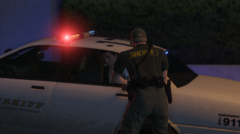
From the album: Lore Patrol
LSSD arresting wanted suspect. Note: No graphics mod this time.Upload your latest RagePluginHook.log please.I don't know but you can surely try to use the search function of the site and look for the keywords you mentioned.Press CTRL+F3 to open the menu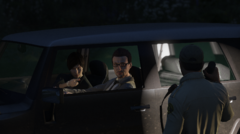
From the album: Lore Patrol
BCSO pulling over a driver due to illegal neon underglowPlease try this: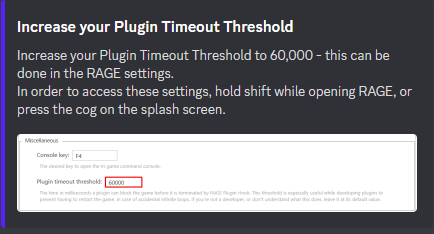 Please try this:
 Please update your game by deleting GTAV.exe as well as PlayGTAV.exe and verify your game files. How to verify your game files:Hi. Can you try to load GTA fully into story mode first. After you spawned in with either M, T or F, alt tab out of the game and launch Rage. Also attach your latest RagePluginHook.log found in your main directory.Hi! Do you want to tell us how you solved your issue in case somebody comes across the same thing?



Account
Navigation
Search
Configure browser push notifications
Chrome (Android)
- Tap the lock icon next to the address bar.
- Tap Permissions → Notifications.
- Adjust your preference.
Chrome (Desktop)
- Click the padlock icon in the address bar.
- Select Site settings.
- Find Notifications and adjust your preference.
Safari (iOS 16.4+)
- Ensure the site is installed via Add to Home Screen.
- Open Settings App → Notifications.
- Find your app name and adjust your preference.
Safari (macOS)
- Go to Safari → Preferences.
- Click the Websites tab.
- Select Notifications in the sidebar.
- Find this website and adjust your preference.
Edge (Android)
- Tap the lock icon next to the address bar.
- Tap Permissions.
- Find Notifications and adjust your preference.
Edge (Desktop)
- Click the padlock icon in the address bar.
- Click Permissions for this site.
- Find Notifications and adjust your preference.
Firefox (Android)
- Go to Settings → Site permissions.
- Tap Notifications.
- Find this site in the list and adjust your preference.
Firefox (Desktop)
- Open Firefox Settings.
- Search for Notifications.
- Find this site in the list and adjust your preference.