




Lennyy
Community Team
-
Joined
-
Last visited
Everything posted by Lennyy
-
Your topic has been moved to LSPDFR 0.4 Support. Please post in the correct location in the future.
-
LSPD First Response: Exception message: Could not find a part of the path 'C:\Program Files (x86)\Steam\steamapps\common\Grand Theft Auto V\LSPDFR\audio'. Download the manual installation of LSPDFR and drop the LSPDFR/audio folder in its designated location.
-
Your topic has been moved to LSPDFR 0.4 Support. Please post in the correct location in the future.
-
Glad to hear you got it fixed!
-
-
Are you on steam, retail or epic?
-
Then I’d suggest trying what I mentioned above. If it really bothers you it’s easier to go that way than pinpoint which plugin it is by simply guessing. I’m fairly certain it’s not something from your mods folder.
-
If it’s a ped it’s not something you can wear per say. You’d have to change your player model to be for example s_m_y_cop_01. Your topic has been moved to GTA V Support, this is not LSPDFR related. Please post in the correct location in the future.
-
It’s not TrainerV is it? Otherwise I’d start with renaming Plugins/LSPDFR to _LSPDFR and retry. If that doesn’t help disable the Plugins folder. If that still doesn’t help make your main directory look like the default one and slowly add mods back. Don’t delete them but move the files somewhere else until you add them back to your game.
-
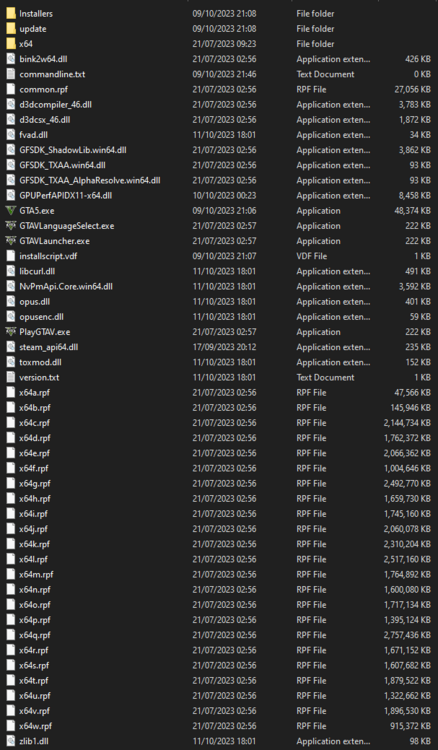
Attach screenshots of your entire folder + the scripts folder please. It doesn’t have to be a LSPDFR/RPH script that is causing this
-
Could be SirenMastery. No clue if it still works. If you could link your source it might be helpful to find what you’re looking for.
-
Glad to hear
-
Attach a screenshot to show what you’re talking about. I can’t really follow your question.
-
What do you mean exactly? When calling for backup nobody arrives?
-
The one inside your main directory without any numbers. It is not from your logs folder.
-
Install a set of EUP configuration files for Ultimate Backup and LSPDFR. An example would be those mods: Your topic has been moved to LSPDFR 0.4 Support. Please post in the correct location in the future.
-
Let’s start by uploading your latest RagePluginHook.log. It’s a text document inside your main directory.
-
I‘m able to download the plugin from his website just fine.
-
Your topic has been moved to GTA V Support, this is not LSPDFR related. Please post in the correct location in the future.
-
What happens when you double tap E to stop a ped? Also try to press G while sitting in a vehicle.
-
Please attach your latest RagePluginHook.log. It’s a text document inside your main GTA V directory.
-
This topic has been moved to the appropriate forum. Please post in the correct location in the future.
-
Random EUP clothing? Perhaps you forgot to install config files for peds. Your topic has been moved to GTA V Support, this is not LSPDFR related. Please post in the correct location in the future.
-
Download the ragenativeui from here and move the .dll to your main directory. Retry after doing that. https://github.com/alexguirre/RAGENativeUI/releases
-
Do you have a mods folder? Try to rename it to _mods and try again.


