




LukeD
Friends of LSPDFR
-
Joined
-
Last visited
Everything posted by LukeD
-
 Awesome stuff! My advice, as one dev to another, get it working with RPH and LSPDFR first. Not everyone will use BetterEMS or Ultimate Backup 😉 And also, my favorite two words (possibly most used in API Dev) Safety Checks! They'll save you a world of pain lol. When in doubt, try/catch 🙂 (I've no doubt you know that already but I like to reiterate it as much as possible lol)
- 625 comments
- 55 reviews
-
-

- 9
-
-
This seems like a hyper realistic plugin, I like the concept and will definitely be checking it out! Do you have any plans to make AI alterations? My only concern is the AI by default can be exceptionally trigger happy and you can be gunned down rapidly with full health and armor. Also, might I suggest a potential for the player to be saved when in critical condition. In other words dead to the AI so they flee, but not fully dead so that EMS could save you?
- 625 comments
- 55 reviews
-
-
- 43
-
-
We do not provide support for pirated copies of GTA. Please buy the game. Closing this thread. If you feel this topic has been closed in error, please report this post.
-
This topic has been moved to the appropriate forum. Please post in the correct location in the future.
-
Please be aware we do not condone advertising posts. If you cannot find a shared link for this user's discord server then that may well be for a reason. Any replies where shared invite links are posted will be removed. This topic has been moved to the appropriate forum. Please post in the correct location in the future.
-
NEW RELEASE! Version 0.4.0.0 Alpha is now available! See changelog for a full list of changes.
-
Exception message: Operation is not valid because the specified Rage.Vehicle is invalid. at Rage.TaskInvoker.DriveToPosition(Vehicle vehicle, Vector3 position, Single speed, VehicleDrivingFlags flags, Single acceptedDistance) In this particular case you tell a ped to enter a vehicle you spawned, but then also immediately afterwards tell the same ped to drive that vehicle to a position. You didn't pass a vehicle to this method, which means it's defaulted to looking for the vehicle the ped is currently sitting in, which is null because the ped hasn't made it inside the vehicle yet. You added .WaitForCompletion() but then set the timeout to 3,000ms (3 seconds). So after 3 seconds it will stop waiting for the task to be completed and move onto the next line of code anyway. Try setting the waitforcompletion to -1 (infinite) Also, perform safety checks before executing tasks. eg. if(myVehicle.Exists()) { myPed.Tasks.EnterVehicle(myVehicle); } This way if the vehicle doesn't exist for whatever reason you won't instant crash your plugin.
-
If you've engaged them in a pursuit then they will use the custom AI to escape the police. If you specifically want them to stay put then you need to assign a task to them and make it persistent i.e no other tasks can override it.
-
Read before you open threads. If you feel this topic has been closed in error, please report this post.
-
I would disagree with making this a rule. People make content how they want to make content, they are not enforced to make something they didn't choose to. There's a huge floodgate issue with such a policy. If texture/model creators have to upload a lower res file then shouldn't plugin developers also offer a less memory hungry plugin for those with low RAM? What about people with bad quality speakers? Should we force audio mod authors to downscale the bitrate of their audio for them? If your system cannot handle running the higher quality files. You simply don't download them, and maybe look for an alternative elsewhere. I do agree, don't get me wrong, with the idea of offering a lower quality file. Similar to how ENB's tend to work. But I don't agree with forcing people to make such a thing.
-
Public alpha version 0.1 has been released! I've decided to release an early access build TO EVERYONE for free to help me get testing and development underway. Please feel free to give it a try and see what you think, download link is on the main post. "What about my corsair,lg,asus..." I would love, absolutely love, to develop this for all platforms. I am currently researching which SDK's are available and alternatives to get them working. Obviously though, having razer peripherals, I cannot test all the others for functionality. But I will try and get this unified.
-
Moved your thread to support section, this is not a website issue. Also I would strongly recommend you stop tagging myself and LMS. We're both very busy, we are not here to provide support. Any support being given is by the community at their choice and at the expense of their own free time. Be patient. Your topic has been moved to LSPDFR 0.4 Support. Please post in the correct location in the future.
-
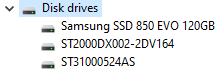
Oh....Ok.... 8GB RAM is alright, but not really enough for running lots of mods on top of LSPDFR as they all require memory. The processor will slow you down but I wouldn't have guessed that much. An i7-9700k however, very nice. With regards to SSD/HDD (Solid State Drive/Hard Disk Drive), what drives do you have? If you open up the Device Manager (open start menu and type Device, it will show up) and click on Disc Drives it will show you something like this: This is mine. It means I have a 120GB Samsung Evo SSD. The other 2 are part codes for Seagate HDD's (totaling 3 storage drives in my PC) If I were you, I would do a lot of research on your current specs. And learn a bit more about your PC. It will help you troubleshoot in the future but also help you with future upgrades. 🙂
-
6 core i5 and an RTX 2060 shouldn't be tanking that hard. How much RAM and are you using SSD's or HDD's? Are you using vehicle models etc? My specs: i7-6700k @4.5GHz RTX 2060 24GB DDR4 (Yes I know, normally you'd expect 16 or 32) I don't run anything other than GTA, RPH and a couple of plugins (mine plus a couple others when not developing) I don't see frame drops like that, on maxed out settings on a 1440p monitor.
-
Your topic has been moved to LSPDFR 0.4 Support. Please post in the correct location in the future.
-
If you want to advertise your plugin please use the script modification showroom section. This is the API forums, for discussing API functionality and coding.
-
I can't say for certain but I suspect there isn't a particular region for spawning only at the beach. PNWParksFan might be better suited to help you here though as he created coastal callouts. I've moved your topic into the API section as it relates to LSPDFR development. This topic has been moved to the appropriate forum. Please post in the correct location in the future.
-
This topic has been moved to the appropriate forum. Please post in the correct location in the future.
-
Your topic has been moved to LSPDFR 0.4 Support. Please post in the correct location in the future.
-
Your topic has been moved to LSPDFR 0.4 Support. Please post in the correct location in the future.
-
Your topic has been moved to LSPDFR 0.4 Support. Please post in the correct location in the future.
-
This topic was designed to be a guide to creating a simple plugin for LSPDFR. It was not created to be a general dumping ground for everyone's programming issues. I'm locking this thread. If you have any issues, please do the following: 1) RESEARCH your problem, google your error codes. You can type in the basics of your issues and look for answers first. 2) If research fails, REPORT your issue to a new forum thread in the API Development section (here), be precises, and add your code in a code tag (and spoiler if it's large). 3) Continue to research while waiting. If you find the answer yourself, report back to your thread, mark it as solved (type [Solved] in the title) and post your solution for others to find. If someone helps you find the answer, do the same with your title. Every post can be indexed by search engines. So the better your title, the easier people will find solutions in the future.
-
@TPhillips511 Please create your own thread if you have a support request. Your response has been removed.
-
This topic has been moved to the appropriate forum. Please post in the correct location in the future.
-
Your topic has been moved to GTA V Support, this is not LSPDFR related. Please post in the correct location in the future.


