



NWpilot07
Members
-
Joined
-
Last visited
Everything posted by NWpilot07
-
 As you seem to be the only one experiencing an issue thus far I'm guessing you aren't close enough to any of the callout locations. You can fix this by either going closer to the locations or by setting the range higher in the ini file. The locations are: A parking area near Rockford Hills PD, parking lot with abandoned cars in Sandy Shores, the side lot of a building on the Grapeseed main street, a parking lot under the highways just north of LSIA, and an area on the side of the road on Great Ocean Highway in Paleto Bay.
- 115 comments
- 10 reviews
-
If this occurs it means you are too far away from any of the spawn points. You can fix this either by increasing the range in the INI, or by moving closer to either LSIA, north-west Los Santos, Sandy Shores, Grapeseed, or Paleto bay. Those are the locations included with the callout. I would really love to be able to do that, but sadly due to the way ELS works it is impossible to have just the lights on with an NPC car. I can only set it as Lights and Sirens on, or nothing at all. I felt no sirens would be more realistic for a traffic stop. If it ever becomes possible to do this I won't hesitate to make it happen. I'll look into doing that.
- 115 comments
- 10 reviews
-
-

- 1
-
-
I'll make sure that one is fixed in the next update, thanks! And nice catch 😉
- 115 comments
- 10 reviews
-
The pack utilizes the Stop the Ped API on certain callouts, I do recommend STP as it is very resource friendly compared to Albo's scripts but if you wish to not use it then disable the callouts: Vehicle Tow Disturbance, and TrafficStopBackup. I will see if it's possible to create a non-Stop the Ped version, but certain things will have to be removed for this to happen.
- 115 comments
- 10 reviews
-
-
Sorry to hear this, could you please attach your log for me to investigate? After all so far you're the first person to report this problem. I'll see if I can figure out what's going on.
- 115 comments
- 10 reviews
-
-
This is most likely happening because you are too far away from the callout location. Silent Alarm has only one location currently and it's in Vinewood Hills, if you aren't close enough to the callout it will automatically CODE 4. In the upcoming update I added an ini file which will allow you to customize the range of every callout, so in the future it will be up to you 🙂 Glad you're enjoying the callouts!
- 115 comments
- 10 reviews
-
I haven't found any surprisingly, but once I update my callout pack I intend to make a large one to fill the void, we really need some k9 callouts!
-
So I'm running into an issue with one of my callouts where I need to create a random driver for three different vehicles at different times during the callout. My code for each instance is as follows: Driver1Sent = true; SpeedVehicle1 = new Vehicle(Tools.Tools.RandomCarModel(), SpeedSpawn); SpeedVehicle1.IsPersistent = true; Driver1 = SpeedVehicle1.CreateRandomDriver(); Driver1.IsPersistent = true; Driver1.BlockPermanentEvents = true; Driver2Sent = true; SpeedVehicle2 = new Vehicle(Tools.Tools.RandomCarModel(), SpeedSpawn); SpeedVehicle2.IsPersistent = true; Driver2 = SpeedVehicle2.CreateRandomDriver(); Driver2.IsPersistent = true; Driver2.BlockPermanentEvents = true; Driver3Sent = true; SpeedVehicle3 = new Vehicle(Tools.Tools.RandomCarModel(), SpeedSpawn); SpeedVehicle3.IsPersistent = true; Driver3 = SpeedVehicle3.CreateRandomDriver(); Driver3.IsPersistent = true; Driver3.BlockPermanentEvents = true; The issue I'm running into is that the driver of each car is always the exact same model every single time. Is there something obvious that I'm missing here? Any help will be appreciated 🙂
-
You could create a ped and then immediately kill them, this would cause them to lay on the ground. Another option, if you have the patience, is to look through the animations and see if there is one for laying on the ground that you could use . Here's where you can find a list of All of the Animations. Hope this helps!
-
For my callouts I use game fibers and while loops for multiple choice dialogue. I can't tell if this is in the Process() or a gamefiber but for me my code usually looks something like this: GameFiber.StartNew(delegate { Game.DisplayNotification("Press ~b~" + Settings.DialougeKey + "~w~ to speak."); while(true) { GameFiber.Yield(); if(Game.IsKeyDown(Settings.DialougeKey1)) { //do thing 1 option1 = true; break; } else if(Game.IsKeyDown(Settings.DialougeKey2)) { //do thing 2 option2 = true; break; } } if(option1) { Game.DisplaySubtitle("Response to option1"); } else if(option2) { Game.DisplaySubtitle("Response to option2"); } }); This is just a quick and dirty example but it demonstrates the general idea, and this could be adapted to work for decision making in a callout, not just dialogue. I hope this helps if you haven't already figured it out 😉
-
With your specs you should be able to run LSPDFR pretty decently as long as your graphic settings aren't too high. I have a very similar setup except with 16gb of ram and it runs like a charm. If you're looking to preserve your frame rate try and avoid plugins by Albo1125 such as Traffic Policer, Police Smart Radio, and Arrest Manager. Many of his plugins haven't been updated in a while due to his retirement from LSPDFR modding and thus suck up your frame rates. Bejoljo's plugins are nice lite alternatives to Albo's plugins. Also if you still experience low frames or texture loss you can try adding these lines to your lspdfr.ini , ths helped me eliminate texture loss and add ~10fps overall. Main.PreloadAllModels = false AmbientSpawn.SpawnFrequency = 7000 AmbientSpawn.MaxCopsInArea = 3 Hope this helps!
-
It seems that the game is crashing while trying to load whatever vehicle was last saved to your home. If this was an addon vehicle which is now removed that could be causing the issue. If that is not the case then try changing your character settings to spawn somewhere other than the apartment by default, you also can create a new character which will set your saved vehicle to a default. Hope this helps!
-
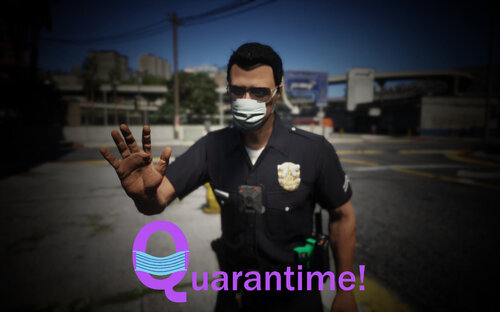 Love how unique and realistic it is! I had a lot of fun with it, and since my city is in lockdown it made patrols very immersive 😄. My only request would be that the large groups of people have some animations to them rather than just standing, but aside from that this pack is awesome!
 -
 Great plugin, it's nice to be able to let the plugin patrol while I eat or take care of something on the side. One problem I noticed however is that from version 1.1.0 and onwards the menu doesn't function correctly. It jumps around to different places and has very limited options as far as driving style (no code 3 or normal code2). Once I downgraded to 1.0.1 however everything started working fine, all features accounted for. Keep up the awesome work!
 -
.thumb.jpg.37cdb54de83d6dee03b6b15e76b2f5fd.jpg) I had fun with these two callouts, sometimes there's something nice about quality over quantity 😉 I especially like the way the bus callout plays out, very realistic and kept me on my toes after I ended up in the hospital on my first go around with the callout! Glad to see more callouts being made and I hope you make more to the same quality as these two, keep it up!
I had fun with these two callouts, sometimes there's something nice about quality over quantity 😉 I especially like the way the bus callout plays out, very realistic and kept me on my toes after I ended up in the hospital on my first go around with the callout! Glad to see more callouts being made and I hope you make more to the same quality as these two, keep it up!- 184 comments
- 24 reviews
-
-
- 2
-
-
I've created a functioning INI, it will be included in the next update and will allow one to enable/disable callouts, set the range of callouts, and adjust key binds and vehicle models for callouts. As for the welfare check, the person in question is not always in plain sight, you need to look around on the side of houses and in backyards. If you still can't find the person after doing this let me know and I'll look into it further. I'll try and figure out why the blip is staying on, it would be helpful to know which callout it occurred on, where on the map the blip was, and the color of the blip. I may have already fixed it but I'll look into it anyways. Glad you're enjoying the pack!
- 115 comments
- 10 reviews
-
-
Do you mean one that you can deploy yourself? If so I recommend SpikeStripsV, it lets you deploy them from your vehicle while driving, and also while out of the vehicle. If you're talking about requesting spike strips to be deployed by backup during a pursuit, then use the Ultimate Backup menu while in pursuit. It gives the option to have spike strips deployed or a normal roadblock. Hope this helps!
-
 Is this one available for download somewhere? I'm a Forest Grove native, been looking to see if one of these exists 😉
 -
I use the same code for a stolen vehicle callout in my pack and it functioned correctly, though I have noticed that if I'm using the License plate Randomizer plugin (To get rid of the default plate, 47EEK or something like that), it will sometimes cause the details on the vehicle to change when it changes the license plate. Other than that I can't think of a reason why it wouldn't be working.
-
-
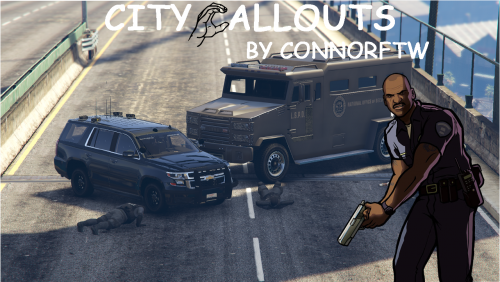 This is a fun callout pack! Love the how unique they are 🙂 Keep up the good work!
 -
Not yet sure how to create a settings ini file but its certainly something I intend to learn, I'll definitely look into your suggestion, thanks! 🙂
- 115 comments
- 10 reviews

.thumb.jpg.37cdb54de83d6dee03b6b15e76b2f5fd.jpg)
