


KPax
Members
-
Joined
-
Last visited
Everything posted by KPax
-
Hey guys, first texture I'm releasing. Hope you enjoy. I normally don't release my textures, but I thought this turned out alright. Editing is allowed as long as proper credit is given. Hope you guys enjoy!
- 2 comments
- 2 reviews
-
Here are 2 good Tahoe models by BxBugs123: http://gtapolicemods.com/downloads.php?do=file&id=1545 http://gtapolicemods.com/downloads.php?do=file&id=1581
-
I think I am going to do that right now actually. EDIT: http://www.youtube.com/watch?v=iFx4Jo_2STc&list=UUJnOWRii9cLtRPSL73Q0D7Q&index=1&feature=plcp
-
Link here: http://gtapolicemods.com/downloads.php?do=file&id=34
-
I use FRAPS. I honestly don't know the file sizes, but the long upload times may be because of bad internet speeds. They are not released, as it says in the description of the videos. I use the one on here, this is a link:
-
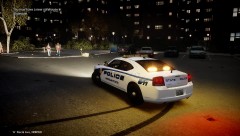 Can I get a link to this car?
 -
Thank you! I'm confused about the first question, and I installed it correctly and then pressed the "ins" key to enable/ disable.
-
I use simple native trainer, found here: http://www.gtagaming.com/downloads/gta-iv/script-mods/2115 Also, can a mod fix the double post please.
-
No that is definitely NB's version of the Whelen Alpha found here: http://www.youtube.com/watch?v=ygbakSwXPyw&feature=plcp
-
Honestly I don't remember that, guess I'm gonna have to go back and check it out! and my specs: Motherboard: MSI 870A-G54 AM3 AMD 870 SATA 6Gb/s USB 3.0 ATX AMD Case: COOLER MASTER HAF 922 RC-922M-KKN1-GP Black Steel + Plastic and Mesh Bezel ATX Mid Tower CPU: AMD Phenom II Hex Core 1090T Black Edition Overclocked to 3.6 GHz Power Supply: XIGMATEK NRP-MC Series NRP-MC702 700W ATX12V v2.3 SLI Ready CrossFire Ready 80 PLUS BRONZE Video Card: HIS Radeon HD 6870 Hard Drive: Seagate Barracuda Green 2TB @5900 RPM Memory: Corsair Vengenance 8GB
-
PLease keep your post relevant to the thread. Please look in the support section for a relevant thread, and if you cannot find one, please create one while following the terms. Link here: http://www.lcpdfr.com/forum/20-support/
-
I only use American police cars, sorry. And I haven't installed a police bike because I suck at driving them :p
-
That is Bxbugs123 Sheriff Suburban:http://gtapolicemods.com/downloads.php?do=file&id=1411 I modified the lightbar colors and imported new skins.
-
I use many mods. I'll try and link all of them, however I have so many installed, I may miss some. Traffic Flow: Indicator Script: Spotlight: IVDashcam: vdH TowingService (I plan to use this in the future.): ELS V6: http://gtapolicemods.com/downloads.php?do=file&id=1764 If I missed anything and anyone points it out, please let me know so I can add it to this list!
-
thank you! :) those are two different chargers... first one was part of a southland pack which i don't have a link for. second is by gfxle: http://gtapolicemods.com/downloads.php?do=file&id=811
-
-
Which Charger? Can you link me a video where I use it?
-
New upload! Sorry about not updating the thread, I've been very busy with real life things!
-
I spy one of my videos (;
-
No. You have to download new weapon sounds and import them just like a new siren.
-
I get most of my weapons from gta4-mods.com I think. I haven't really changed weapons in a while though, so I'm not positive.
-
Thank you for these positive comments :D
-
Looks pretty good! Only little suggestion would be to darken the brownish-yellow! Other than that, it looks great!
- 7 comments
- 1 review
-
-
I honestly don't remember. I think I remember I got it from GPM somewhere.

