IRememberJeep
Members
-
Joined
-
Last visited
Everything posted by IRememberJeep
-
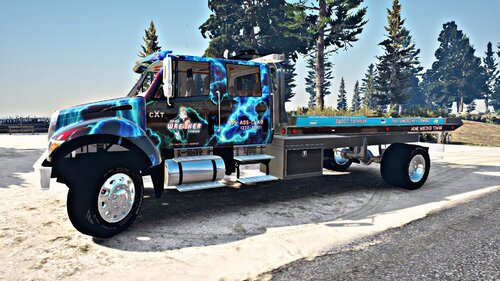 Since they're not all in one pack I decided to leave a review for each. I really think these deserve a lot more credit, all of your work is really good. I'm looking forward to seeing what else will be coming out.
- 3 comments
- 1 review
-
-

- 1
-
-
Part of a pack of three tow vehicle textures. These livery are second to none and really stand out in game. I highly recommend these if you're looking for something more immersive and less generic.
- 3 comments
- 1 review
-
-
- 1
-
-
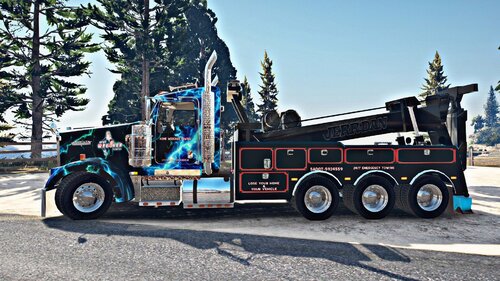 Part of a pack of three tow vehicle textures. These livery are second to none and really stand out in game. I highly recommend these if you're looking for something more immersive and less generic.
- 9 comments
- 1 review
-
A bit late but I replaced the standard Large Tow Truck with this. (File name/replace name towtruck [ex. towtruck.ytd]) I did a quick test and it worked just fine. For reference when replacing, it seems: towtruck is the large truck, towtruck2 is the small truck, and flatbed is of course the Flatbed truck. Edit: As usual @EmergencyDistributors, your livery is fantastic. Thank you for making and sharing these. Cheers.
- 9 comments
- 1 review
-
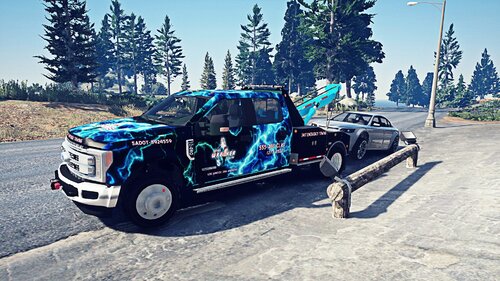 Looks great, I just can't get it to work. Everything looks fine except for the doors which remain the base color and unskinned. I had no problems with the flatbed version, a bit confused on what's causing the issue. Edit: Disregard. In game the livery shows just fine. The model viewer is another story for whatever reason, and only for that model.
 -
 Heavy or "FLAG_BIG"? I wasn't able to find any flag named heavy in my vehicle.meta. Big was the closest I could find. In any case I am trying it. I removed all "FLAG_BIG" flags from the vehicles.meta as well as installing this Plugin. I just want vehicles to stop going full retard when I'm sat on the side of the road on a traffic stop. 😄
- 534 comments
- 42 reviews
-
-
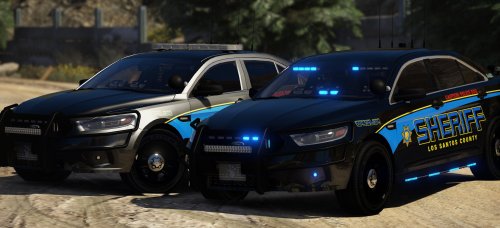 Thank you for these els files. Been searching for a decent LSSD K-9 unit, so of course I was initially irritated when there was no els file included. I'm still learning the ins and outs of the els files. 😄 @Gump, great model. Perfect light placement and amount (lights on the side but not a ridiculous amount), great skin, ALPRs. Can't go wrong. All models should have ALPRs them as an option imo. @bjackson1991 Is that a custom Livery you're using or is that something publicly available? It's really nice, wouldn't mind using it if available.
- 66 comments
- 31 reviews
-
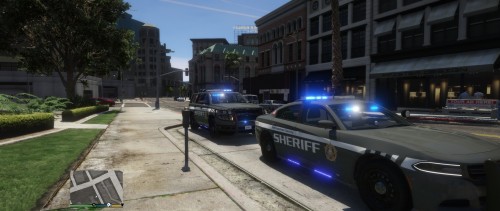 Hands down one of my favorite packs. It may just be me but I found it difficult to find a decent LSSD pack. Besides the lightbar going black when dirty, and the license plates just reading "plate", this pack is superb. It's not overly annoying to clean your vehicle via the trainer every so often to fix the issue. The perfect balance of lights, great models, and a great skin. I highly recommend this pack.
- 31 comments
- 7 reviews
-
This is hands down my favorite vehicle model pack. I've been away from LSPDFR for about a year due to PC problems, I come back and cannot find any of my old files. It took me several days to find a decent ELS LSSD All Blue vehicle pack with good lights. My only issue is that you stopped at two vehicles. Would have loved to see a bit more, perhaps some K-9 units and such. In any case, thanks for taking the time to share this pack. EDIT: To the fellow who posted above me: The lights do work, the light bar is most likely just dirty. Clean the vehicle via the trainer. That's really the only drawback is that it goes so black after a while. I haven't encountered your second issue and the LP doesn't bother me so much. Although if it were fixed I wouldn't complain.
- 31 comments
- 7 reviews
-
I'd rather keep STP, it's a damn good mod. Just decided to download simple trainer and spawn my vehicles in that way which also allows me to customize them. So problem solved by just avoiding the police garage. I've played with no issues and no crashes by simply avoiding that menu. Thank you for taking a look and helping Matteov2.0, I very much appreciate it.
-
Does it happen to say which plugin it was that crashed? You seem to know how to read that log.
-
I didn't think STP affected vehicles that you haven't been in. Is there something in the Log that leads you to believe it's STP?
-
If anyone can give me any advice it would be appreciated. I'm running LSPDFR via EGS. LSPDFR is loading up relatively fine, once in a while it will hang up while loading the plugins. That's not really an issue at the moment though. My main problem is when I enter the garage via the station. Sometimes I can select my vehicle no problem but other times the game locks up at the vehicle select menu or locks up at the black transfer/loading screen when trying to enter the garage. This last time it happened I had been playing for an hour or so. I went back to the station to drop off a suspect and swap out vehicles. As soon as I got into the station, I hit go to garage and the game froze up on a black screen when trying to load the garage. I have installed the vehicle.meta files for the two packs I'm using, replacing the sections for the respective vehicles they replace. Could the handling or variation meta files cause something like this to occur? I will attach the RPH log. If anyone with a bit more knowledge can shed some light on this I'd appreciate it as I'm pretty new to this game. RagePluginHook.log