



.png.4ecd5579233184b652faf55c64ba7028.png)
Hex Modifications
Members
-
Joined
-
Last visited
Everything posted by Hex Modifications
-
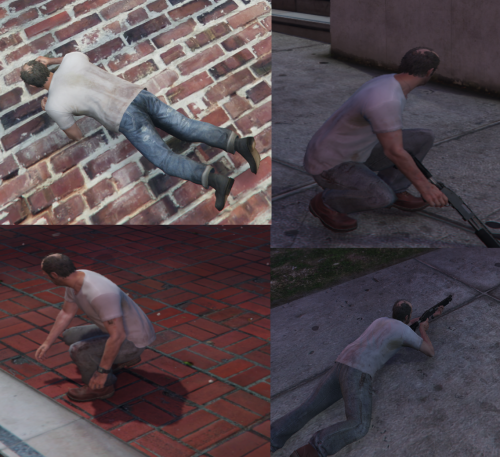 There are some standalone scripthook scripts for crouch and prone on GTAV mods.com
 -
 I am also having the same issue, whilst using NVE and the LML vfs file, my game crashes on startup.
- 339 comments
- 20 reviews
-
-

- 1
-
-
-
Hey, I was just wondering if there was a way to disable all mods at once within the mod manager UI, instead of disabling each mod one by one? Thanks
- 339 comments
- 20 reviews
-
No Problem 🙂
-
Through steam you can Move the install folder to your SSD. Library-Right Click on GTAV - Properties - Local Files - Move Install Folder. and you should be able to Select your SSD. 🙂
-
Ah ok, thanks for the response. I did however find to reduce the stutters slightly, by installing the game onto my SSD (a faster drive) and it has made the game more playable. So I would recommend trying that if you have a faster Disk than the one the game is installed on 🙂
-
Hey, I am currently facing the issue and was wondering if you ever found a fix?
-
ok, I really dont know either, I have tried everything really. Thanks very much for your help!
-
It does seem like it is an Issue with Rendering/Loading of The world, as when Teleporting or Driving fast to somewhere new, it is alot worse and it seems like a Stutter caused by The Loading terrain.
-
At this point I have tried Everything, so I suppose it is just a Very strange Un-fixable issue That only happens on this Game Directory
-
Ah ok, what is strange is that On another GTAV Copy I have on the same Disk, LML does not cause stutters and runs fine. However, I will try moving this one to my SSD. Thanks for the help
-
Hey, So For the past month or so I have been randomly experiencing Stutters using LML, when the vfs.dll is in my Game, when I take it out the stutters go. It is pretty much excactly like this the issue Double Doppler had here However, I can find no fix at all without removing vfs.dll (which LML of course needs to run). I am pretty much out of ideas and would greatly appreciate some help. (The stutters get noticeably worse when Driving, running ETC.) It also gets worse in More Central LS than lets say LSIA or Sandy ETC. I have tried turning all settings down, removing mods folder, removing all plugins, reinstalling all Mods, Changing between gameconfigs and more. None have worked. Here is an example Video https://streamable.com/7w98q1 They Fluxuate between Smaller and larger stutters, and also Become worse when responding to a call Within LSPDFR and also When moving around in the menyoo free cam.
-
.
-
 I am getting stutters while using the mod, help would be greatly appreciated.
- 650 comments
- 52 reviews
-
 One of the best mods for LSPDFR. I do have an issue however, the dispatch never picks me up saying Shots fired or officer down, but does pick me up for code 4 10-8 ETC. Most of the time when I say shots fired, she always puts me 10-8. No matter which way I say it in. It rarely ever picks up as Shots fired.
- 1,364 comments
- 88 reviews
-
 How do you add the turret on top? I went through the extras and it never appeared in game. It does appear in the Open IV YFT as a drawable dictionary.
- 56 comments
- 6 reviews
-
 Wow, final update, what a great pack this has been. I really appreciate your work bro!
- 485 comments
- 78 reviews
-
I have the same issue, no fix found
-
This mod seems to be outdated now sadly with the newest EUP, is it possible for you to update it? as its a great mod
- 44 comments
- 8 reviews
-
-
- 2
-
-
Not Sure if you are still working on this, but if you are it would be great for there to be an on foot option so all the radio chatter from your vehicle you can hear on foot through your shoulder radio/earpiece ETC. Maybe it could be enabled and disabled through the INI? Great mod By the way!
- 650 comments
- 52 reviews
-
-
- 1
-
-
-
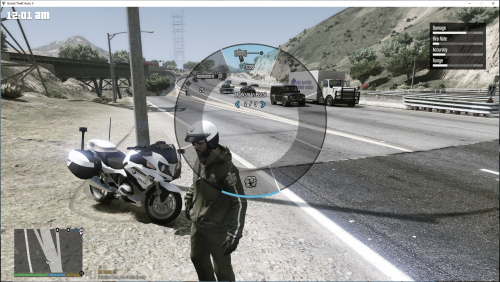 Not sure if you are still working on this, but would it be possible for you to also add a fire extinguisher to the hud because there is a fire extinguisher hud mod but this one is cool to so I am finding a way to get both?
- 8 comments
- 2 reviews
-
Ok nothing worked so I had to delete my mods folder it may have been a different car mod and I think it was so sorry about that
- 485 comments
- 78 reviews
-
@Tdog105 Yes I put it on 1x traffic and I am still getting the issue even after uninstalling the whole pack and I cant play the game at all! and verified my game files but there were invalid files found
- 485 comments
- 78 reviews
.thumb.png.8d4974ac2397d7dfd05d3e776ef309b9.png)


