




ghost128
Members
-
Joined
-
Last visited
Everything posted by ghost128
-
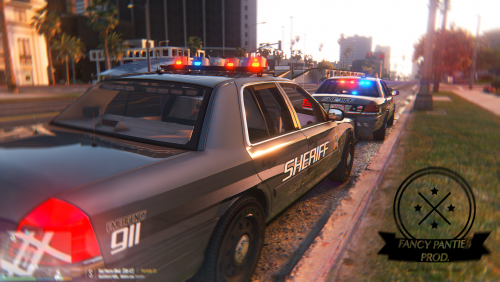 IMPORTANT hey guys, for everyone who had faced problems that after oiv package install GtaV won't load up anymore please try the new oiv-package and please tell me if it works for you now: https://www.dropbox.com/sh/mywiya3njtm0rkf/AADENjedO0yBpJuOxBX0322ma?dl=0 PLEASE BACKUP dlclist.xml & extratitleupdatedata.meta first ;)
- 108 comments
- 11 reviews
-
yes if you do so you just restored the game by telling gta that there is no new package added. I think the whole probleme could be forced by some additional equipment parts which have to be added in benny's mod menu from which gta doesn't recognize the name. Strange thing about is that some gta version does not have a problem with that and others do. So I'm about renaming those parts which doesn't use orignal tuningpartnames and will see if that works out at least meanwhile you can try following: go to the path and delete all files with "police7" at it's name and try if you're game runs again.
- 108 comments
- 11 reviews
-
we are trying to solve the problem. please stay tuned. hey Arariel, do you mean the white pods?
- 108 comments
- 11 reviews
-
Can you PM me?! I hab the vehicles for beta testing at some guys from lspdfr but none reported anything like this but I have an idea what could possibly caused the problem. So I need you to test this out for me because at my game everything works exactly as it should. Further instructions will be given via PM.
- 108 comments
- 11 reviews
-
-

- 1
-
-
-
Well please be sure lowrider1+2 dlc's are installed. If you have any other packages installed prior which needed dlclist.xml or extratitleupdatedata.meta to be edited than you have to manuelly add lines from ADDON folder to your original files.
- 108 comments
- 11 reviews
-
-
oiv-package installation is now included from the recent updated archive oiv-package installation is now included from the recent updated archive
- 108 comments
- 11 reviews
-
-
- 1
-
-
hey Lundy, I've used this Development car by F5544 but it's no problem to add the credits from the file into my credits.. thanks for the advice
- 108 comments
- 11 reviews
-
-
-
no can't imagine that... because original car filesize is abaout 3,6MB not even close to 12-14MB... and the error which he had faced was caused by openIV and I had never any issues in this direction
- 108 comments
- 11 reviews
-
the police2&police3 files are for the "replace version" of the car be sure to use the "addon version".... normal "replace version" just uses the common extra's in the car, no additional stuff and are attended to be used for AI officers ingame (otherwise you would never see the car being used my AI's while pursuit or so) try deleting the old liveries first in openIV and add exactly same named liveries afterwards.
- 108 comments
- 11 reviews
-
-
- 1
-
-
it's all legal buddy I got the permession from him to use it in my vehicle I will make an oiv version for you guys as well so that everything should work. maybe there was something missing in the edit of dlclist.xml and extratitleupdatedata.meta
- 108 comments
- 11 reviews
-
-
- 1
-
-
it's all legal buddy I got the permession from him to use it in my vehicle :)
- 108 comments
- 11 reviews
-
-
- 1
-
-
I'm very proud to finally present you the latest FancyPanties Development project called CVPI-VUV (Various-Utility-Vehicle) VUV (Various-Utility-Vehicle) means this car contains several additional parts beside extra parts, that can be mounted. They can be applied via Mod-Menu / Benny’s Custom Parts through native trainer: 5x Setina pushbar versions 5x interior/rear compartment layouts 5x spotlight versions 4x antenna versions 3x Setina gunrack versions 2x Whelen rear interior lighters 2x steeringwheels 1x Toughbook C19 1x Setina prisoner compartment 1x Python III radar 1x rainguards 1x statehat at front passenger seat Extra / Add / variation parts explanation: ______________________________________________________________________________________ veh_components_menu: extra_1: tough book c19 extra_3: boot antenna v1 extra_4: setina prisoner compartment extra_5: python III radar extra_8: setina pushbumper v1 extra_11: setina pushbumper v2 extra_12: statehat on passenger seat veh_mod_menu: spoiler: antenna_layout_2-4 front bumper: gunrack layout 1-3 skirt: whelen rear interior lightbar v2 grill: spotlight layout 2-5 bonnet: setina v1 pushbumper layout 2-5 benny’s vehicle mod menu: trim design: interior/rear compartment layout 2-5 steering wheel: steering wheel for compartment 2 windows: rain guards on doors some features have already been showcased in the preview video: new light pattern / trafficadvisor showcase video:
- 108 comments
- 11 reviews
-
-
- 18
-
-
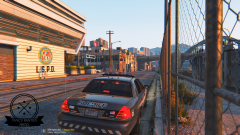 it depends on zmodeler because there are some recent issues/problems while import/export where I don't have any influence but I'm in contact with the creator of zmodeler. From my side I'm pretty much ready to go ;)
 -
Don't worry guys.. the release date is planend within the next couple of days :)
-
guys I've made a preview video which is showcasing some features of the new models
-
I'm currently about a preview video for the Models which will indeed have multiple interior rear lightbars. Because of a limitation of siren dummies I couldn't add more... more screenshots will be uploaded soon
-
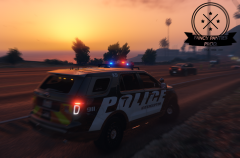 The Explorer is on standby for the moment but will be continued after the next releases
 -
We are already in beta stage and some further points already have been polished so if there won't be any bad surprises I would say maybe within the next two weeks or maybe earlier;)
-
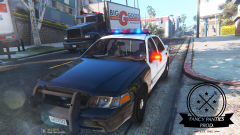
From the album: Fancy Panties Development
There is light at the end of the tunnel! Please prepare for a huge amount of equipment varieties inculding several sorts of interiors, different gun racks, pushbar configurations, antenna version, multiple interior lightbars, prisoner partitions and many many more. Soon availble in your fleet-store center. Happy patrolling duty! FancyPanties Development© FancyPanties Development ®
-
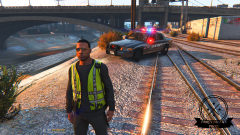
From the album: Fancy Panties Development
Various-Utility-Vehicle 1.0 by FancyPanties Development out for some beta-testing© FancyPanties Development ®
-
From the album: Fancy Panties Development
Various-Utility-Vehicle 1.0 by FancyPanties Development out for some beta-testing© FancyPanties Development ®

