




KN1IGHT
-
Joined
Everything posted by KN1IGHT
-
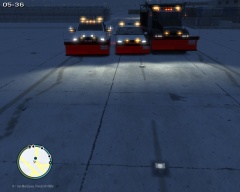
From the album: GTA IV/ LCPDFR Photos
3 of Edmonton's Snow Plows lined up for a photo, and getting ready to go out and plow the roads. The 2000 Chevy Silverado, was originally a Maintenance vehicle, but due to the weather, the Mechanics equipped it with a Snow Plow, which is why there is 2 Whelen LINZ6 modules hidden behind the plow arms. The Biff gravel truck was originally a construction vehicle, but Edmonton bought a few off the company to utilize as snow plows. The Dodge RAM 3500 is the newest edition to the fleet. All vehicles in image, put together by myself. The "mount" on the back of the Biff for the rear lighting, and traffic advisor was made by myself in zModeler2. The Plows are attached to the front bumper, and have L1's as well as L0 (Without L1's the Plow disappeared after a short distance away). Currently, all these vehicles are not released, and it is unlikely that they will be© Knight Rider - Code Two Modifications
-
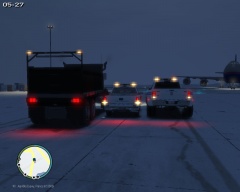
From the album: GTA IV/ LCPDFR Photos
3 of Edmonton's Snow Plows lined up for a photo, and getting ready to go out and plow the roads. The 2000 Chevy Silverado, was originally a Maintenance vehicle, but due to the weather, the Mechanics equipped it with a Snow Plow, which is why there is 2 Whelen LINZ6 modules hidden behind the plow arms. The Biff gravel truck was originally a construction vehicle, but Edmonton bought a few off the company to utilize as snow plows. The Dodge RAM 3500 is the newest edition to the fleet. All vehicles in image, put together by myself. The "mount" on the back of the Biff for the rear lighting, and traffic advisor was made by myself in zModeler2. The Plows are attached to the front bumper, and have L1's as well as L0 (Without L1's the Plow disappeared after a short distance away). Currently, all these vehicles are not released, and it is unlikely that they will be© Knight Rider - Code Two Modifications
-
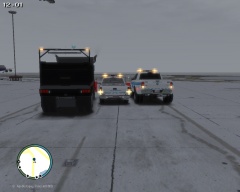
From the album: GTA IV/ LCPDFR Photos
3 of Edmonton's Snow Plows lined up for a photo, and getting ready to go out and plow the roads. The 2000 Chevy Silverado, was originally a Maintenance vehicle, but due to the weather, the Mechanics equipped it with a Snow Plow, which is why there is 2 Whelen LINZ6 modules hidden behind the plow arms. The Biff gravel truck was originally a construction vehicle, but Edmonton bought a few off the company to utilize as snow plows. The Dodge RAM 3500 is the newest edition to the fleet. All vehicles in image, put together by myself. The "mount" on the back of the Biff for the rear lighting, and traffic advisor was made by myself in zModeler2. The Plows are attached to the front bumper, and have L1's as well as L0 (Without L1's the Plow disappeared after a short distance away). Currently, all these vehicles are not released, and it is unlikely that they will be© Knight Rider - Code Two Modifications
-
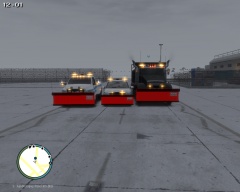
From the album: GTA IV/ LCPDFR Photos
3 of Edmonton's Snow Plows lined up for a photo, and getting ready to go out and plow the roads. The 2000 Chevy Silverado, was originally a Maintenance vehicle, but due to the weather, the Mechanics equipped it with a Snow Plow, which is why there is 2 Whelen LINZ6 modules hidden behind the plow arms. The Biff gravel truck was originally a construction vehicle, but Edmonton bought a few off the company to utilize as snow plows. The Dodge RAM 3500 is the newest edition to the fleet. All vehicles in image, put together by myself. The "mount" on the back of the Biff for the rear lighting, and traffic advisor was made by myself in zModeler2. The Plows are attached to the front bumper, and have L1's as well as L0 (Without L1's the Plow disappeared after a short distance away). Currently, all these vehicles are not released, and it is unlikely that they will be© Knight Rider - Code Two Modifications
-
From the album: GTA IV/ LCPDFR Photos
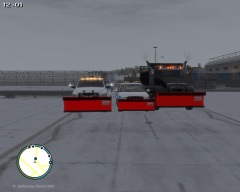
3 of Edmonton's Snow Plows lined up for a photo, and getting ready to go out and plow the roads. The 2000 Chevy Silverado, was originally a Maintenance vehicle, but due to the weather, the Mechanics equipped it with a Snow Plow, which is why there is 2 Whelen LINZ6 modules hidden behind the plow arms. The Biff gravel truck was originally a construction vehicle, but Edmonton bought a few off the company to utilize as snow plows. The Dodge RAM 3500 is the newest edition to the fleet. All vehicles in image, put together by myself. The "mount" on the back of the Biff for the rear lighting, and traffic advisor was made by myself in zModeler2. The Plows are attached to the front bumper, and have L1's as well as L0 (Without L1's the Plow disappeared after a short distance away). Currently, all these vehicles are not released, and it is unlikely that they will be© Knight Rider - Code Two Modifications
-
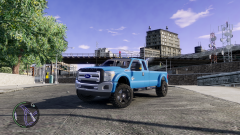 Yes, release unlocked! Would love to do a Super Duty truck
 -
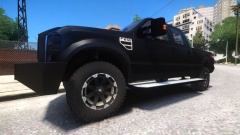 Nice!
Nice! -
-
![LVMPD New-Livery Pack - Ford Police Interceptor [FINAL]](//s3-gallery.int-cdn.lcpdfrusercontent.com/gallery/album_3066/sml_gallery_29300_3066_457681.png) Download link for that model? If its released
Download link for that model? If its released -
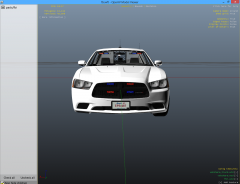
 This Charger I made for a good friend of mine, and originally he didn't want me to publicly release yet, but he quickly changed his mind and said I could. This is my third vehicle model release. Please only leave constructive criticism. THIS FILE CANNOT BE RE-UPLOADED ANYPLACE ELSE Changing of textures is allowed for personal use. Backup your game, before importing these vehicles. I am not responsible for anything that happens to your game. Please note, I may or may not respond to any & all reviews/ comments on this mod, but due to my busy life outside of GTA, the suggestions/ recommendations may not get added/ fixed. - Charger Template is included in the download. - Window tint can be changed by opening the .wtd in SparkIV or Open IV (Recommended and changing the Tint texture.) - Tint upon upload is a reasonable darkness already, but some may wish to have completely clear windows - Since the main function of this Charger is to be an unmarked unit, only an Unmarked Texture with Alberta plates is included in the .wtd 1.6 Changes: - Noticed during a recent multiplayer game, the wheels disappeared at a distance. - This was/ is hopefully fixed in v1.6 - Added in Hidden Lighting in front indicator lights Notice: On the slight chance V1.6 RC20s you with either vehicle, I've left V1.5 which has successfully proved that it doesn't RC20, but has the problem with the wheels disappearing at a distance Model Overview: Name: 2013 Dodge Charger Pursuit Version: 1.0 Lightbar: None Other Lighting: Mini LEDs, Code 3 XT6 T.A., Whelen Talons, SoundOff Intersectors Equipment: BodyGuard 6,7 Partition, Code 3 RLS Control Box, PocketJet Printer, Panasonic Arbitrator Dash Cam, Garmin GPS Unit, Antennas Multiple Liveries: Yes Recommended Handling: 1700.0 6.0 85 0.0 0.0 -0.60 0.0 5 0.20 1.0 150.0 0.22 0.67 0.7 35.0 1.35 1.10 15.0 0.15 0.47 1.5 0.8 0.8 0.14 -0.17 0.0 0.5 1.0 1.0 0.8 1.5 0.0 25000 440040 0 0 Optimized for: Fbi ELS Compatible: Yes Model Status: Locked
- 4 comments
- 1 review
-
 Yes, I did put it together, but he wishes that I don't release it right now, and I'm choosing to respect that. :)
 -
Hey, Glad you like it! Unfortunately, this Charger is currently a private model, done as a request for a good friend of mine. He asked for it to remain private for now, so I'll be respecting his wishes. If he later says I can release it, then it very well might be released. :)
-
From the album: GTA IV/ LCPDFR Photos
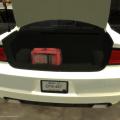
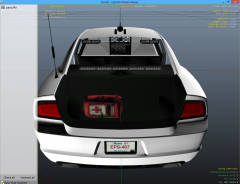
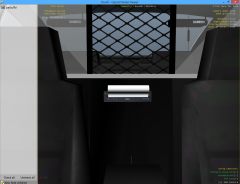
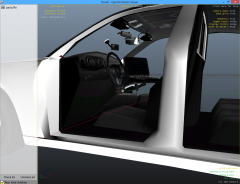
Just an unmarked Charger I put together today. Lighting is fairly basic: - Whelen Talons in front & rear windows - SoundOff Intersectors for mirror lighting - Mini LED Lights behind the front grill - Hidden Reverse lighting - Code 3 XT6 Traffic Advisor - Outer Headlight Wig-Wags - Rear Indicator Wig-Wags Equipment, is also pretty basic. - Setina BodyGuard 6/7 Partition - Rockwell Collins Laptop - Garmin GPS Unit - Panasonic Arbitrator Dash Camera - Touchmaster Siren Box (I think) - Brother PocketJet Printer (Mounted on Partition) - First Aid Kit in trunk© Knight Rider - Code Two Modifications
-
From the album: GTA IV/ LCPDFR Photos
Just an unmarked Charger I put together today. Lighting is fairly basic: - Whelen Talons in front & rear windows - SoundOff Intersectors for mirror lighting - Mini LED Lights behind the front grill - Hidden Reverse lighting - Code 3 XT6 Traffic Advisor - Outer Headlight Wig-Wags - Rear Indicator Wig-Wags Equipment, is also pretty basic. - Setina BodyGuard 6/7 Partition - Rockwell Collins Laptop - Garmin GPS Unit - Panasonic Arbitrator Dash Camera - Touchmaster Siren Box (I think) - Brother PocketJet Printer (Mounted on Partition) - First Aid Kit in trunk© Knight Rider - Code Two Modifications
-
From the album: GTA IV/ LCPDFR Photos
Just an unmarked Charger I put together today. Lighting is fairly basic: - Whelen Talons in front & rear windows - SoundOff Intersectors for mirror lighting - Mini LED Lights behind the front grill - Hidden Reverse lighting - Code 3 XT6 Traffic Advisor - Outer Headlight Wig-Wags - Rear Indicator Wig-Wags Equipment, is also pretty basic. - Setina BodyGuard 6/7 Partition - Rockwell Collins Laptop - Garmin GPS Unit - Panasonic Arbitrator Dash Camera - Touchmaster Siren Box (I think) - Brother PocketJet Printer (Mounted on Partition) - First Aid Kit in trunk© Knight Rider - Code Two Modifications
-
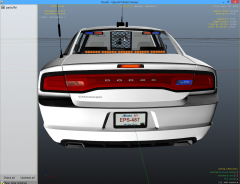
From the album: GTA IV/ LCPDFR Photos
Just an unmarked Charger I put together today. Lighting is fairly basic: - Whelen Talons in front & rear windows - SoundOff Intersectors for mirror lighting - Mini LED Lights behind the front grill - Hidden Reverse lighting - Code 3 XT6 Traffic Advisor - Outer Headlight Wig-Wags - Rear Indicator Wig-Wags Equipment, is also pretty basic. - Setina BodyGuard 6/7 Partition - Rockwell Collins Laptop - Garmin GPS Unit - Panasonic Arbitrator Dash Camera - Touchmaster Siren Box (I think) - Brother PocketJet Printer (Mounted on Partition) - First Aid Kit in trunk© Knight Rider - Code Two Modifications
-
From the album: GTA IV/ LCPDFR Photos
Just an unmarked Charger I put together today. Lighting is fairly basic: - Whelen Talons in front & rear windows - SoundOff Intersectors for mirror lighting - Mini LED Lights behind the front grill - Hidden Reverse lighting - Code 3 XT6 Traffic Advisor - Outer Headlight Wig-Wags - Rear Indicator Wig-Wags Equipment, is also pretty basic. - Setina BodyGuard 6/7 Partition - Rockwell Collins Laptop - Garmin GPS Unit - Panasonic Arbitrator Dash Camera - Touchmaster Siren Box (I think) - Brother PocketJet Printer (Mounted on Partition) - First Aid Kit in trunk© Knight Rider - Code Two Modifications
-
For me I'd have to say: Car: 1982 Trans Am (KITT Replica) or a 2014 Charger SRT, Fully Loaded. (Either completely blacked out, or a nice blue paintjob, like lcpdsergeant's Charger) Truck: Ford F250 (or 350) Diesel Super Duty. Off-roading tires, blacked out. Brush Guard, with 25" or 36" lightbar on the brush guard, along with a Back Rack to protect my rear windows, with 2 Whelen Micro Pioneer Lights facing the rear or a 2012 or 2014 Dodge RAM 3500 Laramie, again blacked out, with a Brush Guard, 25" or 36" lightbar on the Brush Guard, along with a Back Rack to protect my rear windows, with 2 Whelen Micro Pioneer Lights facing the rear.
-
Yes, it is! Thank you!
-
The setting for any Emergency Vehicle AI's use of ELS is: Ai_Els_Sp = on Ai_Els_Mp = on Should be obvious, but I will say it anyways. The Ai_Els_Sp = On is for AI ELS in Single Player The Ai_Els_Mp = On is for AI ELS in Multi-player
-
As the topic says, I'm wondering if the siren in
-
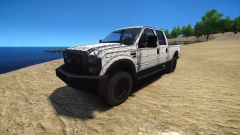 I'd say go for a grill guard :D Looks great on the front! I'd say go for the back, and see how it looks. Great job!
 -
I think the closest thing to that is >this Command Center. All that'd need to be done, is to put an RCMP Texture on it, along with a Checkstop logo/ image like that one. There's another Command Center out there, that is based off the Chevrolet Stepvan, however I don't have a link to it at the moment.
-
Hi guys, First off, I apologize if this is in the wrong section. Second, the F-150 this topic is about is here. I'm wondering how, in this video they got the wheels to be black, as upon download, the wheels are a grey-ish color. I'm sure it's not with the trainer, as I've downloaded this F-150, and the wheels cannot change color via the trainer. I've tried editing a part of the whl texture, to black and it didn't work. There is no other obvious textures to do with the wheels. Any thoughts?
-
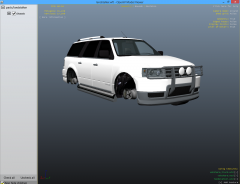
From the album: GTA IV/ LCPDFR Photos
It may not look like much, but it's what I've been working on, testing, working on some more and testing again, for almost 2 hours now. I've taken the default Landstalker from GTA IV, and taken extra_6 car component from the Contender, and added it to the Landstalker to enable it to be used as an Added Car Component using the Trainer. To do this, the original front bumper had to be removed, and replaced with the Contender's front bumper on the front, as the Brushguard (extra_6) didn't look right with the Landstalker's original bumper. This was done as a personal project, and won't be released.


![LVMPD New-Livery Pack - Ford Police Interceptor [FINAL]](http://s3-gallery.int-cdn.lcpdfrusercontent.com/gallery/album_3066/sml_gallery_29300_3066_457681.png)
