




KN1IGHT
-
Joined
Everything posted by KN1IGHT
-
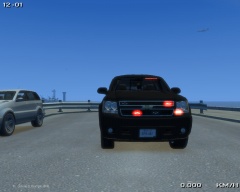
From the album: zModeler Work
Just a Tahoe I started yesterday, when it was a slow day for GTA IV Multiplayer games I started this, since I haven't found/ seen any Tahoes without the Steel Rims. The wheels are from BxBugs' 2008 Chevy Suburban. So far, for lighting, this Tahoe has: - Whelen Inner Edge XLP - SoundOff Intersector Mirror Lighting - Mini LED Grille Lights - Whelen Dominator - Wig-Wags - Hidden lighting in front (seen in front view with cruise lights activated) - Hidden Reverse Light lighting For parts: - 0taku's console - BodyGuard 6,7 Partition - BodyGuard 6,7 Partition as Cargo Barrier - Garmin GPS Unit - Panasonic Arbitrator Dash Camera - Brother PocketJet Printer - First Aid Kit© Knight Rider - Code Two Modifications
-
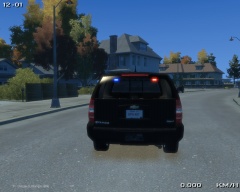
From the album: zModeler Work
Just a Tahoe I started yesterday, when it was a slow day for GTA IV Multiplayer games I started this, since I haven't found/ seen any Tahoes without the Steel Rims. The wheels are from BxBugs' 2008 Chevy Suburban. So far, for lighting, this Tahoe has: - Whelen Inner Edge XLP - SoundOff Intersector Mirror Lighting - Mini LED Grille Lights - Whelen Dominator - Wig-Wags - Hidden lighting in front (seen in front view with cruise lights activated) - Hidden Reverse Light lighting For parts: - 0taku's console - BodyGuard 6,7 Partition - BodyGuard 6,7 Partition as Cargo Barrier - Garmin GPS Unit - Panasonic Arbitrator Dash Camera - Brother PocketJet Printer - First Aid Kit© Knight Rider - Code Two Modifications
-
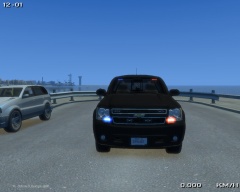
From the album: zModeler Work
Just a Tahoe I started yesterday, when it was a slow day for GTA IV Multiplayer games I started this, since I haven't found/ seen any Tahoes without the Steel Rims. The wheels are from BxBugs' 2008 Chevy Suburban. So far, for lighting, this Tahoe has: - Whelen Inner Edge XLP - SoundOff Intersector Mirror Lighting - Mini LED Grille Lights - Whelen Dominator - Wig-Wags - Hidden lighting in front (seen in front view with cruise lights activated) - Hidden Reverse Light lighting For parts: - 0taku's console - BodyGuard 6,7 Partition - BodyGuard 6,7 Partition as Cargo Barrier - Garmin GPS Unit - Panasonic Arbitrator Dash Camera - Brother PocketJet Printer - First Aid Kit© Knight Rider - Code Two Modifications
-
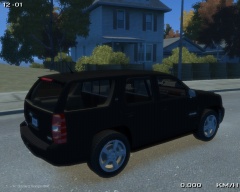
From the album: zModeler Work
Just a Tahoe I started yesterday, when it was a slow day for GTA IV Multiplayer games I started this, since I haven't found/ seen any Tahoes without the Steel Rims. The wheels are from BxBugs' 2008 Chevy Suburban. So far, for lighting, this Tahoe has: - Whelen Inner Edge XLP - SoundOff Intersector Mirror Lighting - Mini LED Grille Lights - Whelen Dominator - Wig-Wags - Hidden lighting in front (seen in front view with cruise lights activated) - Hidden Reverse Light lighting For parts: - 0taku's console - BodyGuard 6,7 Partition - BodyGuard 6,7 Partition as Cargo Barrier - Garmin GPS Unit - Panasonic Arbitrator Dash Camera - Brother PocketJet Printer - First Aid Kit© Knight Rider - Code Two Modifications
-
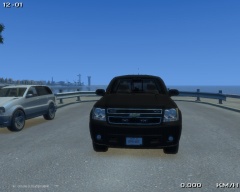
From the album: zModeler Work
Just a Tahoe I started yesterday, when it was a slow day for GTA IV Multiplayer games I started this, since I haven't found/ seen any Tahoes without the Steel Rims. The wheels are from BxBugs' 2008 Chevy Suburban. So far, for lighting, this Tahoe has: - Whelen Inner Edge XLP - SoundOff Intersector Mirror Lighting - Mini LED Grille Lights - Whelen Dominator - Wig-Wags - Hidden lighting in front (seen in front view with cruise lights activated) - Hidden Reverse Light lighting For parts: - 0taku's console - BodyGuard 6,7 Partition - BodyGuard 6,7 Partition as Cargo Barrier - Garmin GPS Unit - Panasonic Arbitrator Dash Camera - Brother PocketJet Printer - First Aid Kit© Knight Rider - Code Two Modifications
-
Okay, but wouldn't that also mean, everything else would need an L2? Edit: Added a chassis_L2, and added in the version of it with a chassis_L2, and no chassis_L2. Results weren't as I had hoped. Wheels still disappeared at the same distance, and based on the results, I'd have to add an L2 to everything else, as when the wheels disappeared on the CVPI with a chassis_L2, that's all that was visible too, was the chassis_L2 The version without an L2, the wheels disappeared, and everything else stayed visible
-
Hi guys, I wasn't sure if one was released yet or not, so I posted here. What I'm looking for (or requesting. If not already released somewhere) is a 2008 Chevy Tahoe "Civilian"/ Alloy wheel. The steel rims do look good, but they don't work that well for an undercover vehicle, that is supposed to look like a normal civilian vehicle. However, I can't seem to find just the wheel that has been released somewhere.
-
Hi guys, I've recently released a DSF CVPI, with the Hubcap wheels. Now, I've noticed this on my other Unmarked CVPIs, and this one as well. At a distance, all the wheels disappear, but everything else remains visible. This happens regardless if different wheels have been used (Ex: Hubcaps) rather then the steel rims provided upon import. I have tried adding a wheelmesh_lf_L2, and that did not solve this problem. Everything else (bodyshell, chassis, ELS, etc.) remains visible at the distance the wheels disappear. Has anyone else encountered this, and if you fixed it, how did you fix this? Again, this is present even with the steel rim wheels that are on it, upon import, so the issue being specific to a specific type of wheel, such as the Hubcaps, is safely ruled out. (Hopefully)
-
This is my fourth vehicle model release, so I hope you guys enjoy it. Please only leave constructive criticism. THIS FILE CANNOT BE RE-UPLOADED ANYPLACE ELSE Changing of textures is allowed for personal use. Backup your game, before importing these vehicles. I am not responsible for anything that happens to your game. Please note, I may respond to any & all reviews/ comments on this mod, but due to my busy life outside of GTA, the suggestions/ recommendations may not get added/ fixed. Note: The all black car is Police2 & the white car is Fbi - CVPI Template is included in the download - .WTD files for an all blue config are also provided, along with the individual ELS textures, if you don't want to change everything to all blue. - An edited rim_tem texture is also provided, for anyone who is a fan of the Hubcaps being all black with the exception of the Ford logo - Window tint can be changed by opening the .wtd in SparkIV or Open IV (Recommended and changing the Tint texture) - Tint upon upload is a reasonable darkness already, but some may wish to have completely clear windows - 1 texture comes with the CVPIs - Color for antenna on roof can be changed by editing the grey_antenna texture in the .wtd - The emerglights_emis texture, for the all blue config, has one texture that is left as red. This was done as the Tail Light wig-wags were mapped to it, to make them "brighter". 1.5 Changes: - Was reported via PM from the first day/ version of this release that the wheels were disappearing at a distance. V1.5 hopefully fixes this with no errors - This was hopefully fixed by adding a Chassis_L2 to the model. Notice: On the slight chance V1.5 RC20s you with either vehicle, I've left V1.4 which has successfully proved that it doesn't RC20, but has the problem with the wheels disappearing at a distance To Do/ Possible Future Updates: - ELS v8 corona compatibility (Right now with wig-wags in headlights, tail lights & ELS in the front indicators & reverse lights the coronas from ELS v8, aren't exactly practical) A future update may include another version of each CVPI, with ELS in the bold listed components removed, to make the use of ELS v8 coronas more "practical". Model Overview: Name: Unmarked DSF CVPI with Hubcaps Version: 1.0 Lightbar: Whelen Inner Edge XLP Other Lighting: Mini LEDs, Whelen Dominator T.A., Whelen Talons, SoundOff Intersectors, Hidden Lighting in Reverse Lights Equipment: Go Rhino CVPI Pushbar, BodyGuard 6,7 Partition, Whelen SA314 Siren, Police Console, PocketJet Printer, WatchGuard Video System 4RE, Garmin GPS Unit, Antennas Multiple Liveries: Yes Recommended Handling: 1700.0 6.0 85 0.0 0.0 -0.60 0.0 5 0.20 1.0 150.0 0.24 0.66 0.7 35.0 1.35 1.10 13.5 0.15 0.48 1.7 1.1 1.1 0.15 -0.15 0.0 0.5 1.0 1.0 0.8 1.5 0.0 25000 440010 0 0 Optimized for: Fbi ELS Compatible: Yes Model Status: Locked Model Overview: Name: Unmarked DSF CVPI with Hubcaps Version: 1.0 Lightbar: Whelen Talons Other Lighting: Mini LEDs, Whelen Dominator T.A., Whelen Talons, SoundOff Intersectors, Hidden Lighting in Reverse Lights Equipment: Go Rhino CVPI Pushbar, BodyGuard 6,7 Partition, Police Console, PocketJet Printer, WatchGuard Video System 4RE, Garmin GPS Unit, Antennas Multiple Liveries: Yes Recommended Handling: 1700.0 6.0 85 0.0 0.0 -0.60 0.0 5 0.20 1.0 150.0 0.24 0.66 0.7 35.0 1.35 1.10 13.5 0.15 0.48 1.7 1.1 1.1 0.15 -0.15 0.0 0.5 1.0 1.0 0.8 1.5 0.0 25000 440010 0 0 Optimized for: Police2 ELS Compatible: Yes Model Status: Locked
-
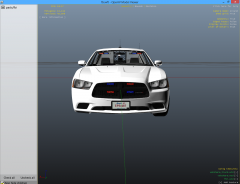 Yes, I updated it recently, and it hasn't been approved yet. As for an ALPR/ marked version, it is possible.
 -
Zelyth, did get most of it right, but I am going to try say it in steps. 1. Using Select -> Quadr select the reverse lights 2. With Selected Mode on (Spacebar) use the Create -> Copy tool, and left click to make a Reverse Light copy 3. The copies will selected. Using the Modify -> Move tool in the Top view, with only the Y Axis selected, slowly move the copied reverse lights, so they are just a small distance away from the originals. 4. Keeping them selected, and selected mode On, open your Materials Editor, and find the lightsemissive texture you would like to use. 5. Click Assign to Selection in the materials editor 6. Using your U.V. Mapper, with the lights still selected, and selected mode still on, uncheck Disable Old Mapping, check Generate New, then check Force Material, and then click Ok. 7. Use the U.V. Mapper like you normally would. 8. Done! I made a quick video, explaining how, along with showing it being done as well. You can view the video here. I hope it helps :)
-
2
-
Hi guys, Been a while since I posted anything. I've been debating about possibly, getting more RAM for my PC, (8 GB to be exact as my PC's MAX RAM is 16 GB) However, I've read somewhere before, that (supposedly) adding more RAM to your PC, can help improve how GTA IV runs, in terms of texture loss, FPS, etc. Is this accurate?
-
-
Honestly, I didn't find the head being knocked off funny. I did find some of the peoples' reactions funny though.
-
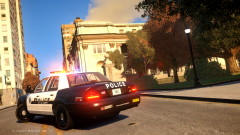 Do you have a link to that CVPI? ~ Posted using iPhone
 -
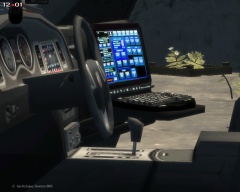
From the album: zModeler Work
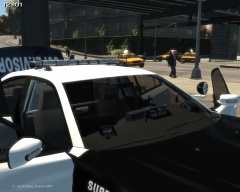
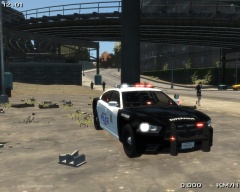
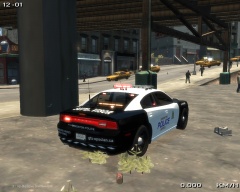
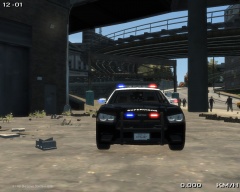
Just something I made today. 2013 Charger Pursuit (GeorgieMoon) with a Whelen Liberty. Lighting consists of: - Whelen Liberty - Front & Rear Wig-Wags - Hidden Reverse Lighting - Code 3 XT6 Rear Side Lighting - Code 3 XT6 Traffic Advisor - Mini LEDs on Rambar - Whelen ION Rambar Intersection lighting & Mirror Lighting - Whelen Talons in front & rear - Whelen Inner Beam front & rear lighting (never worked with it before. it turned out great!) Parts on the Vehicle consist of: - Setina The BodyGuard 6,7 Partition - Setina 2012 Charger Wraparound (Wraparound removed by ymself) - Rockwell Collins Laptop - WatchGuard 4RE Video Camera - First Aid Kit in boot - Stalker Dual Radar - Garmin GPS Unit - PocketJet Printer (Mounted on Partition) - Code 3 RLS Control Box (Mounted below center console) I think that's everything. The texture on it is just an EPS Texture I put on for the screenshots. This Charger is part of a small pack, which I currently haven't decided whether it will be released or not. Please no comments about releasing. I currently haven't decided yet, and at this time, only 2 vehicles in the pack are complete. (This Charger & a CVPI which I haven't had a chance to upload screenshots of. If released, vehicles in the pack will each have 2 versions. One version can/will utilize ELS v8 coronas for the tail lights, headlights, etc. and the other version will not. Note: I am aware, that in this image, the Code 3 RLS Control Box, is missing textures. I noticed that when taking the screenshots. It has since been fixed.© Knight Rider - Code Two Modifications
-
From the album: zModeler Work
Just something I made today. 2013 Charger Pursuit (GeorgieMoon) with a Whelen Liberty. Lighting consists of: - Whelen Liberty - Front & Rear Wig-Wags - Hidden Reverse Lighting - Code 3 XT6 Rear Side Lighting - Code 3 XT6 Traffic Advisor - Mini LEDs on Rambar - Whelen ION Rambar Intersection lighting & Mirror Lighting - Whelen Talons in front & rear - Whelen Inner Beam front & rear lighting (never worked with it before. it turned out great!) Parts on the Vehicle consist of: - Setina The BodyGuard 6,7 Partition - Setina 2012 Charger Wraparound (Wraparound removed by ymself) - Rockwell Collins Laptop - WatchGuard 4RE Video Camera - First Aid Kit in boot - Stalker Dual Radar - Garmin GPS Unit - PocketJet Printer (Mounted on Partition) - Code 3 RLS Control Box (Mounted below center console) I think that's everything. The texture on it is just an EPS Texture I put on for the screenshots. This Charger is part of a small pack, which I currently haven't decided whether it will be released or not. Please no comments about releasing. I currently haven't decided yet, and at this time, only 2 vehicles in the pack are complete. (This Charger & a CVPI which I haven't had a chance to upload screenshots of. If released, vehicles in the pack will each have 2 versions. One version can/will utilize ELS v8 coronas for the tail lights, headlights, etc. and the other version will not.© Knight Rider - Code Two Modifications
-
From the album: zModeler Work
Just something I made today. 2013 Charger Pursuit (GeorgieMoon) with a Whelen Liberty. Lighting consists of: - Whelen Liberty - Front & Rear Wig-Wags - Hidden Reverse Lighting - Code 3 XT6 Rear Side Lighting - Code 3 XT6 Traffic Advisor - Mini LEDs on Rambar - Whelen ION Rambar Intersection lighting & Mirror Lighting - Whelen Talons in front & rear - Whelen Inner Beam front & rear lighting (never worked with it before. it turned out great!) Parts on the Vehicle consist of: - Setina The BodyGuard 6,7 Partition - Setina 2012 Charger Wraparound (Wraparound removed by ymself) - Rockwell Collins Laptop - WatchGuard 4RE Video Camera - First Aid Kit in boot - Stalker Dual Radar - Garmin GPS Unit - PocketJet Printer (Mounted on Partition) - Code 3 RLS Control Box (Mounted below center console) I think that's everything. The texture on it is just an EPS Texture I put on for the screenshots. This Charger is part of a small pack, which I currently haven't decided whether it will be released or not. Please no comments about releasing. I currently haven't decided yet, and at this time, only 2 vehicles in the pack are complete. (This Charger & a CVPI which I haven't had a chance to upload screenshots of. If released, vehicles in the pack will each have 2 versions. One version can/will utilize ELS v8 coronas for the tail lights, headlights, etc. and the other version will not.© Knight Rider - Code Two Modifications
-
From the album: zModeler Work
Just something I made today. 2013 Charger Pursuit (GeorgieMoon) with a Whelen Liberty. Lighting consists of: - Whelen Liberty - Front & Rear Wig-Wags - Hidden Reverse Lighting - Code 3 XT6 Rear Side Lighting - Code 3 XT6 Traffic Advisor - Mini LEDs on Rambar - Whelen ION Rambar Intersection lighting & Mirror Lighting - Whelen Talons in front & rear - Whelen Inner Beam front & rear lighting (never worked with it before. it turned out great!) Parts on the Vehicle consist of: - Setina The BodyGuard 6,7 Partition - Setina 2012 Charger Wraparound (Wraparound removed by ymself) - Rockwell Collins Laptop - WatchGuard 4RE Video Camera - First Aid Kit in boot - Stalker Dual Radar - Garmin GPS Unit - PocketJet Printer (Mounted on Partition) - Code 3 RLS Control Box (Mounted below center console) I think that's everything. The texture on it is just an EPS Texture I put on for the screenshots. This Charger is part of a small pack, which I currently haven't decided whether it will be released or not. Please no comments about releasing. I currently haven't decided yet, and at this time, only 2 vehicles in the pack are complete. (This Charger & a CVPI which I haven't had a chance to upload screenshots of. If released, vehicles in the pack will each have 2 versions. One version can/will utilize ELS v8 coronas for the tail lights, headlights, etc. and the other version will not.© Knight Rider - Code Two Modifications
-
From the album: zModeler Work
Just something I made today. 2013 Charger Pursuit (GeorgieMoon) with a Whelen Liberty. Lighting consists of: - Whelen Liberty - Front & Rear Wig-Wags - Hidden Reverse Lighting - Code 3 XT6 Rear Side Lighting - Code 3 XT6 Traffic Advisor - Mini LEDs on Rambar - Whelen ION Rambar Intersection lighting & Mirror Lighting - Whelen Talons in front & rear - Whelen Inner Beam front & rear lighting (never worked with it before. it turned out great!) Parts on the Vehicle consist of: - Setina The BodyGuard 6,7 Partition - Setina 2012 Charger Wraparound (Wraparound removed by ymself) - Rockwell Collins Laptop - WatchGuard 4RE Video Camera - First Aid Kit in boot - Stalker Dual Radar - Garmin GPS Unit - PocketJet Printer (Mounted on Partition) - Code 3 RLS Control Box (Mounted below center console) I think that's everything. The texture on it is just an EPS Texture I put on for the screenshots. This Charger is part of a small pack, which I currently haven't decided whether it will be released or not. Please no comments about releasing. I currently haven't decided yet, and at this time, only 2 vehicles in the pack are complete. (This Charger & a CVPI which I haven't had a chance to upload screenshots of. If released, vehicles in the pack will each have 2 versions. One version can/will utilize ELS v8 coronas for the tail lights, headlights, etc. and the other version will not.© Knight Rider - Code Two Modifications
-
Hi guys, Firstly, if this has been brought up in the past, and I missed it, apologies for that. I'm wondering if there's any way to change the color of the GPS "Trail" created by DAS when you select another player in a Multiplayer game. The color right now is white, which really only works with the >Night Time version of the Google Maps radar Mod. If it was possible to change it to something like green, then it would work the with >Google Map IV MOD Bonus (Pause Menu Map) 0.1. Since with that one, it's not a night time version, it's difficult to see the path. If it's possible in some way, to change the color to something like green could it be changed?
-
I got that as well when I first installed GTA IV. I had to right click on the disc drive, and click Open, and then go to the GTAIV folder, right click on the setup application, go to the Compatibility tab, and selected Windows Vista (Service Pack 2). I'm running Windows 8, but I assume it should be the same
-
Exactly. They're clearly a bunch of idiots, and probably 10 year olds, who without the use of scripts, would have no idea how to do what they are doing. Looking at their Twitter posts, they're just doing this because they are trying to get Re-tweets and more followers, either for themselves, or Twitter accounts they post a link to. A lot of their posts up until now, ask for 3,000 Re-tweets if you want PSN back up, and also things like RT for XBOX & FAV for PSN. Clearly it's time for them to go back home, go to their bedroom, wake up the next day, and actually get a life, rather then doing this sh*t, and (for some people) ruining their Christmas because they either can't use a new game they got, or use the new console they got. (Please don't ban for anything I said. Just really irritated at this ridiculous B.S.)
-
Fair enough. Xbox 360, according to the Service Status is working, but Xbox One and Xbox on other devices still isn't


