




KN1IGHT
Members
-
Joined
Everything posted by KN1IGHT
-
^ It'll have to do :P
-
That works lol
-
Still no one has an answer of what you win though lol
-
Yeah. No problem XD
-
#winnersprizeunknown? lol
-
^ same here XD
-
Lol ^
-
naw XD
-
nope lol
-
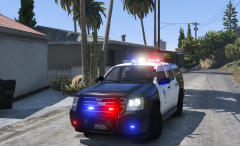 I like it! Even though it's not the "real" lightbar of the LAPD Though there's a TV Show here, called Rush Hour, and the police service is LAPD, and they use a similar bar to the Liberty (if it's not a liberty) except the lenses are colored.
 -
Hi guys, I finally got around to updating to LSPDFR 0.3.1, and am also running PoliceRadio among a few other mods that tie in with LSPDFR. Anyways, my PoliceRadio screen, on Menu 1, the bottom 2 selections are cut off by my screen. What would I do to correct this, as I've never gotten a chance to use PoliceRadio much, and I do not know what the bottom 2 options/ selections are? Edit: My resolution in Graphics settings is 1024 x 768
-
The OpenIV mods folder will allow you to use modified .rpf archives, and use things such as custom vehicles, peds, sirens, etc. When the appropriate ASI Loaders are installed through OpenIV, the game will load the modified archives in the mods folder. However, re-reading that post again, as it's been a while since I set up my Mods folder, mods such as PCTrainer, LSPDFR, etc. will not work in the mods folder, and will need to be placed in the directory of your game that contains GTAVLauncher. Since some mods require ScriptHookV.dll, so after uninstalling the OpenIV ASI Loaders, make sure to remove the ScriptHookV files from your folder before entering online, if you plan on playing online at all. ~ KRI
-
This article I hope will help you, and it doesn't involve 2 full, separate copies of the game. http://gtaforums.com/topic/798272-how-to-use-openiv-mods-folder-and-keep-your-original-gta-v-files-safe/
-
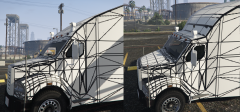 They both look great, but for having those lights on there, the right one is better. For the record, I've seen trucks that look like the left as well
 -
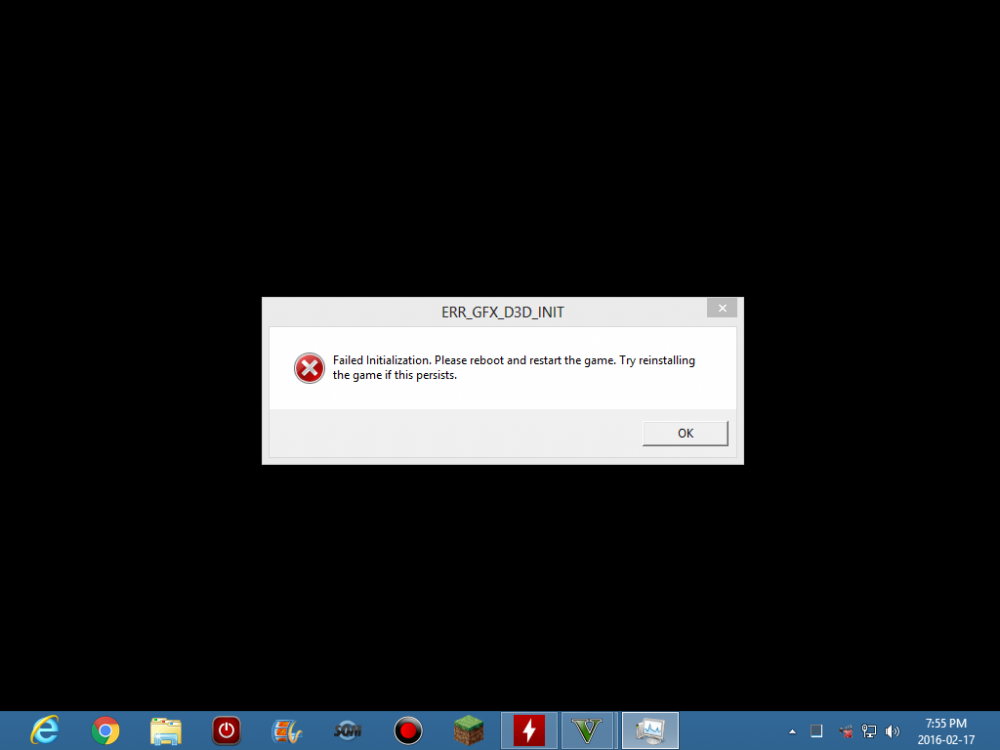
I'm aware this topic is old-ish, but figured I'd post a "solution" I found myself. Keeping in mind, I had this error happen twice to me today within 2 hours. The "solution" below is what I did after I got the error the 2nd time, and didn't feel like rebooting my PC again. Was able to "fix" the issue and get back into GTA, without restarting PC by going to settings.xml and changing <Windowed value="0" /> from 0 to 1 which changed it to windowed mode. Switching back to Fullscreen at the main menu, just plain caused the game to crash with a GTA V has stopped working window. No pop up error window or anything. Keeping in mind I hadn't rebooted my PC for a 2nd time before trying Fullscreen Hope RockStar fixes this fullscreen problem in an update, but I should ( ) be able to live with windowed mode until it hopefully gets fixed
-
All there on my screen as well. Using Chrome for my browser
-
Hi guys, As the title says I've gotten this error occasionally. A screenshot will be posted below. Today it happened, in the middle of a Solo Session, driving around the city, and nothing but driving. Trying to start GTA V now, results in that error. In the past, all I did was restart the PC, and it was fixed again for a while, but it'd be nice to be rid of this error once & for all, as it gets very annoying to have to restart the PC in the middle of a session with friends (has happened 2-3 times already). I haven't played GTA V for a while, but in the past after restarting the PC, I'd be rid of that error for at least a few months. My PC specs are in my signature. Any thoughts?
-
-
Yeah, I know it'll record my mic. But, I'm wondering if it'll record other people talking to me on TeamSpeak, since I hope to upload Multi-player games. Footage won't be that great, if you can only hear myself talking ~ KR
-
So, I've taken a look at ShadowPlay, and its settings. If you've had experience with it, does it record audio from TeamSpeak as well, or just based on its settings (In Game, In Game & Mic, Off)? I chose Bandicam, because I know for sure it will capture TeamSpeak audio as well. ~ KR
-
Hi guys, As per a topic I posted recently titled Upgrade Time, I have upgraded my PC. My new specs are down below in my signature. However, I did a test single player video in GTA IV the other day, since I figured I'd take advantage of my new GPU, and try start doing some GTA IV Single Player videos, that I could never do with my previous GPU, with decent quality. However, the video I uploaded here is the video I recorded that day. Notice, how my voice is fast forwarded, and sounds like a chipmunk (lol), and the movement of the game, makes it seem like I have a crap system, which I do not. Any thoughts on how to remedy this? My recording software is Bandicam (My own personal preference), as I have never gotten along with FRAPS, since I started with GTA IV & LCPDFR. ~ KRI/ KN1IGHT Note: Since it is Christmas, my replies to this topic can, and probably will be delayed. Please try remember to quote me in your reply, so I am notified. :)
-
Thanks for the reply! Since basically 4 GB & 2 GB aren't that much different, I'll probably go with the 950, you said in your first reply, next time I'm around a location that sells that card. Thanks for the info/ help on this!! ~ KRI P.S. I'm looking at this power supply. I'm aware it might be "overkill" but I haven't seen that great of reviews on Corsair 500w PSUs, and that site only has corsair CX and Builder series for a 500w (closest I found to 400-450). Edit: Upon looking and narrowing my search parameters on Memory Express on the PC instead, to 450w & 500w PSUs, the ratings on ones that were below $100, were 3 stars or lower, and the ones that weren't rated at all, were in the $100 - $180 range.
-
Thanks for the reply! I do want to try stay below $300 for a card, and the 950 meets that requirement. So, the last one I mentioned I would get if I had to, is still a good card? (GTX 960 4GB at $331 on Amazon) would you recommend to still do a PSU upgrade to ensure I have enough power, as I have the minimum 350w PSU required? Keeping in mind I do plan on adding maybe 1 more HDD or an SSD, to my PC ~ KRI
-
Hi guys, I've been researching upgrades for my PC, for the last few days, mainly for the graphics card. My current card is in my signature. I've been looking at these two, mainly for GTA V. The first one based on EVGA's product page on their site requires a 400w PSU for a minimum, and the 2nd one says minimum 350w PSU. My current PSU is a 350w, that came with my PC. Either way, I'd be planning to upgrade my PSU, to ensure I have enough power, as I plan on adding some more storage in the future. 1. EVGA GeForce GT 740 4GB GDDR5 Dual DVI mHDMI Graphics Cards 04G-P4-3748-KR https://www.amazon.ca/dp/B00KJGYOGG/ 2. EVGA GeForce GTX 950 2GB SSC GAMING, Silent Cooling Graphics Card 02G-P4-2957-KR https://www.amazon.ca/dp/B013WQCC5O/ Have I "chosen" some decent cards to choose between, for GTA V? Trying to stay below the $300+ mark for a card itself. Note, that if I had to I would go for this card: EVGA GeForce GTX 960 4GB FTW GAMING ACX 2.0+, Whisper Silent Cooling w/ Free Installed Backplate Graphics Card 04G-P4-3968-KR https://www.amazon.ca/dp/B00UOYQ9N4/ Though, I am aware that one would still require a minimum 400w PSU. ~ KRI
-



