
Pupinia Stewart
Members
-
Joined
-
Last visited
Everything posted by Pupinia Stewart
-
Hi there, the new police models do have an abundance of customization, to take advantage of these modifications you will need a trainer. - Rampage is an example of an updated trainer, although there are many out there. (as it is currently up-to-date I will do my instruction using Rampage, most of this is still applicable to alternative trainers) - using Rampage we will navigate to the "spawner" section, once there, hit "vehicles", then "input model" - Once you've done that a text box should appear, type "police5" (Vapid Stainer LE Cruiser) or "polgauntlet" (Gauntlet Interceptor) Once you've done the above steps, you've spawned the new police vehicles, now to take advantage of their customization. - In Rampage, head to the "vehicles section" and then enter "customize" once there, enter "Los Santos Customs" Now you should be able to see all of your various customization options. Let me know if this helped, and let me know if you have any further questions. 🙂
-
Hi there, the two above trainers do offer a snow function, although they have not been updated to the latest version which **may** cause issues trying to get snow. - Simple Trainer for example doesn't allow you at all, and throws an error "snow is not available in this version of GTAV" I recommend using an updated alternative, for example: Rampage permanently, or until the desired trainer is up to date.
-
 Hey Charlie! I'd just like to congratulate you on updating 686 Callouts v1.8.0.0. it's been a pleasure testing the new features, and spotting fixes along the way I'm sure that all of the fellow beta testers would agree! I'm sure the LSPDFR community will love it! So I salute you for all your hard work, juggling college *having to cook and do the dishes to survive!* as well as updating your callouts, you're a mad man... PS. Appreciate you getting me on board for the trailer, it was great directing the mini-movie together, we've got to go bigger and better for V1.9.0.0 ;)) All the best, Pupinia. 💖
- 311 comments
- 60 reviews
-
-

-

- 2
-
-
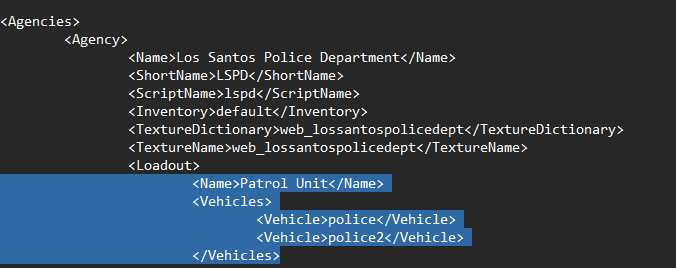
Hi there, Basically, I think I understand what you're asking, please do let me know if I'm on the right track. Usually, I'd recommend placing all replacement vehicle files in the latest patchday, despite this there shouldn't be any issues if you install cars on a different patchday, other than newer patchdays will override the older ones; EG if I had a car in Patchday3, then I installed a car of the same name in Patchday22 it would replace it. As for your query on your Addon Car Pack, there are only a limited amount of Replacement car files, so people make addon packs that create new slots. To make LSPDFR use these you have to edit your "Agency.XML" here: Grand Theft Auto V\lspdfr\data Just as a visual, let's say I want to add an add-on car to my LSPD units, let's say it the model name was "pdcharger1". It is the first agency in the file, I will look for where it says <Name>Patrol Unit</Name> <Vehicles> <Vehicle>police</Vehicle> <Vehicle>police2</Vehicle> </Vehicles> i will copy " <Vehicle>police</Vehicle>" and paste it under, and change the name. It should look like what's seen below. <Name>Patrol Unit</Name> <Vehicles> <Vehicle>police</Vehicle> <Vehicle>police2</Vehicle> <Vehicle>pdcharger1</Vehicle> </Vehicles> and you do that until every model you want LSPD to spawn with is there, then just save the file, and LSPD units when requesting backup will respond using those vehicles. Do let me know if this answered your questions.
-
 Glad to help, wish you luck for your future update, whenever it may come.
 -
Hi there, Just to continue narrowing it down, can you confirm that if you launch without RagePluginHook it crashes to the desktop?
-
Hi there, Unfortunately, your most realistic fix is that you delete your old mods folder, and create a new one. I know, bummer. if you're unable to pinpoint what exactly is causing the crash it may be near impossible to salvage it.
-
-
Hi there, love the concept. Glad people like yourself are inspired to create videos within Grand Theft Auto for creative purposes, as it is a hobby and passion of my own, i felt the obligation to help you out. As referenced by your description you feel as if there is room for improvement. I'd like to help you with this cause, below I will outline some tips, and some additional modifications that you can take onboard to produce a separate video, or improve on the current one. ------------------------------------------------------------------------ - 1. Use a mod named "EVE" to enhance the quality of your Rockstar Editor Exports. - Linked here: "https://www.gta5-mods.com/scripts/extended-video-export" EVE is a useful tool that allows you to create videos in higher resolutions, frame-rate, and bit-rate within Rockstar editor, and save locally to your desired location on your computer without the need of screen recorders. This tool can help remove "colored blotchiness" created by the normal "Low" bitrates that Rockstar Editor exports. Enhanced Framerate can allow you to slow the footage down in post-production to create a smooth slow-motion effect. EVE also comes with very good motion blur which can add to the overall visual look of the video but also to the pacing a speed captured. 2. Linked here: "https://www.gta5-mods.com/scripts/no-rockstar-editor-restrictions" No Rockstar Editor Restrictions is a useful tool that allows you to film anywhere, regardless of location, or camera view, it also allows you to clip through buildings and road surfaces. This tool also gives you the benefit of creating narrower, and wider shots that can help with creating a look you'd like allowing you to obtain a crazy 45x zoom. This has numerous advantages that can allow you to become more flexible in Rockstar Editor. 3. Tonnes of Practice! Practice is key, learning how the camera moves and rotates when adding certain blends and how to create certain looks is key. Practice can intern allow you to create imagery that you can be pleased with. 4. Experiment! I noticed that throughout the video, the main camera shot that you chose to opt for was a static shot with a target or a static shot connected to a specific target. While sometimes these shots are perfect, they're boring and cannot create the wow factor a user on LCPDFR.com would need to be caught by your video. Experimenting with moving shots, like smooth blending etc can really bring these videos to life. I'd highly recommend this tutorial, despite its age the content is still relevant as the R* editor has not changed, functionality-wise. "https://www.youtube.com/watch?v=U4DPbxJVLlw&ab_channel=whanowa". Another Channel called "Logic Films" have a really good playlist that's only intention is to teach people how to effectively use the rockstar editor. Other than those tips, and links provided I'm all out! It's up to you. Hope you found this helpful and not too nerdy and over the top, if you're actually passionate about these things, which I believe you're from your other content; these above tips can help you very much. If you ever have any issues or anything, feel free to reach out to me on LCPDFR.com using the DM feature. (https://www.lcpdfr.com/lspdfr/index)
-
 Haha charlie! It's great to see you back in the LSPDFR space for real! Hope this will inspire some motivation to get some work done on 686Callouts, or other projects you could be planning? Yours Truely; Pupinia <33
 -
I presume you are launching rage and it's saying that? - Are you sure you're on the latest version of RagePluginHook? EDIT: i see there is a image attached but it doesn't seem to work for me... 🧍♂️
-
Do the above, (although I have never experienced a problem like this, but it is best to be safer then sorry!) but is this caused only when you spawn the MP ped? Or just whenever you load up the game? Clarifying may help to discover the issue 🙂
-
-
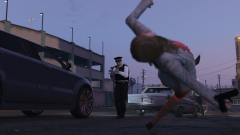 And here lies Charlie's GeForce RTX ark And here lies Charlie's 'GeForce RTX ark' 💀💀💀, i tried to edit the comment #epicfail It's only getting worse 😭
 -
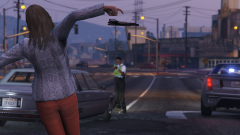 Oh how the times change, no more being able to count the amount of pixels on screen. Quite frankly, now your game is looking smooth, silky and most defiantly stunning. Delighted for you @Charlie686 -PC Pupinia Stewart of MET Police.
 -
As i was one of the first members of the Beta Testing, I can see the drastic changes in the performance and reliability of this plugin over a long period. Charlie you have put some crazy amount of work in to create an amazing pack for the benefit of the greater public. I have defiantly not forgotten the late nights you've had fine-tuning this callout pack to utter-perfection! And clearly this hard work has really paid off, this callout pack is nothing but a Gold-mine for realism and charisma at the same time. Charlie i can't wait to see future development of this plugin pack. To anyone who doesn't want to me blabbing on, this pack is an amazing addition to your LSPDFR game. I promise you you wont regret it. From your bestay, Pupina
- 311 comments
- 60 reviews
-
-
-
- 2
-
-
Hey Charlie 😇 All is working well in this pack! It's made such improvement since pervious beta versions! But none the less, i'm very happy with the pack itself and you deserve a pat on the back < 3 Great work; Pupinia < 3 (your bestay right?)
- 311 comments
- 60 reviews
-
-
-
- 4
-
-
 Looks fab queen
 -
Ooop 💀 From what i can see this is a "fork", but i'm sure they're similar gameplay wise, so you may aswell just install the "fork" ❤️ Mitsu 😀
-
LOL I was typing then i refreshed and you answered it yourself lol
-
Hello there! I see you have some of albo's plugins installed (traffic policer etc), they very outdated and cause crashes, I'd recommend removing that that! Hope this helps 🙂 Mitsu
-
Hi there, From your message i don't really understand. So your saying when you load in to GTA5 it loads all the plugins but crashes after they are loaded? If not, can you get back to me? Mitsu 😄 Just read the log, your game crashes during loading. Have you updated your mods folder in OpenIV? If so you need to re-do your Game config, this may be the reason for your crash? Get back to me.
-