



Pupinia Stewart
Members
-
Joined
-
Last visited
Everything posted by Pupinia Stewart
-
Hi, It appears that you are missing a requirement of the callout pack you've installed, "CalloutInterface.API" You can find it here:
-
 Personally, This doesn't sound like an issue caused by 686 Callouts, but we couldn't confirm or deny without a log. If you have any further issues, refer to Charle686's Discord server, where he can help you more thoroughly. Thanks
- 311 comments
- 60 reviews
-
 Hi there, How do you justify the version 0.5.3.0 BETA release if arguably it is just an "outdated" version of this mod available on GTA5mods.com? The newest version 0.5.2.0 BETA uses a completely different way of capturing the Rockstar Editor, using Voucouder. (it appears you've copy and pasted the description from FiveMods, because your description mentions Voucouder despite the fact that this build doesn't use it.) So if you could fill in the gaps on how this is not just a 0.4.4.0 beta version available here. Thanks, Karen.CO
 -
Hi there. I Hope you're well! Do you have a mods folder? This could be a potential error in your mods folder that is causing your game to crash on start-up. If so, we can test by disabling your mods folder, by renaming it to "_mods". This name change will remove its functionality. If your game no longer crashes your mods folder is causing the issue, and you should revert any recent changes, and confirm you have a Gameconfig and other game adjusters. If you still have no luck, create a new mods folder, and install modifications one by one testing the game runs after each is installed. If this doesn't apply, let us know! Thanks. (I cannot read apparently 🥲)
-
Hi Kiko05, I hope you're doing well. Regarding your crash, it is likely to be caused by an outside factor to Rage Plugin Hook, and/or LSPDFR due to the nature of your issue. To confirm this, I would recommend playing the game without launching RPH, this will confirm if your crash is external to RPH and/or LSPDFR. If your game crash still occurs, I recommend reverting any recent changes in your mods folder, or creating a new one, installing mods one by one, and testing between each install. As for your undetected crash, I assume you're using 686 Utilities. It is an amazing bot, although it is designed to find solutions to LSPDFR crashes, not 'full game crashes', and as your game is crashing "technically" LSPDFR has not crashed, thus no crash is detected 😄
-
Alright, When was the last time you installed a Gameconfig, And was it the one included in NVE? When you remove the Rage/LSPDFR compatibility package from your mods folder, does the game crash when launching the game without Rage?
-
Okay, Do you have a game configuration installed? This removes the limitation on DLC-packs within the game, NVE adds many (DLC-packs) when you install it.
-
Hi there, What is the nature of your crash? Does your game crash when launching without Rage Plugin Hook?
-
Hi again! I'm sorry to be the one to break the news 😞 . It's always annoying to re-do your mods folder. I would install things one-on-one testing as you go because you can always find the cause when you run into trouble. It might seem tedious, but it'll be worth it. Happy modding, Good luck! 🙂
-
Hi there, Lets try testing if your mods folder is the cause, if you rename your "mods" folder to "_mods" and try launching. Do you still recieve the same issue? If not your problem is an underlying issue with your mods folder. You will need to undo any recent changes to your mods folder or start from scratch. If your problem continues, or you do not have a mods folder, please do let us know so we can assist you further. Thanks.
-
Hey Kate! Thanks for the kind words of wisdom and wishes of gratitude! All of us at Karen.CO wishes you the most splendid Christmas tainted with memories of joy, appreciation, and kindness! See you in LSPDFR-TS real soon 😉 - Pupinia Stewart, on behalf of all Karen.CO Members.

-
Huge congrats to you @Charlie686 on the release of V2.0.0.0. countless days of work and stress have paid off! The LSPDFR Community will undoubtedly appreciate your work once again! Thanks for collaborating with me on the Trailer once again it was a blast making it with you! Thankfully the shots were a lot easier than the 3x barrel-roll cart-wheel around the plane scaling the FIB building but it's not bad if I do say so myself (especially the intro... 😉) Best of luck with future projects! All the best, Pupinia (Jack) Stewart.
- 311 comments
- 60 reviews
-
-

-

- 2
-
-
 Congrats Yasd on the release of these calls! Another few callouts for the community to enjoy! Thank you for having me on in the initial testing of these callouts! I love the unique objectives and calls you've created within this callout and hope your creative ventures continue with a V 2.0.0.0 ? 😉 All the best, Pupinia
- 237 comments
- 20 reviews
-
-

-
- 6
-
-
- lspdfr callout
- rph
- translation
- legacy
-
Tagged with:
-
Hey Charlie! Congratulations on the release of 686 Callouts V1.9.0.0! Thank you again for having me on with the job of making your V1.9.0.0 trailer, it's been a blast! I hope the countless days of recording, rendering... Forgetting an outcome, recording, rendering, editing, and rewatching was all worth it 🫣 I think we've smashed it out of the park! ~ Hope you've got bigger and better plans for V2.0.0.0! (And a good song for the trailer 😉) Pupinia Stewart!
- 311 comments
- 60 reviews
-
-
- 1
-
-
-
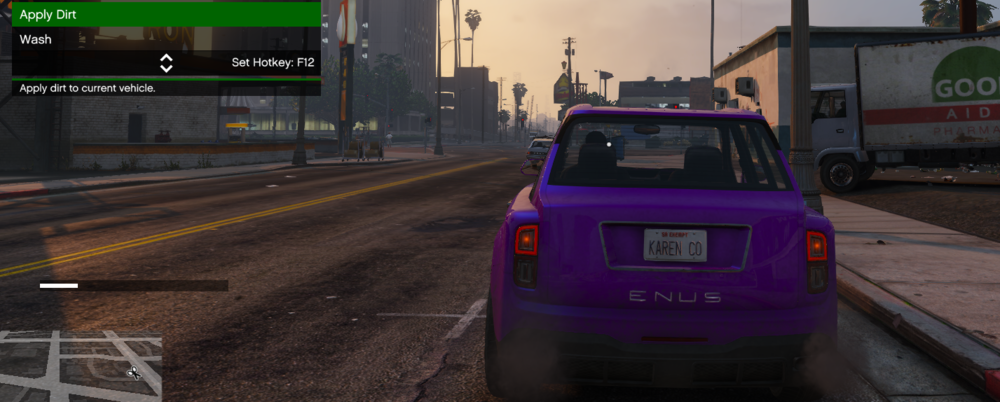
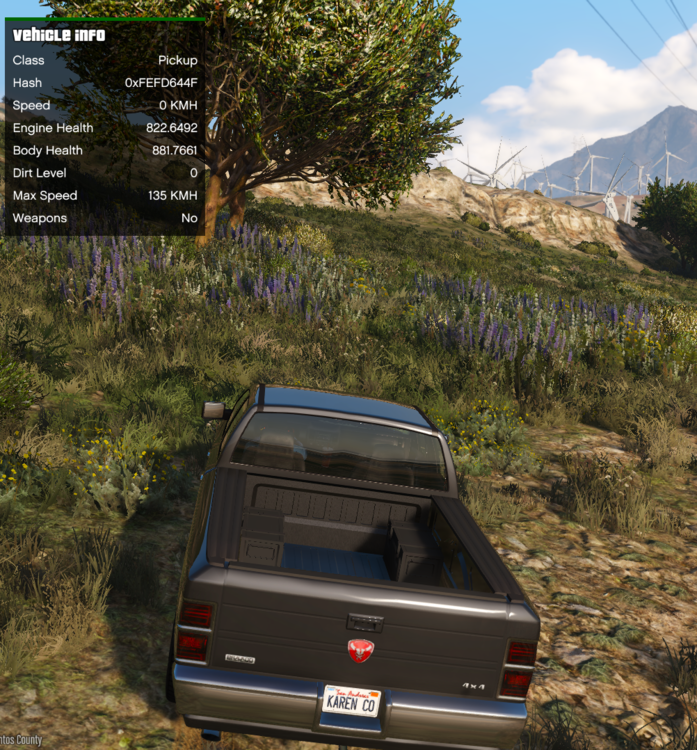
it does! "Wash", found in Vehicles -> Customize Vehicle (as of my testing) does stop dirt once it's applied to a vehicle. The car is not able to get dirty. I drove in the swamps for a few minutes and the dirt level never changed. Although this allows your vehicle to get damaged. Also, it doesn't automatically reset your vehicle (Messing with ELS, your car coming to a stop after a collision etc.) Hope this is helpful!
-
Could you check something for me? - With edit mode enabled in OpenIV, navigate to "mods\update\update.rpf\common\data" and find the file "dlclist.xml". Once you've done that, please right-click the file and hit "edit" The file should open up with a bunch of lines of text consisting of the names of your dlcpacks and the default ones found within the game. Could you make sure that the above folders are found inside that file as seen here, we're going to use the folder named "sup" as an example. <Item>dlcpacks:/sup/</Item> so for you, there should be these lines included in this file: <Item>dlcpacks:/sup/</Item> <Item>dlcpacks:/22G31UM/</Item> <Item>dlcpacks:/eup/</Item> <Item>dlcpacks:/golfr/</Item> <Item>dlcpacks:/uc22jeep/</Item> <Item>dlcpacks:/rabbitchgrlegacy/</Item> (the other ones are there by default) - If they're not inside your dlclist.xml you must add them yourself, which would be the reason why EUP is not working for you. - if you need help adding them to your dlclist.xml or If this is not your issue, please let me know.

-
Currently, this suggests an issue within your mods folder. In my opinion, your best bet is to do as follows: 1) Try to revert any recent changes, (easier said than done...) for example, you could try reverting your "Vehicles.meta" that you've edited with a default one, you can do this by sourcing a default one from your main directory within OpenIV, **or** via a premade backup that you may have created. Then, launch the game and see if the pop-up has gone away. 2) If 1. Doesn't work or your changes cannot be undone. Delete your current mods folder and remake another one from scratch. Although this may be a pain it is often your best course of action in these situations, as and number of things can cause this type of crash. (Remember the basics! Gameconfig ETC!) If issues persist! In the event of issues still occurring after the steps above have been taken, try verifying the integrity game files of GTA from is respectable platform, for example, Steam/Epic ETC. - Pupinia
-
Alternatively, you can just make an antivirus exception ultimately keeping your computer 'safe' from potential unrelated threats.
-
This crash occurred because you don't have "ScriptHookVDotNet Version=3.0.2.0" installed, of which your plugins require.
-
Hi Xorg Great news! Happy to hear you're up and running again! Have fun! - Pupinia
-
Hi xorg, Could you update RageNativeUI for me, and let me know if this resolves your issue? - Pupinia
-
Hi there, Could you try launching GTA5 normally without launching RagePluginHook. Once you've loaded in, and you have control of your character. Then please ALT + TAB out of GTA5, and load Rage. And see if it hooks. Let us know if this works.
-
Hello, Xorg, Could you please upload your RagePluginHook.log? - It's located in your GTA5's installation directory, it will help people identify your issue. - Pupinia

-
Hi there, most common trainers have a snow feature for example "Simple Trainer", or "Menyoo" although due to the game's recent title update, and lack of above trainer updates, they may no longer work. I'd recommend Rampage (which the snow feature is confirmed to work) from now onwards, or until the ones recommended are updated. As for scripts, I have no recommendations... - Pupinia




