



HankVoight
Members
-
Joined
-
Last visited
Everything posted by HankVoight
-
This one here is actually really neat.. '?do=embed' frameborder='0' data-embedContent>>
-
All good.
-
Yes select the X then rotate it, you just have to change the axis until you get the right direction, if you mess up press Ctrl Z and it will erase it. Have a look in the gallery section I will upload a photo there. Then try either Y or Z axis instead
-
I had the same problem but if you rotate it on the X axis it should work fine (meaning it will rotate direction not sideways) if you understand that. This link is a screenshot I just took and will show you what I mean http://s112.photobucket.com/user/Chris_Wharley/media/Untitled_zps18d81366.png.html
-
-
-
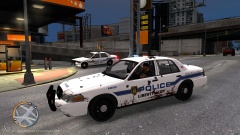
From the album: Testing
Got into two pursuits and a shoot out and this is the end results.. -
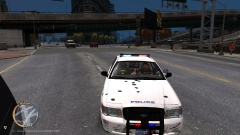
From the album: Testing
Got into two pursuits and a shoot out and this is the end results.. -
One problem I have is that once you get a few meters away from the car the skin disappears and it looks like a giant dairy cow with lights on it. Hopefully this will be fixed because other than that it's a very nice model.
- 7 comments
- 3 reviews
-
Holy crap! That model is insane! Could we possibly get another vehicle with the same lighting setup to fill the police2 slot Bravo 5/5
- 29 comments
- 7 reviews
-
-

- 1
-
-
It's all good don't sorry bro!
-
That one is all messed up unfortunately, I can't seem to add anything to it.
-
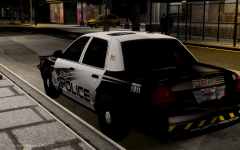 Oh my this looks damn sexy! Please release it.
 -
-
-
Haha my bad, it's the Chevrolet Camaro 2012 ZL1 Which I have no idea how to do yet either. I'm not looking to put a skin on it just the two grill lights like the Hawaii Five-0 Camaro http://slg.serv1.free.fr/forza4.html
-
I found a beautiful Chevy Camaro that I want to turn into a police vehicle but its in .z3d format and I have no idea how to convert it to .wft. Can someone convert it for me please.
-
-
Oh my thank yo very much! Helps a lot.
-
How on earth do I fix this? This is my first go at Zmodeler so some help please!
-
If I had any idea how to use Zmodeler and I could afford it I would.
-
GTA IV Liberty City Police skin pack made by Chris_Wharley. You are NOT allowed to upload these textures anywhere else without my express permission. These skins may be used for clan/community purposes but proper credits must be given. If not action will be taken. Textures are purely fictional and do not respresent any real Agency or Police Department with the exception of the FIB skin. Vehicles used for this pack can be found on www.lcpdfr.com and GTA4mods.com in the download section and are all ELS enabled vehicles. Which means you need ELS V8 to make them work properly. Link to vehicles can be found in the read me. All credits go to the authors of these great models. I take no credit nor resposbility for them. Please make sure you back up your game files before installing either this texture pack or any any of the vehicle mods.
- 8 comments
- 2 reviews
-
Update from Saturday afternoon/night - Completed the skins to my liking. Created an FIB Police skin for the Marauder, CVPI and Impala both now have a Supervisor skin. Dodge Charger has two skins to choose from, a DARE unit and a normal patrol unit. I was thinking of doing a traffic unit but maybe on the next set of skins I might. Uploaded new photos in the first post and deleted old ones. EDIT - Skin pack has been released - '?do=embed' frameborder='0' data-embedContent>>
-
-

