mtm
Members
-
Joined
-
Last visited
Everything posted by mtm
-
Can you load into story mode without RPH? Or does it still crash? Also, have you installed any new addon vehicles or eup?
-
Did you do a manual install or did you install via the installer?
-
It freezes as in the game doesn't automatically launch when you start Rage? If this is the issue you can start GTAV and then launch rage while loading in.
-
Post your ragepluginhook.log located in your main directory.
-
What I meant by base folder was following the same path just without the mods folder. Apologies for the confusion, the path would be: Grand Theft Auto V\update\update.rpf\common\data
-
If you were using a mods folder you can go into the base folder (not in mods folder) and copy it from there.
-
Apologies, but I'm not sure what may be causing this issue.
-
Looking at other forms similar to your issue, some people have accidentally added a modifier key to the accept callout and initiate traffic stop key. Can you make sure you haven't done this?
-
Can you make sure your keys.ini file looks right in the lspdfr folder?
-
Does anything happen when you pull behind someone and try to start a traffic stop?
-
Go ahead and post you ragepluginhook.log. You should find it in your main directory under ragepluginhool.exe.
-
You may have accidentally deleted the folder, you can just go ahead and remake it or you can re-install ELS here.
-
Reinstall it using the manual install. Note: You do not need to uninstall it, just drag and drop the manual install's files and say yes to overwriting.
-
How did you install LSPDFR? Manual or Automatic?
-
Okay, go ahead and send another RPH log.
-
First, make sure you set your PTT (Plugin Timeout Threshold) to 60000 in your RPH Settings. Second, do you have any addon vehicles installed?
-
Do you have any addon vehicles, guns, ect?
-
Post your entire log, please. Edit: If this is your entire log, does GTA load without Rage?
-
Disable ambient spawns.
-
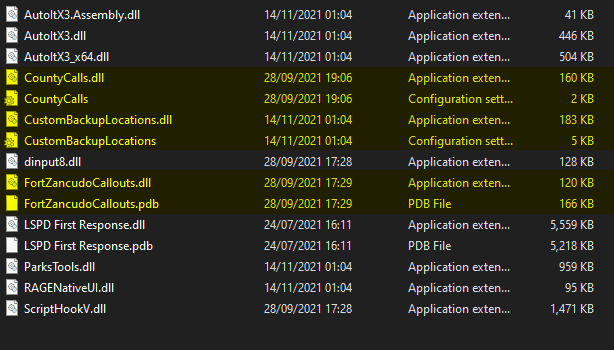
The files highlighted should be in your main directory These highlighted files should be in Epic Games/GTAV/plugins/LSPDFR
-
-
Did you put what the readme.txt should've had in the dlclist.xml/ Also, what pack did you install
-
Don't disable your antivirus, that makes your system vulnerable, just add an exclusion.
-
I posted in your other forum.
-
Do you have a mods folder? If so, name it _mods Note: This will disable your mods folder to determine if it is a problem with that or something else.