Ndb20
Members
-
Joined
-
Last visited
Everything posted by Ndb20
-
any1
-
I want to be able to edit the cops that spawn around the city but I could not find any information online. I'm not understanding these components and props or how to edit them. I did EUP backups with EUP to UB converter but that uses a different format.

-
hello can anyone just take a look? game was freshly installed and carefully set up. everything was running smoothly for 2 days. nothing new installed.
-
RagePluginHook_20052025_171540.log
-
-
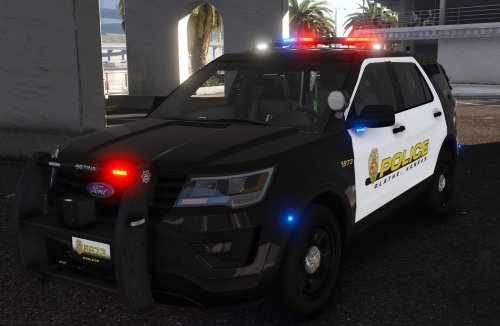 use the damn internet for goodness sake. just type how to all blue lights. ---- youre actually so extra for including like 5 different tahoes and explorers but thank you because tahoes and explorers are sexy and all the different variations makes this pack one of the most comprehensive addons ive seen and thank you for the reflective ghosts (ghosts are always a plus 😍) and all the alprs/nonalprs versions give perfect variety for customizing my agency addons for ai patrols **also you're daddy for being one of the very few to debadge the back of (FINALLY) and replace tires on georgies tahoes 😩😩
- 24 comments
- 5 reviews
-
 interesting. shouldve made it longer.
 -
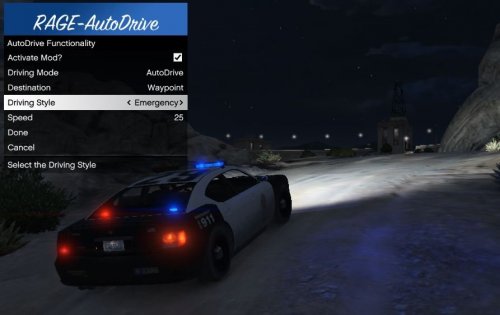 Something wrong with plugin. Loads up about 50% of the time. Im practically dependent on this plugin now so it drives me crazy when it doesn't load. Can we get an update for this? Also appears other people above me experiencing similar issues. Other than the load up issue, this plugin is a great way to relax and lets me pay attention to other things around me instead of focusing on the road and trying to drive smoothly
 -
-
-
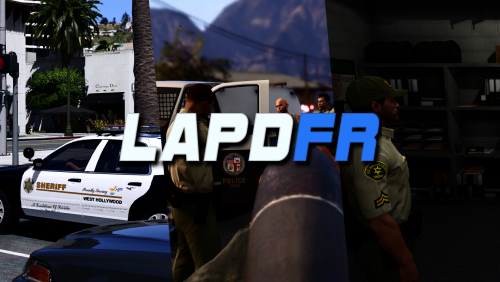
 originally installed the 'regular' version, which has a wait time delay after selecting and starting a mission (this is why i saw no marker and thought the script was broken but its not). swapped out the 'regular' version for the 'content creator' version and the problem was solved. difference between ‘regular’ and ‘content creator’ files the difference between regular and content creator is that with the content creator there is no intermission delay after starting a mission (call). i see no point in the intermission implemented into the regular version as im still required to manually open the menu and teleport in before changing my clothes and starting the mission so the creator version is the ergonomic file, for all players, in my opinion. personal review of calls the calls (missions) from this script are smooth and on a different level in terms of complexity in comparison to the simplicity and choppiness offered in conventional lspdfr callout packs this is likely to become the next step for future callouts as we know it for the lspdfr community if one day there is a way to randomly trigger these missions while patrolling - so we can play these mission callouts in conjunction with traditional 'simple' callouts - rather than having to start the missions up manually, switching back to default character, putting uniforms back on and then spawning a car before starting. In a perfect world itd be nice if these “mission markers” could spawn at random throughout the map, activating a mission upon driving into the marker like traditional gta missions. this and having to re gear uni/weapon/vehicle are the only takeaways from these mission maker callouts however i understand this is newly released and likely to be in early development but overall this is a great script i enjoyed playing and i think sereous did a great job final thoughts and personal opinion mission maker callouts in comparison to traditional plugin rage callouts: more immersive and run more smoothly quick and condensed video I made showcasing trespassing callout
- 66 comments
- 16 reviews
-
-

-

- 4
-
-
-
this looks cool. so can these missions be triggered randomly while patrolling or do we have to manually start them?
- 66 comments
- 16 reviews
-
-
- 1
-
-
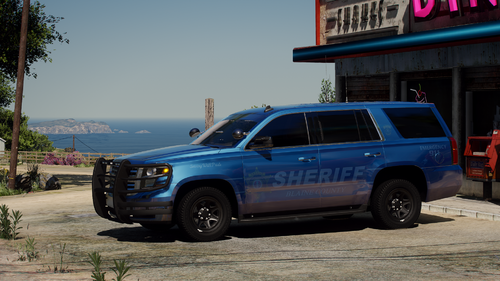 f150 is so clean but it isnt recognized as a police vehicle so cant pull people over/activate alpr. can you update the meta or variation to make it a cop car? also love the ghost skin for the f150. **edit dont worry about it. i just dropped the files into a different addon 🙂
- 76 comments
- 10 reviews
-
-
- 1
-
-
 perfect timing since force a callout is now broken. this one is more practical and i enjoy hearing that pinging sound. its very relaxing. thanks
- 451 comments
- 47 reviews
-
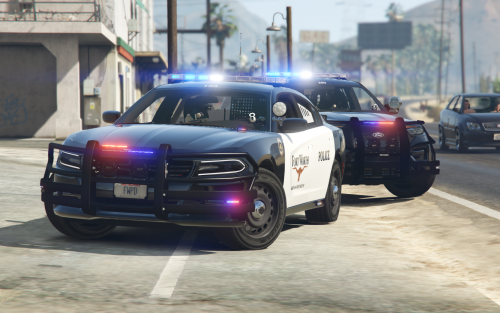 fort worth uses legacy lightbars. i suggest you find legacy ones for more realism + legacys look way better
 -
use old eup menu https://gta5mod.net/gta-5-mods/scripts/eup-menu-2-2-1-0/
-
Doubt this post belongs here and but saw many people posting about how their newly downloaded eup menu doesnt work because they havent updated their rage so i thought id leave a link to the old eup menu here for those who need it or dont intend to update their game to the latest version. Ill leave this here for ease of access because this is the most viewed forum category and is the easiest to find for most people. https://gta5mod.net/gta-5-mods/scripts/eup-menu-2-2-1-0/
-
heres a link to the old eup menu file. youre welcome. https://gta5mod.net/gta-5-mods/scripts/eup-menu-2-2-1-0/
-
Dope. Works great. I like how it uses blinkers and does random u turns as well. Only thing is the top patrol speed is 25mph **edit the speed options are from 1-25 but the numbers are not in relation to mph. When set at the maximum, 25, im going about 100 mph on the highway. Decreasing the setting to about 10 or 11 gives a cruise speed of about 50 mph. overall this is an ergonomic plugin that is basic in its current state to say the least but im anxious to see more advanced features in the future. cheers.
-
Dope. Works great. I like how it uses blinkers and does random u turns as well. Only thing is the top patrol speed is 25mph **edit the speed options are from 1-25 but the numbers are not in relation to mph. When set at the maximum, 25, im going about 100 mph on the highway. Decreasing the setting to about 10 or 11 gives a cruise speed of about 50 mph. overall this is an ergonomic plugin that is basic in its current state to say the least but im anxious to see more advanced features in the future. cheers.
-
-
you will learn young padawan
-
-
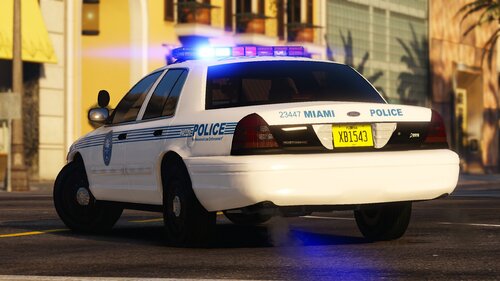 so miami pd has 5 different variations of blue and red lights on their cars?