


FalleN2099
Members
-
Joined
-
Last visited
Everything posted by FalleN2099
-
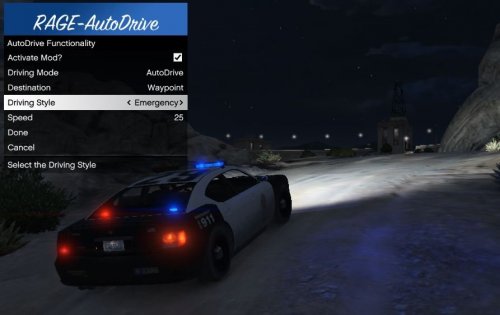 Just had to hit the Modifier Key + The "normal" Key, so just hit Crtl + G
 -
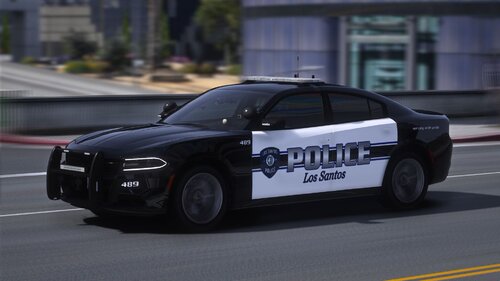 There is no .xml for the 14charger Just had to copy the 18charger and rename it
- 84 comments
- 5 reviews
-
I can't open the menu, even though the plugin is loading?
-
 Also have the problem with skipping options.
 -
Did it, now It does not crash anymore. Do I have to reinstall each mod and have a look which one makes the game crash? 😕
-
First: I'll do it right now Second: Yes, I have a mods folder
-
Sure! Thank you for helping me! RagePluginHook.log
-
Hello, i have a problem that my game crashes closely every time I play it a few minutes after starting. Log: rage plugin error.txt
-
Hey, das ist mein erstes mal dass ich GTA Updaten muss. Ich habe bereits die Sachen mit -verify gelesen, gebe ich das allerdings so wie beschrieben ein startet zwar der Launcher aber ich bekomme keine Möglichkeit das Spiel upzudaten. Außerdem steht dann dort dass es einen Fatalen Scripthook Error gibt (wahrscheinlich weil noch keine neue Version verfügbar ist). Wie kann ich mein Spiel updaten? Danke schonmal für Antworten!
-
 Should any window pop up from the loader when u start the game? For me, nothing happens (only the game starts). I left the ModManager files in the folder and put the whole folder just in the game direction. Sorry for bad English by the way. Edit: It was Norton. Fixed.
- 338 comments
- 19 reviews
-
Sooo..... I'm updating LSPDFR for the first time, but I don't know how to do it. I already searched on Google but i only found videos where they tell you how to update RPH. I installed the game via the automatic installer. Do i have to click the lspdfr_uinst.exe and just install LSPDFR again with the newest version? Thank you already for any help!
-
 If I choose court summons in the Ticket-System, it doesn't show up when pressing F9. Literally nothing happens. How can I fix that? (Sorry for my bad English)
- 1,178 comments
- 137 reviews
-
 Maybe I am just a little bit dumb but which files do I have to download? Only the 1.2 or also the Squad-Master?
 -
Hey, mein Spiel stürzt nach Installation von ELS, ModdingDLCPackV und einem Auto für ELS ständig beim Start ab. Logs:
-
Hey, I have got a problem since I installed ModdingDLCPackV, ELS and a car for it (Potato Charger). Game crashing at start. Log file:
-
 Got a problem since I installed ModdingDLCPackV, ELS and a car for it (Potato Charger). Game crashing at start. Log file: 03.11.2019 10:00:52.177] Started new log on 03.11.2019 10:00:52.177 [03.11.2019 10:00:52.180] ==================================================================================================== [03.11.2019 10:00:52.169] Log path: D:\Games\Sonst\RagePluginHook.log [03.11.2019 10:00:52.180] Log verbosity: Trivial [03.11.2019 10:00:52.182] Initializing input system [03.11.2019 10:00:52.184] Initializing game console [03.11.2019 10:00:52.190] Console key has been set to F4 (key code: 115) [03.11.2019 10:00:52.245] Initializing console variable "ConsoleScrollAmount". [03.11.2019 10:00:52.245] Type: System.Int32, Reading section: "Miscellaneous", key: ConsoleScrollAmount [03.11.2019 10:00:52.247] Read value: <null> [03.11.2019 10:00:52.248] Initializing console variable "ConsoleKey". [03.11.2019 10:00:52.248] Type: System.Windows.Forms.Keys, Reading section: "Miscellaneous", key: ConsoleKey [03.11.2019 10:00:52.248] Read value: <null> [03.11.2019 10:00:52.248] Initializing console variable "PluginTimeoutThreshold". [03.11.2019 10:00:52.248] Type: System.Int32, Reading section: "Miscellaneous", key: PluginTimeoutThreshold [03.11.2019 10:00:52.251] Read value: 10000 [03.11.2019 10:00:52.251] Setting value of console variable "PluginTimeoutThreshold" to stored value. [03.11.2019 10:00:52.251] Initializing console variable "AlwaysShowConsoleOutput". [03.11.2019 10:00:52.251] Type: System.Boolean, Reading section: "Miscellaneous", key: AlwaysShowConsoleOutput [03.11.2019 10:00:52.252] Read value: <null> [03.11.2019 10:00:52.252] Initializing console variable "ShowConsoleCommandInfoOnPluginLoad". [03.11.2019 10:00:52.252] Type: System.Boolean, Reading section: "Miscellaneous", key: ShowConsoleCommandInfoOnPluginLoad [03.11.2019 10:00:52.252] Read value: <null> [03.11.2019 10:00:52.252] Initializing console variable "ShowOnScreenWarnings". [03.11.2019 10:00:52.252] Type: System.Boolean, Reading section: "Miscellaneous", key: ShowOnScreenWarnings [03.11.2019 10:00:52.252] Read value: <null> [03.11.2019 10:00:52.252] Console initialized [03.11.2019 10:00:52.252] Initializing forms manager [03.11.2019 10:00:52.253] Cleaning temp folder [03.11.2019 10:00:52.254] Version: RAGE Plugin Hook v1.69.1254.16006 for Grand Theft Auto V [03.11.2019 10:00:52.259] ================ RAGE Plugin Hook ================ [11/3/2019 10:00:52 AM.265] Detected Windows 10 Professional (64-bit) (10.0.18362.0)! [11/3/2019 10:00:52 AM.266] Checking game support [11/3/2019 10:00:52 AM.602] Product name: Grand Theft Auto V [11/3/2019 10:00:52 AM.602] Product version: 1.0.1737.6 [11/3/2019 10:00:52 AM.602] Is steam version: False [11/3/2019 10:00:52 AM.602] Initializing DirectX [11/3/2019 10:00:52 AM.604] Initializing Direct3D [11/3/2019 10:00:52 AM.604] Getting game swap chain [11/3/2019 10:00:52 AM.630] Swap Chain created: 0x7FF7E33980F8 [11/3/2019 10:00:52 AM.630] Swap Chain VTable: 0x17B9C5931C0 [11/3/2019 10:00:52 AM.630] 0x74894810245C8948;0x8D48564157552024;0x170EC814890246C [11/3/2019 10:00:52 AM.630] D3D11Present: 0x7FFF6C594300 [11/3/2019 10:00:52 AM.630] D3D11ResizeBuffers: 0x7FFF6C5A9A50 [11/3/2019 10:00:52 AM.630] D3D11ResizeTarget: 0x7FFF6C5F7C20 [11/3/2019 10:00:52 AM.630] D3D11SetFullscreenState: 0x7FFF6C5B1580 [11/3/2019 10:00:52 AM.630] Getting device [11/3/2019 10:00:52 AM.630] Retrieved device [11/3/2019 10:00:52 AM.630] Creating wrapper [11/3/2019 10:00:52 AM.631] Direct3D initialized [11/3/2019 10:00:52 AM.631] Initialized DirectX [11/3/2019 10:00:52 AM.631] Direct3D watcher thread spawned [11/3/2019 10:00:52 AM.696] Wrapper created [11/3/2019 10:00:52 AM.700] Effect created [11/3/2019 10:00:52 AM.700] Creating buffer [11/3/2019 10:00:52 AM.700] Created buffer [11/3/2019 10:00:52 AM.700] Creating blend state [11/3/2019 10:00:52 AM.700] Created blend state [11/3/2019 10:00:52 AM.700] Done with creation [11/3/2019 10:00:52 AM.753] Initializing texture system. [11/3/2019 10:00:52 AM.753] Initializing texture system; phase 1 [11/3/2019 10:00:52 AM.753] Initializing texture system; phase 2 [11/3/2019 10:00:52 AM.759] Initializing texture system; phase 3 [11/3/2019 10:00:52 AM.759] Initializing texture system; phase 4 [11/3/2019 10:00:52 AM.768] Initializing texture system; phase 5 [11/3/2019 10:00:52 AM.769] Initializing texture system; phase 6 [11/3/2019 10:00:52 AM.770] Initializing texture system; phase 7 [11/3/2019 10:00:52 AM.772] Initializing texture system; phase 8 [11/3/2019 10:00:52 AM.773] Initializing texture system; phase 9 [11/3/2019 10:00:52 AM.774] Initializing texture system; phase 10 [11/3/2019 10:00:52 AM.777] Initializing texture system; phase 11 [11/3/2019 10:00:52 AM.777] Initializing texture system; phase 12 [11/3/2019 10:00:52 AM.779] Initializing texture system; phase 13 [11/3/2019 10:00:52 AM.779] Initializing texture system; phase 14 [11/3/2019 10:00:57 AM.632] Direct3D watcher thread ended [11/3/2019 10:01:23 AM.239] LoadingScreenMsg: Initializing game support [11/3/2019 10:01:23 AM.490] Initializing game support [11/3/2019 10:01:24 AM.075] LoadingScreenMsg: Velocity limit removed [11/3/2019 10:01:24 AM.392] Compatibility level: 0 [11/3/2019 10:01:24 AM.392] Supported version detected [11/3/2019 10:01:24 AM.392] ================================================== [11/3/2019 10:01:24 AM.392] LoadingScreenMsg: Patching code [11/3/2019 10:01:24 AM.643] LoadingScreenMsg: Waiting for game initialization [11/3/2019 10:01:24 AM.894] Waiting for game initialization [11/3/2019 10:01:24 AM.995] LoadingScreenMsg: Initializing core [11/3/2019 10:01:25 AM.246] Initializing hook [11/3/2019 10:01:30 AM.269] LoadingScreenMsg: Completing interoperability [11/3/2019 10:01:30 AM.520] Completing interoperability [11/3/2019 10:01:30 AM.520] Initialization code 1. [11/3/2019 10:01:30 AM.520] Initialization code 2. [11/3/2019 10:01:30 AM.520] Initialization code 3. [11/3/2019 10:01:30 AM.528] 1 Address: 0x00007FF7E12B72F4 [11/3/2019 10:01:30 AM.528] Calling func 1 [11/3/2019 10:01:30 AM.545] 2 Address: 0x00007FF7E1E1D652 [11/3/2019 10:01:30 AM.545] 3 Address: 0x00007FF7E08A5CEA [11/3/2019 10:01:30 AM.574] Address: 0x00007FF7E1E1D5FC [11/3/2019 10:01:30 AM.574] Unknown var: 0x00007FF7E2E39C00 [11/3/2019 10:01:30 AM.574] Initialization code 4. [11/3/2019 10:01:30 AM.574] Initialization code 5. [11/3/2019 10:01:30 AM.574] Completing interoperability, phase 1 [11/3/2019 10:01:30 AM.575] Completing interoperability, phase 2 [11/3/2019 10:01:30 AM.575] Completing interoperability, phase 3 [11/3/2019 10:01:30 AM.575] Completing interoperability, phase 4 [11/3/2019 10:01:30 AM.575] Completing interoperability, phase 5 [11/3/2019 10:01:30 AM.575] Completing interoperability, phase 6 [11/3/2019 10:01:30 AM.575] Completing interoperability, phase 7 [11/3/2019 10:01:30 AM.575] LoadingScreenMsg: [11/3/2019 10:01:30 AM.827] LoadingScreenMsg: Loading Story Mode [11/3/2019 10:01:38 AM.131] LoadingScreenMsg: Loading and Populating Game World [11/3/2019 10:01:38 AM.382] LoadingScreenMsg:
- 2,699 comments
- 240 reviews
-
-
Danke. Hatte nur gedacht, dass irgendwie z.B. die Speicherstände irgendwo in den vorhandenen Dateien gespeichert werden 😄
-
Jetzt noch eine hoffentlich allerletzte Frage: Ändert LSPD alleine ohne zusätzliche Mods irgendwas an den vorhandenen Spieldateien oder nur an den Dateien, die man manuell rein installiert hat?
-
Danke für deine Hilfe! Habe bisher noch keine Extra-Mods installiert. Aber leider gibt es ein Problem: Wenn ich die gemoddeten Spieldateien durch die normalen Spieldateien ersetze, erkennt GTA diese nicht und will dass ich sie neu installiere. Wie kann ich das lösen? Ich lösche immer alle Dateien raus aus dem Ordner und ziehe dann das komplette Spiel wieder rein.
-
Schade, wenn ich es so versuche (also mit einem mods-Ordner) sagt RagePluginHook, dass es direkt im Hauptverzeichnis sein muss. Dann scheint meine Annahme also nicht zu stimmen 😞
-
Sorry, aber ich bin einfach zu blöd um es zu verstehen 🙂 So wie ich es verstanden habe hast du also auf einer anderen Festplatte das Vanilla Spiel, welches du z.B. verwendest, wenn du ausversehen mal eine GTA-Spieldatei oder sowas gelöscht hast (halt irgendwas an den normalen Dateien geändert hast). Jetzt verstehe ich allerdings nicht das mit dem Mod-Ordner. Ich denke du meinst, man kann die mods in einen Ordner mit den Namen "mods" installieren und diesen immer aus dem GTA-Verzeichnis rausziehen aus dem Spiel wenn man normal spielen will und danach wieder reinziehen, oder? Und da entstehen keine Start-Probleme bei den Mods? Vielen, vielen Dank dir für deine Antworten!
-
Danke. Trennst du die Internetverbindung bevor du die Mod spielst?
-
Hey, ich wollte um auf Nummer sicher zu gehen RagePluginHook mit dem Mod in einen neuen Ordner machen, in den ich das Spiel kopiert habe. Leider muss ich beim Start von RagePluginHook aber das Spiel dann aus dem Launcher starten, bei welchem der "originale Ordner" hinterlegt ist. Kann ich das irgendwie umgehen bzw. wie wären eure Tipps, dass ich die Mod installieren kann ohne das Risiko auf mich nehmen zu müssen gebannt zu werden. Ein Rockstar-Support-Mitarbeiter hatte mir diesen Weg empfohlen.
-
Gerade getestet: Funktioniert nicht, weil das Spiel mit RagePluginHook ja im anderen Ordner ist und wenn ich RagePluginHook starte muss ich das Spiel noch über den Launcher starten. Dieser startet aber vom anderen Verzeichnis. Was soll ich machen?



