


ImmortalAustralian
Members
-
Joined
-
Last visited
Everything posted by ImmortalAustralian
-
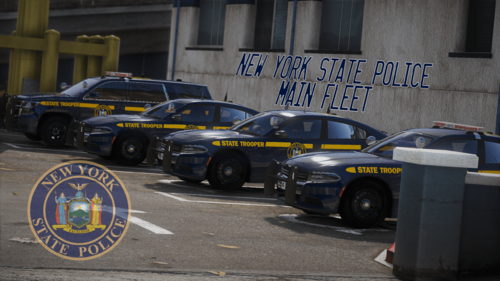 The meta files will be inside the add-on dlc pack, you'll need to pull them out of there and place them on your desktop so you can copy the necessary lines across to replace the slots you're putting the vehicles into.
- 42 comments
- 9 reviews
-
Tips: Use simple trainer to spawn in the vehicles. Use simple trainer to change the livery of the Charger and Taurus If you want this pack to be a replacement, rename to desired car slot and replace and copy each .meta (vehicles, handling, carvariations, and carcols) in the replacement metas Cars already have tints on them, no need to add tint in trainer. Download Custom Environmental lighting!! Use the VCF's I provided. They provide the best realistic lighting NYSP use. Each car has it own reflective livery, pretty cool right? I doubt Torz will remove the lightbar from certain vehicles, he's created these with the intent of them being as accurate as possible so if a vehicle doesn't have a slicktop counterpart IRL, I doubt he will make one.
- 42 comments
- 9 reviews
-
-

- 1
-
-
 Just wanted to ask if you're using the Natural Vision Remastered graphics pack as that will explain why this occurs on that tahoe, I used to have the same issue however since I recently installed VisualV before adding in NVR it's no longer a problem. It's an issue with NVR that I believe has a fix but I cannot find a link to the page where the fix for that is found anymore.
- 483 comments
- 78 reviews
-
-
-
-
 Would really love to see the inclusion of them! I also +1 to you adding a bike and taurus too
- 33 comments
- 2 reviews
-
-
- 1
-
-
Any chance we could see the inclusion of ghost liveries and black & white & silver liveries too?
- 33 comments
- 2 reviews
-
Again as I said in my edits, it's working fine now, it was caused by having over 176 els-enabled models (it doesn't like having any more than that installed at one time). I'm more than happy with not updating both LSPDFR and RPH as there is nothing wrong with either of them at the moment.
-
Game was working perfectly fine last night without issue. The only thing I've added is a new DLC pack with 11 cars and swapped out about 6 slots. I haven't touched anything else. I'm well aware my LSPDFR is not up to date, i'm not worried about updating it because it's the version i've used for the past few months with no issue. Update - it ended up being that I had too many cars installed (having anything over 176 els enabled models causes a crash when forcing duty apparently so there's that I guess? RagePluginHook.log
-
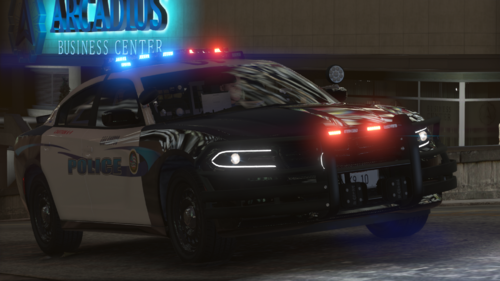 Lovely car and livery. The valor lightbar is definately a winner and got me to download it.
- 18 comments
- 7 reviews
-
-
- 1
-
-
Beautiful car and livery however I've noticed an issue with the model itself regarding the boot. It seems it's misaligned when closed, I've open and closed the trunk and it's still present so yeah 😕
- 18 comments
- 7 reviews
-
Disregard, issue seems to have resolved itself By resolved itself, I mean that I can use ForceDuty again without LSPDFR crashing.
-
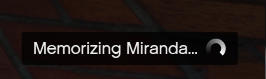
This has remained on screen since I went on duty at the station (I used to use force duty to avoid it but force duty now crashes my LSPDFR instead). Any idea how I can remove this?
-
I'll do a different gameconfig, most likely 2x. As for the heap & limit adjuster, i already have those installed. Nevermind, I forgot to download the updated gameconfig that is compatible with the new update - I'm sure it'll work now.
-
RPH is crashing - just did a clean mods folder but has not cleared it up - gameconfig is installed at 4x traffic so its not the issue. Log is attached - will await for some help. RagePluginHook.log
-
You do realise if you buy the physical retail, it will not require steam and will only use the RGSC launcher. I myself have the 7 disc physical retail version and it runs through RGSC and not steam.
-
You can't use the old RPH - the new RGSC launcher broke backup & revert and as such RPH updates will not support the previous update and will only support the latest GTA V update - you'll need to update your RPH.
-
You'll need to wait for LSPDFR, RPH and SHV to be updated within this week (no promise on SHV if we follow the history for it being updated).
-
RPH is not updated to be compatible with the new update yet. You'll need to wait until RPH, LSPDFR & SHV are updated as the new RGSC launcher has broken the backup & revert system. You shouldn't have to wait longer than a week for those three to receive updates.
-
Not a problem, I hope it works for you, if not, then I guess waiting for the updates to RPH, LSPDFR and SHV to be released is the next best option.
-
Like I said, I don't know if it'll work and I have no intention of trying to use it because I'd rather just wait than possibly damage my game.
-
I'm alright, thanks for the offer but I'll just wait, I doubt it'll take too long for it all to be updated. This is a convenience as I wanted to stream some LSPDFR and show off the new content I had installed but I guess that will have to wait.
-
Like I said, it most likely isn't really worth it because it hasn't been updated since like December 2017 iirc so it probably won't function correctly or could cause crashes. https://www.gta5-mods.com/tools/no-gtavlauncher
-
Yikes... I only have a 2TB SSD that GTA V sits on and 300GBs+ of its space is taken up by one game (it has a huge amount of DLC). It sucks that the RGSC launcher broke backup & revert because that was my lifeline back on the old RGSC launcher.


