
EvanGaming2022
Members
-
Joined
-
Last visited
-
Currently
Viewing File: [DLS/Add-on] 2018 Dodge Charger PPV - Chumash Police Dept.
Everything posted by EvanGaming2022
-
ohhhhhh, okay im sorry I misunderstud, okay you can remove the heap adjuster, if you are only replacing then you dont need a game config
-
-
how many addons do you have installed?
-
does the game crash with out those 2 addon car packs you installed?
-
okay, so are you launching with rph or without rph?
-
Hi there, can you please send your Rph log located in you Gta 5 directory?
-
No Problem, Take your time, I will be on for the rest of the day so just reply in this thread and ill try to respond!
-
-
Correct then from there you can installed your adddon car packs (if you havent already). And if there is some sort of issue or crash just let me know in this Thread! Hope it Works!
-
Sorry I meant to Tell you where that goes, Simply just drag and drop the files into your gta 5 Directory. do you know where the Game Config file goes?
-
yes you need to install that and the head adjuster HeapAdjuster - GTA5-Mods.com (gta5-mods.com)
-
Hey There, Do you use a Game config for addons?
-
Here what I want you to try to do, Reinstall lspdfr and launch it and let me know what happends.
-
its alright dont worry about, however there are some errors that are showing on your log give me a few minutes to analize them! do you have any mods or plugins?
-
your rph log is your directory, its a text document called "Rage Plugin Hook" once you find that then go ahead and drag and drop that file into the chat :), let me know if you have any questions.
-
alright, Just to be safe can you send me your Rph log there may not be anything in there but just to be sure can you send it?
-
Hey there, do you load your plugins on start up or do you manually load them into your game via the rph f4 menu?
-
-
just A side note when ever you change your mods folder to _mods any mods in your mods folder will be disable, so if there are some things missing its just becuase you disabled you mods folder! let me know if you have any questions!
-
Great job!! Glad you figured it out, now it looks like your crash is menu based so what I want you to do is rename your mods folder to _mods and tell me what happends if that why if it still crashes we know its not something in your mods folder!
-
Well First off Welcome to the website :), when you post scroll down to a tab that says Lspdfr 0.4 support then from there you can let us know what your issue is. but Anyways, it looks like your crash is menu based what im going to recommend is that you change your mod folder to _mods and tell me what happends that why I will know if it is or isnt the mods folder that is causing your lspdfr to crash.
-
Hi there, Before I assist you please make sure next time that you post in the correct forum.
-
Ahem.
-
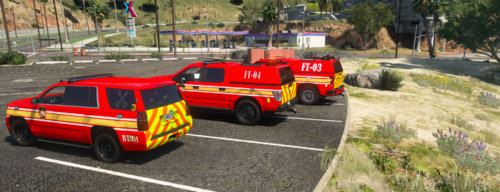 is that skin based off of Mcfrs (Montgomery County fire and rescue) in Maryland?
 -
Hi There, what I want you to do is go into your Rph settings and tick the setting to dont load any plugins on start up and please update you lspdfr! let me know what happends :D.