


Creators: Due to background reprocessing of files, approvals and file security checks may be delayed. Thanks for your patience.

medmark
Members
-
Joined
-
Last visited
Everything posted by medmark
-
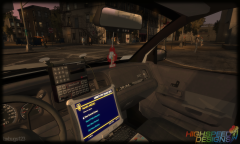 I can't tell what kind of car that is? Its got a GM onstar mirror and the dash of a Ford?
 -
Let me just whip those up for you real fast......... Just kidding. The chevy ambulance is already out here, I think Lt Caine made one you just need to re texture it. As for the Ford and the Engine, good luck finding somebody to just make those for you. Your best bet would be to buy a 3d model that is close and convert it for GTA.
-
 I would love to get my hands on this bad boy! Have always wanted to get an ambulance set up right!
 -
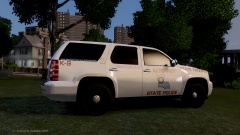 Its still available on turbosquid and I got mine on humster. The conversion is not going so well though....
 -
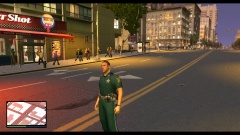 Not just interested, super interested!
 -
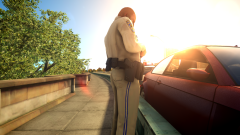 looks great, cant wait!
 -
![[WIP] Dodge Charger PPV](//s3-gallery.int-cdn.lcpdfrusercontent.com/gallery/album_2692/sml_gallery_138650_2692_357117.jpg) still needs spotlights, antennas, etc... looks good though!
still needs spotlights, antennas, etc... looks good though! -
My interpretation of the license is that you cannot share the raw files that you download directly from their site like the 3ds or max files. Once you alter the files from their original form into a zmodeler file you are good to go!
-
Made by LMS....JokerMods/Tim98 and yes, they are ridiculously sweet!
-
-
Hello All, I am very new to converting a model for GTA 4, and by very new I mean this is my first shot at taking a raw 3d file and working on getting it game ready. Here is what I am doing and please let me know if you recommend taking an alternative path. I am converting a new 2015 Chevy Tahoe PPV for GTA4. I currently have the 3d file and have it all in zmod. After watching a lot of videos on conversion I decided to import the already unlocked old Tahoe (07-14) model and copy (replace) my new Tahoe over the top to make all the collisions easier, etc... Everything is scaled correctly but the first issue I am running into is the already unlocked Tahoe only has 1 bodyshell line. How do a create a sub category to include bodyshell_L0, L1, etc...? My second question is if I have 2 parts on my new model, like front_FEND and rear_FENDE can I combine those two items into 1 (bodyshell) so I can create the hierarchy correctly? Like I said I am very new at this and if I am attacking this the wrong way please let me know. I will keep trial and erroring through this in the meantime but any guidance would be great, Thanks! I've also included a few photos. http://www.autoblog.com/2014/02/14/2015-chevrolet-tahoe-police-vehicle-chicago-2014-video/#continued A more in depth look at the new 2015 Tahoe PPV http://on.aol.com/video/2015-chevrolet-tahoe-police-pursuit-vehicle--2014-chicago-auto-show-518123161 I couldn't figure out how to embed the video so I apologize about that!
-
-
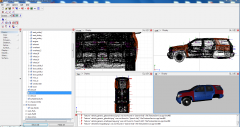
From the album: 2015 Tahoe conversion
-
-
If you like it then you should download it, just a thought!
-
Your request makes no sense?
-
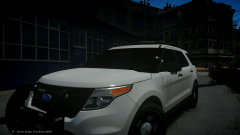 The light package on that explorer is ridic!!!
 -
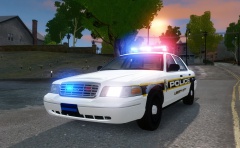 I hope you add a push pumper and spotlights!
 -
-
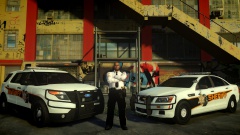 What Ped model is that? The pant stripes look good too! Just a minor critique, the driver spotlight is mounted way too high up on the A pillar, needs to be lowered down.
 -
![[REL] 2010 GMC Sierra 2500HD](//s3-gallery.int-cdn.lcpdfrusercontent.com/gallery/album_547/sml_gallery_2101_547_1646580.png) That is a 1500. 2500 HD GMC's have a totally different look
That is a 1500. 2500 HD GMC's have a totally different look -
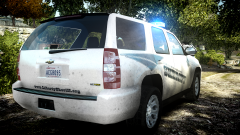 Any progress on these tahoes? They look good!
 -
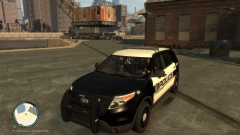 Was this ever released? I really like your explorer with the Code3 lightbar, just wish it had a push bumper, this one would really do the trick!
 -
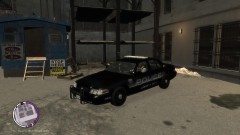 Did you ever re-release the Tomar blade cvpi?
 -
I have this same issues with TBoGT. You also need to update the ped file under TLaD, there are two separate places that have the m_y_cop ped file.

![[WIP] Dodge Charger PPV](http://s3-gallery.int-cdn.lcpdfrusercontent.com/gallery/album_2692/sml_gallery_138650_2692_357117.jpg)



![[REL] 2010 GMC Sierra 2500HD](http://s3-gallery.int-cdn.lcpdfrusercontent.com/gallery/album_547/sml_gallery_2101_547_1646580.png)
