Skip to content
View in the app

A better way to browse. Learn more.

LCPDFR.com

A full-screen app on your home screen with push notifications, badges and more.

To install this app on iOS and iPadOS
  1. Tap the Share icon in Safari
  2. Scroll the menu and tap Add to Home Screen.
  3. Tap Add in the top-right corner.
To install this app on Android
  1. Tap the 3-dot menu (⋮) in the top-right corner of the browser.
  2. Tap Add to Home screen or Install app.
  3. Confirm by tapping Install.

Jcookgrime

Members
  • Joined

  • Last visited

  1. EnlistedManatee started following Jcookgrime
  2. noahpinkerton97 started following Jcookgrime
  3. DenisCZ started following Jcookgrime
  4.    Alfie's Creations reacted to a comment on a file: DynamicWeather
  5.    GTA 5 Jedi Master reacted to a comment on a file: DynamicWeather
  6.    Trp. Keaton reacted to a comment on a file: DynamicWeather
  7.    KnightHawkOne reacted to a comment on a file: DynamicWeather
  8.    K7BSamuel reacted to a comment on a file: DynamicWeather
  9.    chinky8889 reacted to a comment on a file: DynamicWeather
  10.    Jcookgrime reacted to a file: DynamicWeather
  11. Voixd started following Jcookgrime
  12. Dylanswd3 started following Jcookgrime
    • 1,118 downloads
    • Version 1.0.0
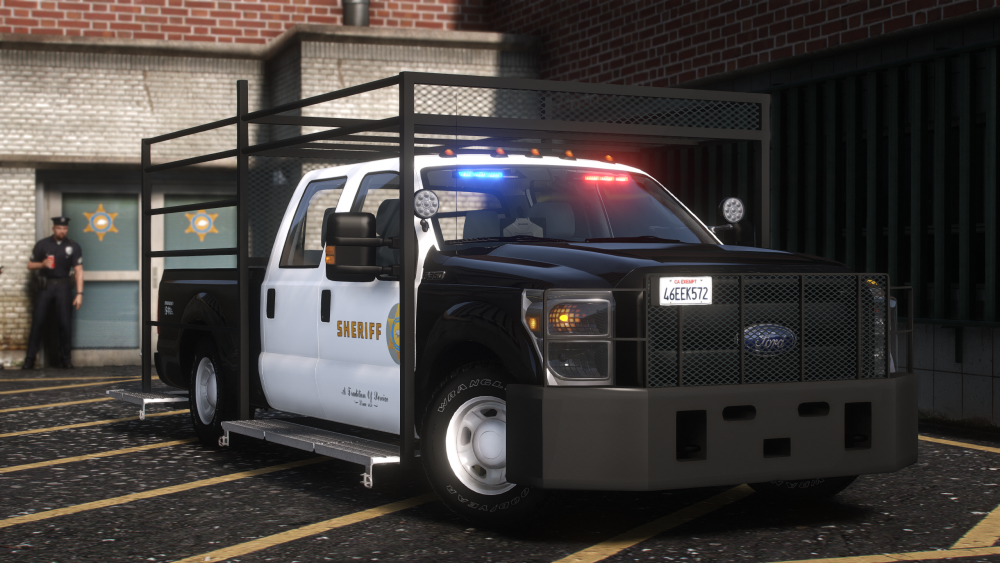
    Hybrid Lighting. Uses a skin from my San Grimedreas pack, and an edited version of a different car from same pack. The livery is not for everyone. But the template is included. Dont rip or unlock, dont claim as your own, dont reupload. Heres lighting, Its different and I enjoy. Join my discord and open a support ticket if you have issues, no need to clutter the comments if you do: https://discord.gg/MX5P999Mbn Check out my patreon as well! That link will be in the Discord.
  13. Bryson8256 started following Jcookgrime
  14. blaketalmadge9 started following Jcookgrime
  15. jadex73 started following Jcookgrime
  16. AHPD7256 started following Jcookgrime
  17. About time someone other than me is making packs these size. My current one is 137 vehicles lol. Great Job Thero.
  18.    Jcookgrime reacted to a post in a topic: Emergency Distributors Scam
  19. Thank you for having him remove the link, atleast on first file I looked at. However, there is still two concerns. First, his uploads still consist of numerous pictures in description that are completely unrelated to the upload itself. Unless you can explain to me the benefits of which it serves then I do not think they need to remain. Second, His Credits. From a dev perspective it is not ok. Let us take the most recent Camaro as an example. The first credit is "Underground." Is that for the base? Underground is a discord name, was it Vanz that converted it? Was it Sharkzilla that converted it? Where is the base from? Is it from Turbosquid? Is it from Forza? Did the convert come from a ripped version off sketchfab and converted? Who textured it? If "underground", their bases do not come with wheels, whos wheels? Who made what parts? These are incomplete credits section and doing them completely in a lazy manner like so completely spits in the face of corresponding developers.
  20. I have, and it gets marked resolved with no change. Same as the credits issue. ref: #19502
  21. Multiple people have been taken advantage of financially by this user. This site heavily influences the traffic to his website and discord based on his downloads. But as for site related. All of his posts are over 50% of the description promoting his website, discord, commissions etc. Followed by a large amount of pictures of vehicles unrelated to the actual upload In addition, every single upload contains improper credits
  22. Jcookgrime changed their profile photo
  23. Playing normally about 60 fps.
  24. You're an absolute legend. I have every ai vehicle replaced, preload set to true, a mixture of 5 graphics mods, multiple large mad mods, fr running, about 200 add-on cars with 8k liverys and gameconfig with 3x traffic. rtx2080, set the ini to 2200. No texture loss.
  25. I'd kiss myself too if I was you.
  26.    Jcookgrime reacted to a file: Whelen 295SSA1 [DEV]
  27. I see the jealousy radiating off of your post.
  28. Now we just need the Code 3 BMW lighting package.

Account

Navigation

Search

Search

Configure browser push notifications

Chrome (Android)
  1. Tap the lock icon next to the address bar.
  2. Tap Permissions → Notifications.
  3. Adjust your preference.
Chrome (Desktop)
  1. Click the padlock icon in the address bar.
  2. Select Site settings.
  3. Find Notifications and adjust your preference.