


.png.7bc5a40215517e3a1ce47fe16bea974b.png)
Siracusa
Members
-
Joined
-
Last visited
Everything posted by Siracusa
-
From the album: Flotta
-
From the album: Flotta
-
From the album: Flotta
-
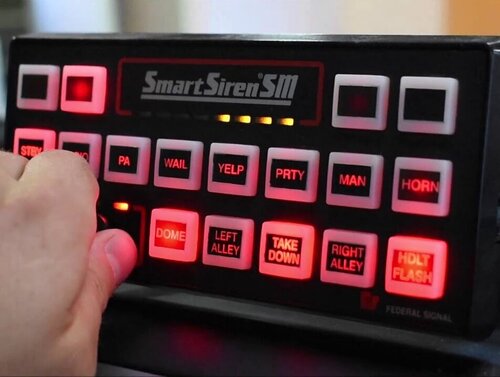 nice sounds , do you hear the reverberation ? the echo ? has long been looking for sirens with realistic reverberation
- 32 comments
- 10 reviews
-
 same thought of mine , I don't find an "illegal possession of firearm" for guns , so I use "possession of stolen firearm" or "illegal possession of automatic weapon"
- 198 comments
- 21 reviews
-
I just disappeared "pat down the ped" , that besides , never used , never seen that you get a suspect kneeling , if the animation had been "sitting on the ground" or on the bumper of the patrol car I would have used it , otherwise it's fine
-
it is the same procedure as when installing the first time , automatically just follow the steps , the most recent version will automatically overwrite the previous one , remember the scripthook if it is updated for versions 0.45 / 0.46 https://www.lcpdfr.com/lspdfr/04/install/
-
try reinstalling EUP 8.1 and LSPDFR_EUP_1.0.3 , see if openIV requires any updates , and see if you have the latest scripthookV with updated dinput8
-
 I think you wrote my original message as a quote 🙂 , when I wrote this message they did not answer me so I would not know , if you meant to tell me if this maneuver worked to get around the problem , honestly the new update of GTA two week old automatically "cleaned" my meta from the mod , and I mean stay like this
- 124 comments
- 7 reviews
-
yes , it does not overwrite anything , you can do it either manually , or automatically , once downloaded you have the two choices inside the file 0.46
-
on reporting the crime , in shots fired , and I also believe in "obstruction", I also insist as the friend above , actually it is something that often happens , fortunately in the "grand theft auto" and "escape" it still works , it is just strange indeed , for now I get around the problem by calling the back up , and I wait for Ai , even if the suspect runs away and does not appear on the map
-
I think the beauty of lspdfr is also in this , creating your own fleet , if you get tired of a vehicle or if you prefer another model , go to the blogs on mods5 or in lspdfr and download and install the vehicle that you are interested , or just change the textures , look for the cruiser with the lightbar you prefer , if you do not like the textures , you go to change the textures , the real problem is that , every 4 months about rockstar an update comes out , and brings us I mess up here , but the speed of the lspdfr developers , the changes of the rages and the various scripts react quickly to fix everything , the mods made here , to make the game more and more a simulator , is phenomenal , congratulations to you
-
and yes , I have always noticed this , ok , tomorrow I install the new updated Beiolijo mods , so playing I see if the error where I sometimes cannot report a crime with the right rumbler was only a problem of the 0.45 update , sorry for my english
-
would you suggest me to disable "cop holster" ? Other thing , sometimes with "thumble rumbler right" I can't report a crime , I use the joypad because faster in execution , Bejolio has updated the most functional main mods , do you suggest me to install "ultimate backup" ? Or use that of the vanilla of the new update ? I find Beiolio mods extremely useful and functional , and realistic , happy holidays
-
I'm waiting for compulite updates (actually updated it yesterday but once installed it gives me as if it were not) , stop the ped and ultimate backup , at this point, if the new backup of lspdfr seems more functional , almost I would almost avoid backing up Beljio , but is there the possibility of roadblocks and spike strips during chases ? as in Beljio's ultimate back up ? uhm you just have to try
-
all right brother , then I replaced the x64 , the mods folder was wrong , thanks for your interest and answers , good week end
-
could you help me please ? I think I have the same problem , maybe it's the same as the boy above , where do i get the crash report? you have to download it from mods5
-
if you use "stop the ped ", " ultimate backup" or "compulite" , know that Beljio has updated his mods for the latest version , maybe that's it , you can't find them on lspdfr, but on google https://bejoijo256.wixsite.com/bejoijo
-
same thing happens to me , I don't know , I wait for the last minor update of lspdfr , if it persists I reinstall a new mods folder and overwrite all , it has been a week and more that they say that the update of lspdfr will be released shortly , I don't know what they mean by short, because it is going a lot time by fatal do you mean the phrase "... damaged game files ..." ? to me this comes out as fatal but not in the loading of the rage plugin hook , immediately afterwards , the anger loads me well and if I remove dinput8 it makes me start playing , but without eup , vehicles and who knows what else
-
brother to me always crashes , installed now the new openIV , tried to launch it , and crashes in the loading screen , "damaged files", remove dinput8 and start the game , then either fix scripthookV or maybe the new lspdfr update will fix it , start the game without dinput8 gave me the usual problem of missing eup and cars , only vanilla
-
@UnknownBastion is it better to wait for the new lspdfr ? I have many keys to change and adapt , useless that I start working on it now, maybe tomorrow the new lspdfr comes out and the keys files are written to me again ? also because the cars of the vanilla still pop up , while in the dlc I installed the custom cars , this problem from what it is derived ? the new updates have overwritten the modified vehicles_meta , before resetting them better wait and see if they fix everything ?
-
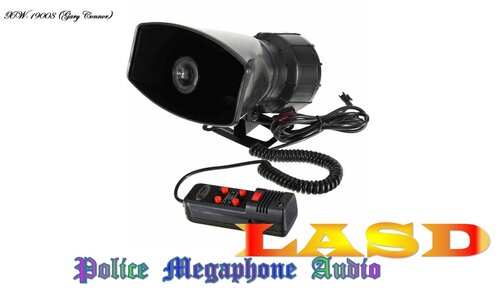 great work i like this , fantastic , but nothing female voice ? do you thing add in future ? also in LAPD megaphone ? I use female cop , and i dont download this mod , in this mod are only man cop voice ?
 -
ma gli eup sono oiv, e nella trama di lspdfr_eup si dice chiaro di installare "regioni divise caratteri ect" nella cartella di dati lspdfr ... non puoi semplicemente installare l'eup nella cartella mods, è un problema derivante dal malfunzionamento di il nuovo scripthookV, (io think ) my asi manager is blue , not installed , if i install it , it also installs dinput8 in the gta folder , and the game crashes in the loading screen , saying "corrupted files" ect in another forum , I read that the openIV developers are aware of this error , and they are fixing it , so maybe the problem is also in openIV
-
I could not tell you , I have similar problems , we are there , in these days of kaos aspect that put lspdfr updated , for sure something that is not there is , all I'm kaos to add a robbery in rockstar online gta , to me the uniforms not loaded , I tried with oiv 8.1 and lspdfr_eup1.0.3 , without dinput8 , I enter the game and I find strange accessories on me , parachute ect , no eup , if I try with dinput8 I crash at the beginning , bha
-
the funny thing is , that once removed dinput8 , letting the eup speech go , I go to openIV , and it tells me to install asi manager , if I do it I will reinstall dinput8 automatically and we are there , crashing , if I remove dinput8 the game is not anymore the same , I wait for them to download the new lspdfr , I see if everything works together , if not they have to re-set scripthookV , or at least dinput8
.thumb.png.21ec19f782a284cfcfbb53606e84e5ac.png)

