Yard1
Friends of LSPDFR
-
Joined
-
Last visited
Everything posted by Yard1
-
-
-
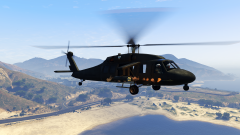 As you can see, yes. You can switch through them just like on the Buzzard.
 -
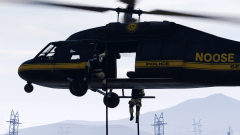 It works :D Also removed the weapons.
 -
-
-
Annihilator Force Assault Penetrator (FAP) with Cerberus rocket pods. Something small I always wanted to make :)
-
-
Both Buffaloes are out! Go grab them while they are hot! Now working on: Ambulance! Also, would somebody be interested in a civilian Stanier 2nd gen and Interceptor (Torero :) ) that don't suck big time?
-
-
-
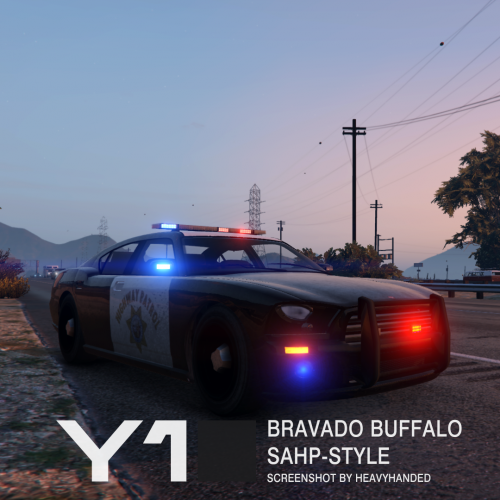 This is a Bravado Buffalo 1st gen (police2) mapped to support liveries and a lighting setup similar (it's not exactly the same due to game limitations and my personal preferences) to the one used by California Highway Patrol, with a custom made LED lightbar (made out of default parts) inspired by Whelen Liberty. To simplify installation this mod requires you to install Netman's SAHP Added cars (https://www.gta5-mods.com/vehicles/sahp-added-cars , also found in Law Enforcement Improvements), and replace his Buffalo (hwaycar) with mine. Included in the archive are 4 High Quality (4096x4096) and 4 Standard Quality (2048x2048) skins and PSD files with editable unit number layers for both High Quality (4096x4096) and Standard Quality (2048x2048) allowing you to make additional unit numbers, should you wish to do so. The glass works perfectly. -------------------------------------- Installation: IT'S VERY IMPORTANT THAT YOU FOLLOW THE INSTRUCTIONS CAREFULLY. MAKE BACKUPS! First, install Netman's SAHP Added cars ( https://www.gta5-mods.com/vehicles/sahp-added-cars ), using the instructions found there. Then: Install with OpenIV: Files from "Models and textures" folder to update\x64\dlcpacks\mpchristmas2\dlc.rpf\x64\levels\gta5\vehicles\xmas2vehicles.rpf -------------------------------------- This download is exclusive to LCPDFR.com and GTA5-mods. Feel free to edit the file, just make sure to credit me. However, don't re-upload if you have not changed anything. Model by Rockstar Games, mirror lights by Netman, UV-Map, template, lightbar, assembly and skins by Yard1. Screenshots by HeavyHanded.
- 16 comments
- 3 reviews
-
-

- 1
-
-
 Use the guide there: http://www.lcpdfr.com/forums/topic/50909-adding-a-new-emergency-vehicle-is-possible-now/ Just change the model name and use these settings: <lightSettings value="0" /> <sirenSettings value="0" />
- 21 comments
- 2 reviews
-
-
- 1
-
-
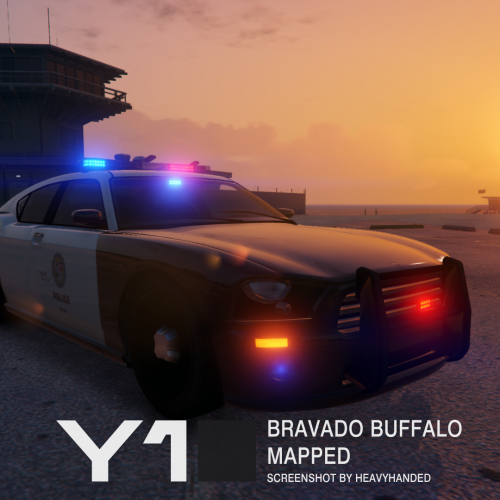 This is a Bravado Buffalo 1st gen (police2) mapped to support liveries and a lighting setup identical as on the default model. The lightbar is set as an extra. meaning that the car may spawn in a slicktop configuration. If you don't wish for it to spawn without the lightbar, add FLAG_EXTRAS_REQUIRE to the vehicle's flag in vehicles.meta (in update.rpf). Included in the archive are 8 High Quality (4096x4096) and 8 Standard Quality (2048x2048) - 4 LSPD and 4 LSSD skins and PSD files with editable unit number layers for both High Quality (4096x4096) and Standard Quality (2048x2048) allowing you to make additional unit numbers, should you wish to do so. The glass works perfectly. -------------------------------------- Installation: IT'S VERY IMPORTANT THAT YOU FOLLOW THE INSTRUCTIONS CAREFULLY. MAKE BACKUPS! Install with OpenIV: Files from "Models and textures" folder to update\x64\dlcpacks\patchday3ng\dlc.rpf\x64\levels\gta5\vehicles.rpf Optional: To prevent the lightbar from falling off the car during car crashes, add FLAG_EXTRAS_STRONG to the vehicle's flag in vehicles.meta (in update.rpf). -------------------------------------- This download is exclusive to LCPDFR.com and GTA5-mods. Feel free to edit the file, just make sure to credit me. However, don't re-upload if you have not changed anything. Model by Rockstar Games, UV-Map, template, lightbar, assembly and skins by Yard1. Screenshots by HeavyHanded.
- 19 comments
- 5 reviews
-
-
- 7
-
-
-
 We all have our preferences :)
 -
http://i.imgur.com/VoNHSGl.jpg
-
Give me a couple minutes.
-
Oh, she's LSPD's newest recruit :D
-
-
Snapped a photo during a walk on #hawickave. Never seen one before! #lspd #alta #lossantos #ls #vinewood
-
-
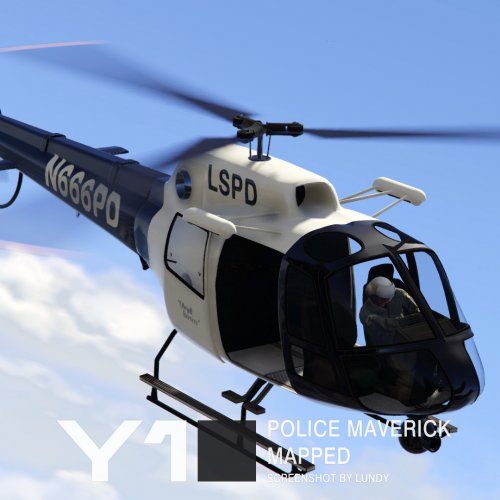
This is a Police Maverick (polmav) UV-mapped to support liveries. No other changes have been made to the model. Included in the archive are 3 High Quality (4096x4096) and 4 Standard Quality (2048x2048) skins - LSPD, LSSD, SAHP and default Air Ambulance (only Standard Quality). The glass works perfectly. -------------------------------------- Installation: IT'S VERY IMPORTANT THAT YOU FOLLOW THE INSTRUCTIONS CAREFULLY. MAKE BACKUPS! Install with OpenIV: Files from "Models and textures" folder to update\x64\dlcpacks\patchday4ng\dlc.rpf\x64\levels\gta5\vehicles.rpf If you use my LSSD Maverick Mod or Realism Dispatch Enhanced, you can use the files from "Additional presets" folder to replace the relevant files from those mods. -------------------------------------- This download is exclusive to LCPDFR.com and GTA5-mods. Feel free to edit the file, just make sure to credit me. However, don't re-upload if you have not changed anything. Model by Rockstar Games, UV-Map, template and skins by Yard1
- 21 comments
- 2 reviews
-
-
-

- 13
-