


sssneaky
Members
-
Joined
-
Last visited
Everything posted by sssneaky
-
-
-
-
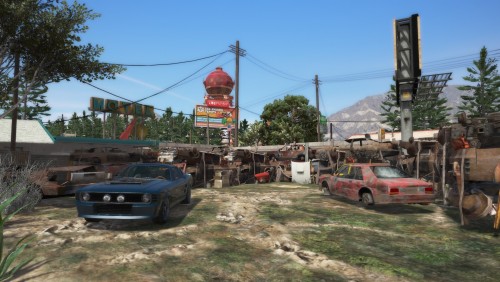 This mod makes Route68 so nice to patrol through. One of the first things that happened when I was playing was I had a pursuit through the small town on the road and he got spiked by another officer, crashed into the construction bollards and I proceeded to arrest him while the beautiful trees etc were in the background. It just adds such a nice level of immersion. I combine it with Forests of Chilliad and it just makes the game so much more playable in the northern regions. I'd rate this 10/5 if I could.
- 20 comments
- 2 reviews
-
-

- 1
-
-
You can get ahead of a car you're in pursuit with or when they go into an area that is a dead end they will end up coming back through the entrance and you can own there tires with a strip. Try it out. Very satisfying when you do it right!
-
SpikeStrips is for you to place. UB spike strips are when you're in pursuit you can call other officers to place them ahead on the roads.
-
 I haven't gotten around to testing or playing with these callouts but the fact you're updating so often is great man. Keep up the great work mate.
- 174 comments
- 13 reviews
-
-
- 1
-
-
This is cool af.
-
As someone who lives in WA I say: Fuck yeah.
-
StopThePed + Interaction+ bro Let me know either here or via PM if you need any help with the installation process of this build.
-
I think he means it didn't help. Not sure though.
-
Better Advanced Meta for damage. LSPDFR Comes Alive you can tweak so ambient events happen even less via the .ini.
-
I've seen it happen once. It's incredibly rare it seems.
-
rofl, if only!
-
Oh I've never noticed that. You can disable all controller controls for LSPDFR main. So it must be a plugin doing it? What plugins do you use bro?
-
ez
-
No idea honestly. I let the mod makers do there magic and I test and enjoy the results. Ask the boys from EUP or the guys who made the EUP Jurisdictions+.
-
Try this. Just change the <handlingId></handlingId> line in vehicles.meta for policeb in mods\update\update.rpf\common\data\levels\gta5 with fiveM. I haven't tried this but it should work fine. I think. Do this after adding the replacement policeb in ya patchday folder obviously.
-
Just only apply the mods that aren't bumpers etc.....
-
Added after testing Traffic+. Formatted a bit. Added my EUP custom uniforms wardrobe.ini for other people to use if they please.
-
Everything is working perfectly. 5 callouts, 2 traffic stops in the Route 68 area. I don't notice any FPS loss and I'm at night time with rain going. Map works perfect as well.
-
I'm back! Time to test out a couple new mods. Just did testing on the build seems good with everything updated. Haven't properly tested Interaction+ yet but the author seems to know what's up and is updating it almost daily now so I'm confident that it's fine. Testing out the amazing mod Route 68 Remastered right now in combination with the Forests and City lights YMAPs. Going to look so good if it's all working together. Also added into testing a Road Map by a guy named DLK. Don't know how I didn't see those files earlier and I was looking for a street name map for ages..
-
Use a trainer like TrainerV and you can remove all those things or just don't press apply all.... 🤔 How do you not get how addon and replacement cars aren't the same as default lol..
-
You installed LSPDFR incorrectly
-
Check out my thread and look at the radiance spoiler try that.


