




Caesar
Members
-
Joined
-
Last visited
Everything posted by Caesar
-
-
This is in the wrong section dude. But anyways. Here are a few things. Number 1 Problem: Third-party modifications can hamper your game experience and cause issues with the GTA engine. This is almost always not caused by LCPDFR itself. Solution: Remove car modifications with a high polygon (poly) count. These are not handled gracefully by the game engine and these modifications can sometimes have 10x the polygons of original unmodded vehicles! Other modifications cause crashing, most usually the ELS modification, which works by constantly changing a vehicle's parts! Most people assume LCPDFR is causing their issues because they install car mods, ELS and then LCPDFR last. Number 2 Make sure you aren't using a crack - We don't support cracks Update GTA IV to 1.0.7.0 (the latest version of the game, or 1.1.2.0 for EFLC) - This sometimes fixes a wide variety of issues Make sure that you run the game as an administrator. Make sure that your GTA IV root folder (and every subdirectory) is not set to "read-only" Ensure that FirstResponse.net.dll is in the SCRIPTS folder and that AdvancedHook.dll is in the GTA IV ROOT folder. Ensure that ScriptHook.dll, ScriptHookDotNet.asi and Dsound.dll OR Xlive.dll are in the GTA IV ROOT folder Ensure that there is a folder titled 'LCPDFR' in the SCRIPTS folder. Check that all the above files exist, if they do not, reinstall LCPDFR with the automatic installation. Ensure that you are using up to date versions of every LCPDFR dependency and LCPDFR itself. Install these: http://www.microsoft...9f-b21f31ab88b7, http://www.microsoft...&displaylang=en Run a diagnostic report (found here: http://www.lcpdfr.co...agnostics-tool/) which will point any errors it can find and will be used later on if you need to post a topic.
-
Pictures...would be amazing.
-
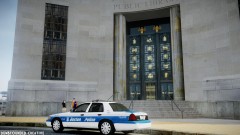
![[WIP] Liberty City Police CVPi](//s3-gallery.int-cdn.lcpdfrusercontent.com/gallery/album_1328/sml_gallery_3938_1328_22084.jpg)
From the album: RobertB's WIPS
WIP. -
Why are you asking?
-
Orange Park Police Department (Florida) - My Local department Florida Highway Patrol (Florida) Orange County Sheriffs (Florida) LAPD (California) NYPD (New York) Alaska State Troopers (Alaska)
-
There is already drug calls...and shootouts...(if thats what you mean).
-
You need to add the CVPI textures, and if you havent already, vehshare files too.
-
You edited the emerglights wrong..and..you may wanna change the rambar...
-
No
-
I only just found it.
-
 Perfectly normal.
 -
This. Is. Astonishing. The driver was killed, but amazingly his 5-year-old son was unharmed. http://www.youtube.com/watch?v=yNwwGysefvU
-
Thats not ELS-H. It would say if it was.
-
Sir. You. Are quite sexy.
-
-
-
Get over a fever.
-
-
-
This car was requested by a friend. - NAME: 2010 Impala "Loveland Police Department" - VERSION: V1 - OPTIMIZED FOR: Police2 - MOD STATUS: Closed - Multiple Liveries: No Credits: - Model is original Chevrolet Impala From Driver SF, modified for and converted to GTAIV by Bxbugs123 - converted in to a Police vehicle by Bxbugs123 - Seats By Bxbugs123 - rims by Schaefft - original 911EP galaxy by Boatinman, converted to gta iv by WarDoG and other few edits by WarDoG, edited by RobertB -Go Rhino Pushbar made & converted by Bxbugs123 -Main textures made by Bxbugs123 -Unity Spotlight Modeled & converted for GTA IV by Bxbugs123 -Main textures made by Bxbugs123 -Setina The Bodyguard Partition by Bxbugs123 -Shotgun by Grim -Rockwell Collins Laptop Made & Converted by Bxbugs123 -Textures By Bxbugs123 & DoTTGaMMa -Skin by Jetski343 Screenshots by Carrythxd Files Included: -police2.wft -police2.wtd -readme.text -Screenshots UPLOADING AND OR EDITING THIS FILE WITHOUT PERMISSION IS FORBIDDEN! YOU MAY EDIT TEXTURES FOR PERSONAL USE!
- 18 comments
- 10 reviews
-
-
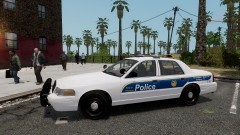 Nice job Buggs :)
 -
-
I like that...Nice one Chris Anyone else have suggestions?


![[WIP] Liberty City Police CVPi](http://s3-gallery.int-cdn.lcpdfrusercontent.com/gallery/album_1328/sml_gallery_3938_1328_22084.jpg)
