Toby S.
Members
-
Joined
-
Last visited
Everything posted by Toby S.
-
 Why do I lose so much FPS when running your plugins or any LSPDRFR plugin it seems? With LSPDFR running and not on duty, I get 50-60 FPS, soon as I go on duty with your plugins, along with Ultimate backup and 2 callout packs, I go to 23 fps max and get freezing/stuttering.
- 1,178 comments
- 137 reviews
-
 How do you get the different colors/liveries? There are no livery options and changing the color does nothing for me.
- 19 comments
- 3 reviews
-
-
.thumb.jpg.182dedb1a55dea252c1853d35d4d1e3c.jpg) Why isn't this updated on lcpdfr? M-U is a huge hassle to even GET the mod...
Why isn't this updated on lcpdfr? M-U is a huge hassle to even GET the mod...- 256 comments
- 29 reviews
-
-

- 1
-
-
-
 Wonderful mod! Think you'll ever do a CHP lighting setup on this? I have yet to find a newer model tahoe with CHP lighting.
- 7 comments
- 3 reviews
-
 Yeah I figured it wasn't neccesary. Still a bit of a bummer although :\. AMAZING interior I love the display for the light patterns(idk the real name xD)!
- 38 comments
- 14 reviews
-
 Notice a glitch on the slicktop. When you're far away, you see floating lights where the lightbar would've been. And the roof lights up as if it has a lightbar on it at night. Other than that amazing mod!
- 85 comments
- 36 reviews
-
-
- 1
-
-
Whenever I replace the Vehicle meta my game crashes on startup. I'm positive it's this because as soon as I put the normal meta file in my game and use just the charger without the meta replacement, my game loads fine and lets me spawn the charger. Any ideas to why this happens?
- 38 comments
- 14 reviews
-
 Tried installing it, just made all police lights super dim. running NVR 3.0 and latest VisualV. Does ENB 0.387 conflict with it?
- 67 comments
- 10 reviews
-
 Amazing! Love your 2011 vic as well. Any plans for CHP Explorer, Tahoe, F350?
- 325 comments
- 53 reviews
-
-
- 1
-
-
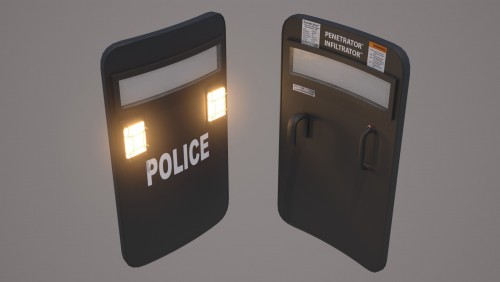 How do I uninstall this? Not having very much luck with it and would rather use the normal shield until this is further developed.
- 36 comments
- 3 reviews
-
-
- 1
-
-
 All the other vehicles work perfect. Just the vic. Also, noticed the Caprice gets dirty very fast and the rear windshield turns opaque.
- 253 comments
- 53 reviews
-
Anybody else having problems with the vics lights? They never work no matter what I try. Reinstalled the pack twice to see if the vcf was just messed up during the download but nothing...
- 253 comments
- 53 reviews
-
-
- 1
-
-
-
-
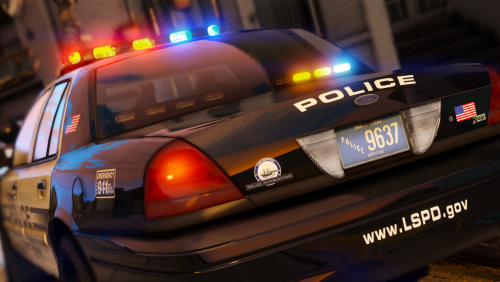 The extra braces on the wrap around for the ram bar, i believe it's extra 12, don't stay. If I try to put them on, they just immediately go away. Is this known and is there a fix if so?
- 32 comments
- 34 reviews
-
 Gotta say I love this mod, own a 06 retired NCHP CVPI, sound nice. Just WAYYYYYYYYYYY too quiet. You gotta remember man, that's the same engine from the Fox Body mustangs! It just has different exhaust and mufflers. Give it some roar!
- 49 comments
- 3 reviews
-
 Whenever I try to change a texture on, say the FIB jacket so it's DOA or something, my EUP menu crashes. Is there something I'm doing wrong?
- 2,349 comments
- 238 reviews
-
-
-
Yup, figured it out, works for me. Thanks! Just a few questions if anybody has answers. How do I change the vehicle liveries? I checked the livery mod menu in Simple Trainer and there are none.
- 253 comments
- 53 reviews
-
If I just rename the files, will they work as replacements? Sorry, to bother with dumb questions.
- 253 comments
- 53 reviews
-
Followed the instructions on this page and my game crashes before it loads me into the game. Are the instructions on this page all that's needed to ensure the vehicles work?
- 253 comments
- 53 reviews
.thumb.jpg.182dedb1a55dea252c1853d35d4d1e3c.jpg)