




UnknownBastion
Community Team
-
Joined
-
Last visited
Everything posted by UnknownBastion
-
Hello, A replace vehicle is anything that takes the place of a base vehicle (i.e. POLICE, POLICE2, POLICE3, POLICE4, SHERIFF, SHERIFF2). To do a replace, just make sure the file names for those are the same as the base vehicle, same for the ELS files too. Then you can replace them here: mods\update\x64\dlcpacks\patchday22\dlc.rpf\x64\levels\gta5\vehicles.rpf Remember that you can only replace 4 PD vehicles (3 with lightbar, 1 slicktop) and 2 sheriff vehicles. If you want more, you will need to make dlcpacks for them. Hope This Helps! 🙂
-
No problem!
-
Hello, I believe with Cop Holster, you can press caps lock to put your hand on your gun. Hope This Helps! 🙂
-
Alrighty!
-
Welcome to the LSPDFR Support Forums! Hope you enjoy your stay! As mentioned, check out the Support Subforums if you have any questions. 🙂 I mean....I did the same thing as well. xD
-
I'm just passing on the information that I am given. Although, kinda figured something like this would be said. I tried looking into the document that can be found on his Discord, but there wasn't much more in regards to the question asked.
-
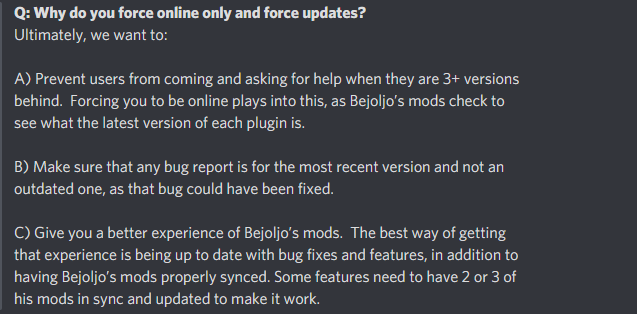
Below is a snippet from the official statement that came from BejoIjo's Server. Hope this clarifies some stuff! 🙂
-
That's unfortunate that you see it that way. I was merely pointing out some discrepancies in what Criminal Justice said and provide some insight into what his issue might be rather than just blame LSPDFR outright. I've seen people do it before, and it has gotten to the point of really annoying me. Apologies Sam. My goal here was to only inform. Not to be malicious in any way.
-
Im pretty sure he meant us. You were fine. 🙂
-
You got it dude! 🙂
-
I think I have been rather nice. I stuck to factual points, never made a single personal attack, and only made suggestions as to what you might want to try before blaming LSPDFR itself. But sure, you can call me rude. I could care less either way. I hope you have a good day. 🙂
-
This.
-
Except that still wont fix the issue of him crashing even without RPH.
-
That isn't an LSPDFR issue, that sounds like a mods folder issue. Remove whatever you added to it recently and try again.
-
Does it crash when you launch without RPH? That's what I am saying. The update checker that comes with his stuff makes it so it cant be used. Remove it, and you should be fine. It's also good practice to see if a Plugin might be causing the issue first. Before you expand to other issues. Asking stuff like: Is the game crashing when launched normally? Does removing ScriptHookV solve the issue? Does removing all the Plugins except LSPDFR solve the issue?
-
Maybe because a majority of the people use Bejo's Plugins.
-
Define: "Broke my game". If RPH is crashing, make sure you have removed all of BejoIjo's stuff, as it has an update checker.
-
I mean...if the Plugins that a user is using is outdated, then you should. Because it can cause stability issues. That is how Bejo's mods act when LSPDFR is updated, due to the version checker. Heck, some mods that still use 0.3b are completely unstable and should not be used in the slightest with the new LSPDFR version. It honestly should. It's a very important path to consider when troubleshooting a users issues. Subtle flex but okay. Still doesn't subtract from the point that I made that the new version of LSPDFR is most likely not the cause of the crash and that you didn't even bother to test your Plugins.
-
Sounds like you didn't try everything. You could have just removed everything from Plugins except LSPDFR and see if it launched. If it did, then the issue was one of the Plugins. In this case, most likely Bejo's.
-
Honestly, Im not sure how to get those errors to go away. The only solutions I know are what I gave above.
-
I agree. I've said this before and I will say it again, you can't blame LSPDFR for the decisions of Third Party Creators! It's such a shame that some people can't see that.
-
Hello, Try adding this to the lspdfr.ini: Ambient.DisableAmbientGameCopSpawnBlock = true Thanks! 🙂
-
No. It will only replace the base LSPDFR files. You should only need to replace the dll, unless there were other files that got updated. 🙂
-
I would love to see this, and it's something I brought up with Bejo's Community Manager. I know that a majority of the population would love to see it, it most likely won't happen, because it is ultimately up to Bejo. Hopefully there will be a way to solve the version checker issue. In my opinion, I really don't mind it because I play other games while I wait, but I know some die-hard LSPDFR fans just can't wait for the updates, and it can cause them a major inconvenience.
-
Hello! First off, welcome to the LSPDFR Official Forum! Here are a couple of quick fixes for the issue you are having: 1. Make sure you have ScriptHookV installed. 2. Make sure you have AdvancedHook installed. 3. Make sure you have the OpenIV.asi and ASI Loader installed through ASI Manager. 4. Make sure you installed the ELS files to ELS/pack_default. 5. Make sure the XML file names match the vehicle file that they correspond to. Hope This Helps! 🙂


