




KiliHD
Members
-
Joined
Everything posted by KiliHD
-
 IGNORE MY COMMENT - ITS FIXED WITH YOUR NEW VERSION! SORRY. Sadly it always crashes my game, no matter what i do and always on the start up of LSPD when going on duty or loading into the game. First error (might have been because i did not have Grammar Police installed: Second error message after research and doing things differently: I dont know if the error is because i do something wrong, but i would not know what to do differently.
- 109 comments
- 12 reviews
-
 Cool and good new Callouts! I really need to try the snowball fight one time. 😄 But could you add something so i dont need to arrest people at the illegal protest because they wont leave otherwise.
 -
-
 Game Version 0.9.5 HOTFIX - LSPDFR Crash more then once when being in and out of an emergency [1/7/2021 4:16:40 PM.197] LSPD First Response: [FATAL] Forced termination [1/7/2021 4:16:40 PM.197] LSPD First Response: [TRACE] Released 8 entities from DefaultContentManager [1/7/2021 4:16:41 PM.567] LSPD First Response: [INFO] LSPDFR has shut down [1/7/2021 4:16:42 PM.578] LSPD First Response: [AmbientAICallouts] [AmbientResponse] ERROR: System.Threading.ThreadAbortException: Der Thread wurde abgebrochen. [1/7/2021 4:16:42 PM.579] at Rage.GameFiber.SleepThis(Int32 duration) [1/7/2021 4:16:42 PM.579] at Rage.GameFiber.Sleep(Int32 duration) [1/7/2021 4:16:42 PM.579] at AmbientAICallouts.Main.<>c.<Load_AmbientResponse>b__31_0() in D:\#UserData\Dokumente 2 - TB\Development\Visual Studio\Repos\AmbientAICallouts\src\AmbientAICallouts\Main.cs:line 152 [1/7/2021 4:16:42 PM.698] LSPD First Response: All signs removed [1/7/2021 4:16:42 PM.950] LSPD First Response: [AmbientAICallouts] [Fiber 83] ERROR: in AICallout object: At Process(): System.Threading.ThreadAbortException: Der Thread wurde abgebrochen. [1/7/2021 4:16:42 PM.950] at Rage.GameFiber.SleepThis(Int32 duration) [1/7/2021 4:16:42 PM.950] at Rage.GameFiber.Sleep(Int32 duration) [1/7/2021 4:16:42 PM.950] at EmergencyCall.EmergencyCall.OfficersAproach() in D:\#UserData\Dokumente 2 - TB\Development\Visual Studio\Repos\AmbientAICallouts\src\Default-AiCallouts-Pack\EmergencyCall\EmergencyCall.cs:line 151 [1/7/2021 4:16:42 PM.950] at EmergencyCall.EmergencyCall.Process() in D:\#UserData\Dokumente 2 - TB\Development\Visual Studio\Repos\AmbientAICallouts\src\Default-AiCallouts-Pack\EmergencyCall\EmergencyCall.cs:line 70 [1/7/2021 4:16:42 PM.951] LSPD First Response: [AmbientAICallouts] [Fiber 83] ERROR: in AiCallout: System.Threading.ThreadAbortException: Der Thread wurde abgebrochen. [1/7/2021 4:16:42 PM.951] at EmergencyCall.EmergencyCall.Process() in D:\#UserData\Dokumente 2 - TB\Development\Visual Studio\Repos\AmbientAICallouts\src\Default-AiCallouts-Pack\EmergencyCall\EmergencyCall.cs:line 125 [1/7/2021 4:16:42 PM.951] at AmbientAICallouts.AiCalloutManager.ProcessEmergencyLocation() in D:\#UserData\Dokumente 2 - TB\Development\Visual Studio\Repos\AmbientAICallouts\src\AmbientAICallouts\AiCalloutManager.cs:line 357 [1/7/2021 4:16:42 PM.951] LSPD First Response: [AmbientAICallouts] [Fiber 83] INFO: Aborting Code [1/7/2021 4:16:42 PM.954] LSPD First Response: [AmbientAICallouts] [Fiber 83] ERROR: could not handle vehicle: System.Threading.ThreadAbortException: Der Thread wurde abgebrochen. [1/7/2021 4:16:42 PM.954] at AmbientAICallouts.AiCalloutManager.ProcessEmergencyLocation() in D:\#UserData\Dokumente 2 - TB\Development\Visual Studio\Repos\AmbientAICallouts\src\AmbientAICallouts\AiCalloutManager.cs:line 372 [1/7/2021 4:16:42 PM.954] at AmbientAICallouts.AiCalloutManager.UnitResponds() in D:\#UserData\Dokumente 2 - TB\Development\Visual Studio\Repos\AmbientAICallouts\src\AmbientAICallouts\AiCalloutManager.cs:line 337 [1/7/2021 4:16:42 PM.955] LSPD First Response: [AmbientAICallouts] [Fiber 83] ERROR: in AICalloutManager object: System.Threading.ThreadAbortException: Der Thread wurde abgebrochen. [1/7/2021 4:16:42 PM.955] at AmbientAICallouts.AiCalloutManager.UnitResponds() in D:\#UserData\Dokumente 2 - TB\Development\Visual Studio\Repos\AmbientAICallouts\src\AmbientAICallouts\AiCalloutManager.cs:line 341 [1/7/2021 4:16:42 PM.955] at AmbientAICallouts.AiCalloutManager.SetupAiCalloutManager() in D:\#UserData\Dokumente 2 - TB\Development\Visual Studio\Repos\AmbientAICallouts\src\AmbientAICallouts\AiCalloutManager.cs:line 261 [1/7/2021 4:16:42 PM.956] at AmbientAICallouts.AiCalloutManager.<>c__DisplayClass22_0.<.ctor>b__0() in D:\#UserData\Dokumente 2 - TB\Development\Visual Studio\Repos\AmbientAICallouts\src\AmbientAICallouts\AiCalloutManager.cs:line 126
- 346 comments
- 43 reviews
-
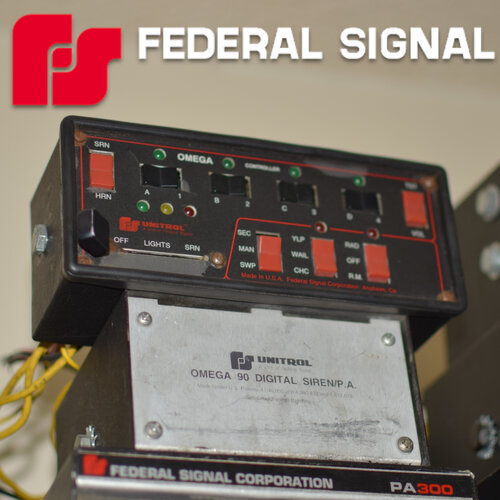 High Quality sirens. Perfect to use with ELS. Easy to install. Good for people who like high pitch sirens and complete different sirens type. Thanks!
- 36 comments
- 7 reviews
-
-

- 1
-
-
 Because of the comments i wont try this out. But if there would be an update i would love to download it instantly.
- 204 comments
- 22 reviews
-
Hey Albo1125. Youre huge work made myself and other very happy. Thanks for being active for so long and bringing beautiful mods into the gta5 modding community!
-
-
 Thanks a lot, i like those Cars! There so beautiful. Thanks for posting it ❤️
- 283 comments
- 95 reviews
-
-
 Awesome, i like it! 🙂 I will add you soon to my list on www.kilihd.de/gta5lspdfrguide.html ! 😎 Keep up this great work and ... Thanks!
- 779 comments
- 187 reviews




