


Jetty Bot
Members
-
Joined
-
Last visited
Everything posted by Jetty Bot
-
Grammar police can be notoriously finicky Does Grammar Police give you any messages about the Speech Engine? Are you holding down right alt while you're talking? Can you upload a RagePluginHook.log so I can take a look please?

-
If this is the callout you installed: It seems to be pretty outdated so I wouldn't recommend using it with the newest release of LSDFR But if you want to upload your RagePluginHook.log I can take a look and see if it's what's crashing LSPDFR or if it's something else.

-
Can you upload your asiloader.log and els.log please?
-
It sounds like you're trying to install an addon pack I would double check a few things and make sure they're all in the right location First in OpenIV I would go to mods\update\x64\dlcpacks and make sure that the folder that came with the vehicle pack is located there. It should be a folder with a dlc.rpf inside of it named something like sheriffpack (or whatever the pack is named, this changes between packs) Second I would go to mods\update\update.rpf\common\data and open up the dlclist.xml There should be a line in that file that looks something like this: <Item>dlcpacks:/sheriffpack/</Item> I'm using the placeholder name of sheriffpack for simplicity but the named in between those / should match the name of the folder that you just looked at in the dlcpacks
-
So some things I would double check: Go into the plugins folder and open up the CopHolster.xml and make sure EnableHolsterAnimations is true I would also make sure that the plugin is getting loaded in game. Either by setting it to auto load with Rage or by manually loading it once you're in game.
-
This could be a long shot but I would try two things In OpenIV I would go to mods/update/update.rpf/common/data and open up the visualsettings.dat In the visualsettings file use Control+F to search for car.deafultlight.day.emissive.on and make sure that, that and the car.deafultlight.night.emissive.on both have values above 0 If they are (which they really should be after installing NVE) I would try going in game and setting your PostFX and Shader qualities to High or better and see if you have any lights
-
No that is not allowed What I would try is deleting the old files before you add the new ones
-
I would recommend you do a full reinstall of LPSDFR and not just the pdb and dll According to your log you are running/previously had a very old version of LSPDFR installed so it would be best to make sure you have all the changes that have been made since you first installed LSPDFR
-
After you add those files you will need to rename the mods folder from _mods back to mods to enable it and test to see if it worked.
-
If you are curious about how to make a replacement vehicle into an addon vehicle I would take a look at Albo's Modding DLC. It's probably going to be the easiest way to learn how to convert them and he has Youtube tutorials to go along with it
-
So a couple things I would try: I see you mentioned that you've tried other patchdays but I would try, if you haven't already, to use this path in OpenIV mods/update/x64/dlcpacks/patch2024_01/dlc.rpf/x64/levels/gta5/vehicles.rpf If using that path still does not work for all vehicles then NVE could be the source of the issue. When you install NVE it has it's own dlcpack for vehicles. It could be that that dlcpack is "overwriting" the cars you are trying to put into your game. You can try to either put your replacements into the NVE vehicles dlcpack or you can try disabling that dlcpack by removing it's line from the dlclist.xml
-
From what I can tell from your logs you are using addon vehicles Do you have a modified game config, heap limit adjuster, and pack file limit adjuster installed? If not then you're gonna want to get all three so the game doesn't crash when attempting to use addons https://www.gta5-mods.com/tools/heapadjuster https://www.gta5-mods.com/tools/packfile-limit-adjuster
-
It looks like you will need to uninstall "Heli Assistance" it has a known issue where it says it can't find Spotlight (a required plugin) even though it's installed which it looks like you have.
-
Well there's a couple steps you can take to try to fix your mods folder First you'll want to make sure you have a modified game config, heap limit adjuster, and pack file limit adjuster all installed https://www.gta5-mods.com/misc/gta-5-gameconfig-300-cars https://www.gta5-mods.com/tools/heapadjuster https://www.gta5-mods.com/tools/packfile-limit-adjuster These will help prevent crashes if you were trying to install some sort of addon. Second you can go through your mods folder and remove items one by one to try to find the source of the issue. The crashing can be caused by either the files you installed were simply installed incorrectly or the files are just broken and have to be removed.
-
Would you please upload your asiloader.log and els.log? They are both located in the main directory.
-
This is most likely going to be an issue within your mods folder You can test by renaming your mods folder to _mods, this will disable it, and then try launching the game without Rage and see if you are then able to load all the way into single player. If the game works when the mods folder is disabled then there's a couple things you can try: First I would try installing a modified game config, heap limit adjuster, and pack file limit adjuster https://www.gta5-mods.com/misc/gta-5-gameconfig-300-cars https://www.gta5-mods.com/tools/heapadjuster https://www.gta5-mods.com/tools/packfile-limit-adjuster If after you install those you are still not able to launch the game with the mods folder enabled then you will need to go through and remove the last items you've installed in the mods folder until it works again. If you are unable to find the source of the issue then you will have to restart your mods folder as there is no way for someone to tell you definitively what in your mods folder is causing the game to crash.
-
I noticed you didn't list a modified game config as something you installed You will need a game config if you want to use addons If you don't have one already I would try installing this: https://www.gta5-mods.com/misc/gta-5-gameconfig-300-cars
-
First I would try loading up the game without Rage and see if you are able to load all the way into single player. If you are then try loading into single player and then Alt+Tab out of the game and launch Rage If you are not then rename your mods folder to _mods, this will disable it so we can see if something in your mods folder is crashing the game, and then try launching without Rage again.
-
When you install NVE it adds it's own dlcpack that has to do with cars that is most likely "overwriting" any cars that you are trying to install. I would go to the dlclist.xml (mods\update\update.rpf\common\data) and try removing the NVE_vehicles line and then see if you are able to see your replacement cars in game. If you don't want to remove the edits made to cars with NVE then you could also go to mods\update\x64\dlcpacks\NVE_vehicles\dlc.rpf\x64\vehicles.rpf\ and remove the files for cars that you are trying to replace.
-
A couple of things from your log: It looks like you don't have the newest version of RageNativeUI which is causing some issues So I would throw this in your game https://github.com/alexguirre/RAGENativeUI/releases I will also attach a screenshot of some files that you currently have in Plugins/lspdfr which should be moved into the main directory where they belong.
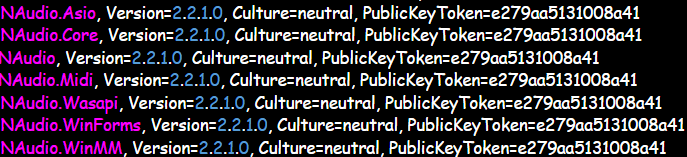
-
If you are unable to launch the game even when you don't launch Rage try this: Rename your mods folder to _mods, this will disable your mods folder so we can see if it is what's crashing your game, and then attempt to launch without Rage. If it works then something in your mods folder is causing the game to crash. This can be because you don't have a modified game config installed, something was installed incorrectly, or you just have a broken mod. If it still crashing when the mods folder is disabled and without Rage then please find and upload your asiloader.log and els.log (if you use ELS). They will both be in the main directory.
-
As far as my understanding goes, the ambiently spawning units are controlled by the agency.xml in lspdfr/data. So you would need to go into that file and remove the vehicle lines for the cars you don't want to see around the map You can also try setting Main.WorkaroundDLCVehicles = false in the lspdfr.ini but I don't think that works 100% of time I've attached an image for what some of the lines you're looking to remove look like.

-
 Thank you for helping in my quest to have as many overlays as possible. You're a champion of the people!
- 76 comments
- 11 reviews
-
-

-

- 2
-
-
 Added this to my "Favorites" vehicle models. Super clean liveries and a good variety of models. 10/10
 -
I would go into your lspdfr folder and open the keys.ini Make sure you have a key (or button if you're using a controller) set for TOGGLE_DUTY_Key=


