frostburglaw
Members
-
Joined
-
Last visited
Everything posted by frostburglaw
-
Hey there. My server is also manchester.lagrange. I have entered and exited this website numerous times including after computer restarts so I've ruled it out as a "One-time thing" sorta issue. I still have this issue for sure. There's no significant impact on my ability to download, just the ever so minor additional step. I figured figured it would be a good idea to bring it up since it's technically not supposed to do that yknow. I appreciate y'all :)
-
Hey, I haven't beeen on the website much at all recently. The redesign looks pretty neat I must say. However I have been running into this issue where I will click to download, and the countdown to begin download will get to zero but it will not begin the download. It functions normally upon clicking the button to manually begin the download, but the automated system has definitely been giving me issues. Another thing is I noticed the post about slower speeds with users of T-Mobile in europe. I'm unsure of if it's just my computer/network specifically at this moment, but I use T-Mobile. The website has been quite slow for me. I am on the East coast USA. Not sure of if the Issue with T-Mobile ISP is global or only known to be an issue localized to Europe but I figured I'd put it out there. Thanks for yalls hard work.
-
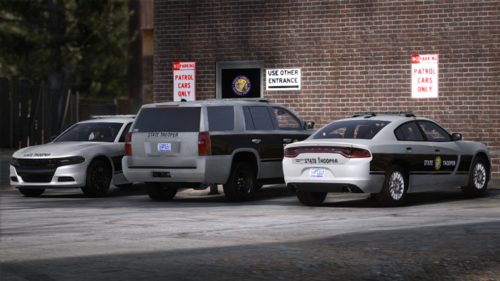 I am also having this same issue. It seems as if some of the extras being used are just blank and are not emissive. The cruise lights do not work on those either and I have noticed it appears as if an extra is applied like it's tied to ELS however it is blank and there is no emissive. When switching through the ELS patterns, on both the WRNL and PRMY stages there seems to be multiple patterns without color/emissives and that causes frequent gaps with no visible lighting with stage 3 activated. I have attempted to troubleshoot and play play around with the ELS XMLs but nothing within that XML will change it. Also I have noticed specifically with the Ghost unit (SHP 1829) That when I view the model in OPENIV I am able to see the console and extra equipment but I seem to be unable to toggle it on within the game. @Jfloyd17Is this something that you're able to provide clarification on? I understand that this is a finished product IIRC but I've been having these issues and hadn't seen any other messages about it. I figured I would at least bring it up just in case.
- 54 comments
- 4 reviews
-
-
diagnostics report: also, I have found that if I close the tab quickly before it completely freezes up, then it's fine. and yes. it happened a couple times today,
-
Hello, randomly when I get on LCPDFR.com, it makes my mouse freeze up and the page becomes unresponsive. I am unable to close it and my whole computer freezes up. Only way to fix it is always to restart my computer because nothing is responsive. (I’m doing this on my phone and apparently every picture I try To take is over 4mb)
-
 hey, Brandon P. I absolutely love the model except every time I spawn this vehicle it spawns white. for the unmarked version. Is there any way I can make spawn a darker grey or black. I just don't want to keep using a trainer
- 66 comments
- 1 review
-
alright, I will try that
-
no. I do not. last time I added that gameconfig file, it crashed my game and I had to reinstall
-
yes I do....could that be causing it? correction: they are replacing the vanilla ones
-
when I load without rage it still crashesmy game is crashing every time my plugins are about to load. I think it is a problem with my eup menu. maybe dlclist.xml because when I try to copy my dlclist.xml file to mods folder it doesn't show up in my mods folder. and when I add it manually, my game crashes at the same spot every time right before it loads my plugins. I have attached my crash log belowThanks for all the help......😑hi. I recently had to reinstall everything and now when I open gta v with rage, the rage splash screen won't show up. I have force windowed mode and borderless window checked. I do not know what to do. any help appreciatedNow once the backsplash comes up it just stays on “loading story mode” Edit: then after about 5 minutes it says" game memory error..."Yeah I think when I put a gameconfig mod in it may have done something.What a helpful community :/yeah. I have never seen that. I would help but I don't know what to doyour rage plugin hook is not able to run the version of gta that you have installed. you need to go to RAGE plugin hook's website and download the newest version. hope this helps 🙂My whole game keeps crashing just as the rage backsplash comes up while loading. I have no idea why. I have attached my crash log in a spoiler below. I hope I did it right. I am new to these crashes it always crashes at the same time of loadinglol thanks.



.png.96fd6e677eb0ad209a8bcfff3d17e990.png)
.png.4744cc347f7a82218a4f1df5c7ccd40c.png)
.png.1de4e643a121a4078ce76f5a996490b5.png)
.png.8ce812e3f2134e2151d96c5dada34540.png)