




Zalym
Members
-
Joined
-
Last visited
Everything posted by Zalym
-
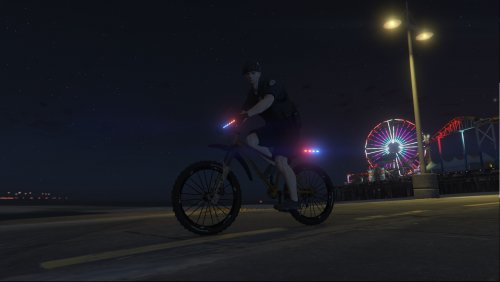 This is an awesome little bike if you want a different flavor to your patrols. Take it out for a spin and see what you can find in LS. If your bike's color doesn't work quite right you can easily and quickly change it in the vehicle color menu in Simple Trainer.
- 19 comments
- 2 reviews
-
-

- 1
-
-
Thank you for this bike! 🙂 It's a different way to see the city and do some patrolling--especially with stop the ped and parking enforcement mods. Another great vehicle for any LSPDFR library! (I had the gold color-change issue as well. I just used the simple trainer vehicle color menu to mess around with it and saved the color option.)
- 19 comments
- 2 reviews
-
-

- 1
-
-
 This is a great mod! Tons more fun than it should be 🙂 thank you for your efforts to have this available! I do have a semi-repeatable issue sometimes when the menu refuses to stay up. Sometimes, when I use the buttons to open it, the menu flickers on and then back off. I can't get it to stay on my screen. It doesn't crash anything, and reloading the game seems to fix it. I just can't figure out what might be causing it to happen. I assume its another mod that I have that's running or caused a conflict but sometimes this crops up at the beginning of a session and sometimes during the middle. I've tried changing the buttons to avoid conflicts with other mods and used modifier keys too. It's not a huge deal, a quick reload fixes it--just something I noticed.
- 95 comments
- 16 reviews
-
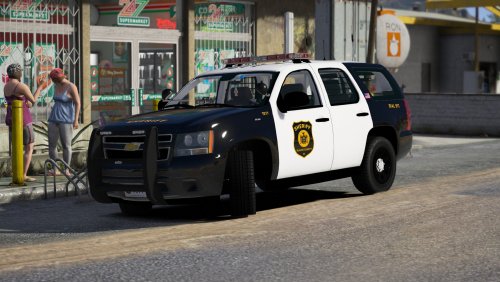 Running 3rd Shift with the coyotes out in the Senora Desert in a great looking vehicle. Thanks!
- 18 comments
- 16 reviews
-
-
- 1
-
-
 This pack is a great pack of classic unmarked vehicles with a little bit of generational variety to add some flavor! Easy to recommend 🙂
- 111 comments
- 11 reviews
-
First, these are AWESOME! The models are slick and detailed. The lights/patterns/options are fantastic! I can't wait to use them soon. That 2014 Charger is a beast of a car. I do have a question on the 2014 Tahoe. The full amber (secondary) light bar correctly flashes/stays steady depending on the chosen pattern. When it does though, it seems to only light up the rear-driver indicator on the ELS menu and it only shows a rear-driver amber reflection on a wall. This is certainly not a huge deal, and I probably wouldn't have noticed it at all if I hadn't parked under a bridge while playing with the ELS settings. I was thinking (not that I know anything about modding) that this might be a function having a "single" amber light source and only being able to have that be assigned to one side or another, or I certainly could have done something wrong during install or just need to change a setting myself. I just wanted to ask for my own curiosity--I doubt this will ever bother me during a real gaming session. Thank you again for this pack.
- 111 comments
- 11 reviews
-
I've got EUP running, its menu either causes a crash or I did something wrong so I uninstalled it but the uniforms are all usable. I don't want to spend the time setting up the uniforms I want to normally use in different departments only to have to do it again the each time I log in. is there a way to save uniform configurations which i set up in the main locker room menu within the game? Or will I need to find the right settings in the locker room, write them down and change the settings inside the (outfit?) custom file. I don't want to change the NPC's outfits, just my character's options. Thanks for any help.
-
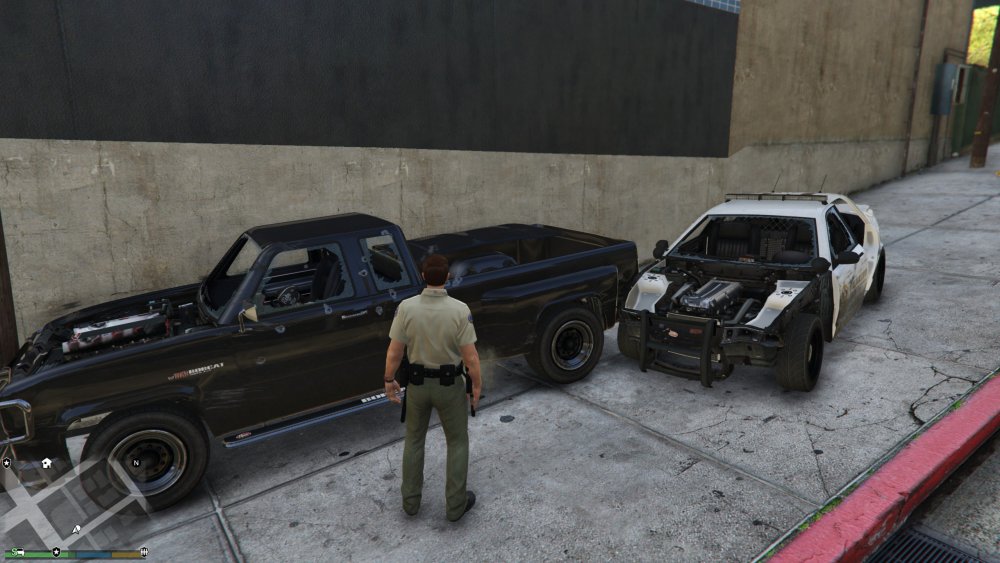
Surveying a rough 1st day back on patrol...
-
I just logged out of a quick session and wanted to post this same question. Hopefully, we're just missing something--but I can't figure it out.
-
still no one knows 🙂
-
I have no idea but... neat!
-
Doing well, thanks--how are you?
-
Ooh shiny 🙂😆 Well, that certainly would be the worst case. Hopefully not, but if its not ready, its not ready. We'll soon find out, one way or another.😄 Sniper296 likes to play with fire... 😄
 I'd love to see some version of the cases' outcome be integrated into the mod. Gives a sense of totality in the sandbox. I'd let the NPC's take care of transport though--that being said, a chance of having a breakout attempt on high-profile cases would be cool. Not that I think or know of anything like this in .4--just thinking out loud.Here's hoping for a Friday/Saturday release (depending on where one lives). Have a great day folks! Thanks for this info--I installed .3.1 with all sorts of other plugins as they were recommended. I'm sure they were worth it but maybe this time I'll keep the mod clean for a while to save on FP.Very cool. Good luck to you!Congrats!! Enjoy the break. Which college, if you don't mind a total stranger asking?Maybe. I wasn't here for the .3 release, but given some of the craziness over the last few days on these forums...that stream chat could get horrifying. 🙂 I wouldn't mind seeing it though, if that was the plan anyway, otherwise I'd rather just see it for myself.Good question! I was just searching for a police/first-responder game of any sort to play (I've played and enjoyed the Emergency series enough in my lifetime). I stumbled across some YT videos about this mod, I think Jeff Favignano was the first one I saw, and I went out and bought GTA V to start playing LSPDFR.Here's hoping 🙂 Dream well.Hmm, well here's something new to while we wait I guess: I don't listen to the in-game radio stations while playing LSPDFR? Usually, I like to pop in some some epic/fantasy/sci-fi soundtrack style music from either my own collection or I'll find some original content created by people on YouTube (folks like Derek and Brandon Fiechter or Adrian von Ziegler or any number of other artists for example) What, if anything, do you folks listen to while playing LSPDFR?I enjoyed that feature as well! Nothing like being able to see the results of your work for the day. 🙂


