Ginkarasu
Members
-
Joined
-
Last visited
Everything posted by Ginkarasu
-
-
ScubaSteve10, Don't quote me on this, I'm not an expert, but it seemed my dlclist.xml got overwritten after I had installed another .oiv package. I just edited the dlclist.xml by adding "<Item>dlcpacks:/eup/</Item>" without the quotations, at the bottom of the dlclist.
-
-
 Stupid question; I was doing this callout damage to property, after talking to the witness I found three perps spraying graffity, I arrested two of them on the spot, the third in an alleyway. They all dropped the spray cans, I saw 3 green blips, but I couldn't pick them up, even by walking over them... Or is there a key for it? Point is: I failed to collect 3 pieces of evidence.
- 546 comments
- 103 reviews
-
 No you explained it perfectly, yes, I was referring to outstanding warrant. I'm not a native English speaker and not versed in American law. Thats why I may sounded vague and I couldn't express my "issues". But like I said you explained it perfectly, sorry if I annoyed you on my part.
- 202 comments
- 21 reviews
-
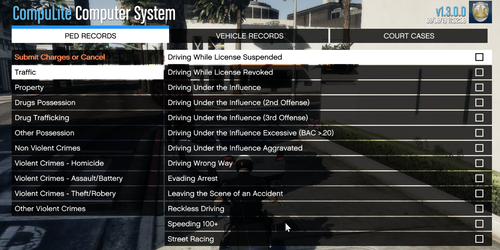
What I asked; every so often, when you check a suspect in the computer, you might see arrest warrant for (insert crime here) so when I want to create an arrest report, the option "Arrest warrant" should be available, which is no where to be found. However in the "updated" version of compu-lite, Bejoijo or what is his name is, included this option. "what do you mean the new Compulite" He updated all his plug-ins yesterday.
- 202 comments
- 21 reviews
-
I accidently posted my comment on the wrong page, but then I realised I was using your mod instead of the one you linked on this page. Anyway, I wanted to create an arrest report, for a perp who had an outstanding arrest warrant for a crime, though the new compulite has an entry for that your's hasn't, yes I checked. Maybe an oversight or just a case of updating your file.
- 202 comments
- 21 reviews
-
-
Every once in a while RPH, completely fails to start up. Up until recently, I could fix it by re-installing RPH. Today however, if I click the RPH icon, absolutely nothing happens. GTA V itself still works fine though. As I have already l tried it. But I'm only wanting to play LSPDFR. So currently I'm dumbfounded as to why RPH doesn't work at all. Yesterday when I closed the game nothing seemed out of place. But today RPH doesn't even start up. But if I try to run GTA V afterwards, I receive a message that GTA V is already running or something like that. But there's no entry of it if I check the task manager. PS: I didn't include a log, since I'm writing this on my mobile. And also the last log was made yesterday evening. When RPH was working normally. Anyone else have/had this problem. And might know the solution? Any suggestions would be highly appreciated. Again, thanks but no thanks, I've found out what the problem was. My anti-virus suddenly decided RPH was a dangerous file. So for anyone having this problem, check if your anti virus is blocking RPH. And make it (RPH) an exception.
-
EUP worked perfectly until the day before yesterday. The plug-in is still selected in the plug-in menu of RPH, but won't load into the game anymore. Anybody else having/had this problem know how to fix it? Nevermind, fixed my problem. Now it works again as intended. To those stumbling upon the problem of EUP not loading into the game; for me It started after I'd used another .oiv package installer. All I had to do was manually add EUP to the DLClist.xml. Don't know if this is the way to solve it for anyone else. But in my case this worked.
-
 It worked perfectly until the day before yesterday. EUP is still selected in the plug-in menu of RAGEPLUGINHOOK, But it won't load anymore into the game. Anybody else had/having this issue and might know how to fix it? EDIT: Disregard my post. Accidently posted in the wrong mod.
- 95 comments
- 16 reviews
-
 quick update: Since I updated all ALbo1125 mods, the crashes went away, and the LSPDFR Computer+ behaves normally again. Knock on wood!
- 1,743 comments
- 172 reviews
-
-

- 1
-
-
That's just it, my game with this installed ctd's when trying to use the computer, but Rage Plugin Hook, does not make an error log/crash report, like it would be the case if LSPDFR crashes.
- 1,743 comments
- 172 reviews
-
I totally loves this mod. It's essential. But sadly the last couple of days I noticed this mods performed worse and worse, now I can't even see the login screen. Essentially my game gets stuck. and it eventually ctd the game.
- 1,743 comments
- 172 reviews
-
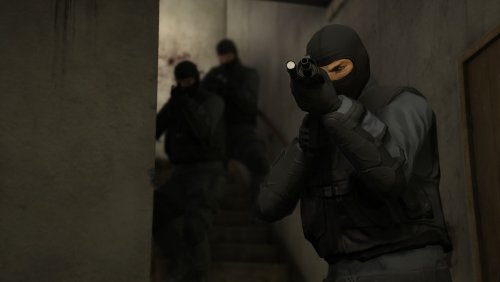 Woah, I love the new Search Warrant call! Really cool! Quick question though. It turns into a shooting fest, so I take it these noose agents aren't there to make an arrest? Also it would be cool to add more locations to these callouts (ie: Lester's warehouse would be another cool location)
- 53 comments
- 14 reviews
-
Hi, I was wondering if you still do requests? Because I would like set 2 with Character Wheel (in vehicle/on foot) and Light Melee (on foot) added to it? Thanks in advance!