


Pazzi
Members
-
Joined
-
Last visited
Everything posted by Pazzi
-
sorry.. no support for cracked GTA.
-
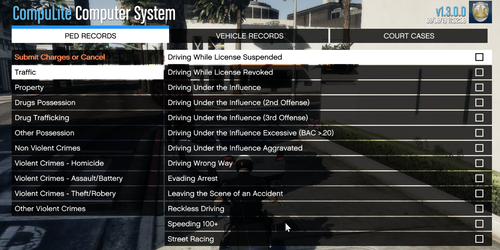
I would suggest to play LSPDFR with these core plugins: Traffic Policer Police Smart radio Stop The Ped (do not run with arrest manager, since it's a duplication) Interaction+ (used only for traffic stop questioning; disable the police computer) Ultimate Backup CompuLite They will give you maximum gameplay experience, stability and performance.
-
try to install gameconfig with 0.1x traffics and 0.1x peds. https://www.gta5-mods.com/misc/gta-5-gameconfig-300-cars the new LSPDFR is very hungry on CPU because it always checks all ambient traffics and peds in the loop. the more the population, the more FPS will be suffered. Note. you can also try to adjust population in the ingame settings, but somehow it seems has no effect in my end, that's why i prefer to decrease population using gameconfig, which is working well.
-
[8/16/2019 1:53:11 PM.343] LSPD First Response: ============================== [8/16/2019 1:53:11 PM.343] LSPD First Response: UNHANDLED EXCEPTION DURING GAME FIBER TICK [8/16/2019 1:53:11 PM.343] LSPD First Response: ------------------------------ [8/16/2019 1:53:11 PM.343] LSPD First Response: Origin: Rage.SleeplessGameFiber [8/16/2019 1:53:11 PM.343] LSPD First Response: ------------------------------ [8/16/2019 1:53:11 PM.343] LSPD First Response: Exception type: System.FormatException [8/16/2019 1:53:11 PM.343] LSPD First Response: Exception message: Input string was not in a correct format. [8/16/2019 1:53:11 PM.343] LSPD First Response: ------------------------------ [8/16/2019 1:53:11 PM.343] LSPD First Response: Inner exceptions: [8/16/2019 1:53:11 PM.343] LSPD First Response: ------------------------------ [8/16/2019 1:53:11 PM.343] LSPD First Response: Stack trace: [8/16/2019 1:53:11 PM.343] LSPD First Response: at System.Number.StringToNumber(String str, NumberStyles options, NumberBuffer& number, NumberFormatInfo info, Boolean parseDecimal) [8/16/2019 1:53:11 PM.343] at System.Number.ParseInt32(String s, NumberStyles style, NumberFormatInfo info) [8/16/2019 1:53:11 PM.343] at CompuLite.Utils.createCourtCaseBase() did you edit charge.xml or use custom charge file? there might be some typo on the numbers since the error states that it failed to convert a text to number type var.
-
if the plugin/callout doesn't support controller button, you can use Steam control configuration that can map a button to certain keyboard key. you can also try to use 3rd party controller to keyboard mapping software.
-
first, you need to install Windows 10 on your MacBook (using bootcamp) then, install Steam and GTA V if you can run GTA V, most probably, you would be able to run LSPDFR too.
-
 what is your screen resolution? i think the author stated that it is guaranteed to run well on a 1080p monitor and resolution.
- 14 comments
- 1 review
-
Different ways to make it bright: Install VisualV + RadianceV Or install Natural Vision Remastered Or install Make Visual Great Again
-
 great to have a new callout pack... btw. the thumbnail says "LCPDFR" instead of "LSPDFR" 🙂
- 1,007 comments
- 63 reviews
-
-

- 2
-
-
it's back available now... check out the author's profile page for a link to his website.
-
if you read his message in the profile page... you will find out.
-
yeah, he stated in the readme file that he only has 1080p monitor and the plugin is best to be played in 1080p resolution.
-
what version do you have? it had mouse pointer and screen resolution issue prior to version 1.2.0.0 if you have older version, try to change screen res to 1080p
-
did you check his profile? i think he left a message there. https://www.lcpdfr.com/profile/336857-bejoijo/
-
HBD 🎂
-
install EUP configuration for lspdfr and ultimate backup
-
go to RPH setting and set "Start GTA as windowed borderless" try to disable anti virus/windows defender (or exclude lspdfr files from scanning)
-
1. Delete "Plugins" directory (back up first) 2. Delete "lspdfr" directory (back up first) 3. Install LSPDFR 4. Install RagePluginHook
-
try to install good gameconfig.xml
-
go to OpenIV and install ASI Loader module from OpenIV
-
RPH 1.68 is paired and can only be used with GTA patch 1737. you still have GTA patch 1604 installed. make sure to upgrade GTA and have patch 1737. if you plan to just use the old patch 1604, you need RPH 0.66 to run with it.
-
if you have EUP installed you need EUP configurations for both LSPDFR and Ultimate Backup. you can search and download those files in "Visual Data" or "Misc" files section.
-
yeah.. somehow LSPDFR added idle animation on cop walkstyle which might brake other animation at the same time (e.g. flashlight hands anim) it's a bug.. but you can still set the same cop walkstyle using trainer or EUP menu which doesn't brake anything.
-
try Interaction+ plugin. it has computer lite integrated.
-

