Stu Montana
Members
-
Joined
-
Last visited
Everything posted by Stu Montana
-
Anyone knows a pack with front/back red/blue tinted glass on a liebrty lightbar? thx Stu

-
 sorry, IDK why, but on the 20`tahoe the radar-equipment on the roof spawns when I turn on the ELS lights. anybody any idea what's wrong here? thanks! EDIT: fixed it (ELS reinstall solved it)
- 73 comments
- 22 reviews
-
I don't really know what that means 🙂 but even posting here in the forum is affected by this, as my unintentional double post above shows (I only hit "Submit" once!). The downloads are super fast, the web pages however take forever to load (images, ads, content), it's currently almost impossible to browse/search for files, I always go through google to get at least to the page I need.... In the past years it has always been quite slow from what I remember, but it has never been this bad. I hope it gets fixed somehow, especially since there's apparently no issue with the servers as you wrote...
-
same here. from central europe it takes up to 5min to show one page. downloads are fast, no problem there. but surfing the site in the evening is almost impossible.... same here. from central europe it takes up to 5min to show one page. downloads are fast, no problem there. but surfing the site in the evening is almost impossible....
-
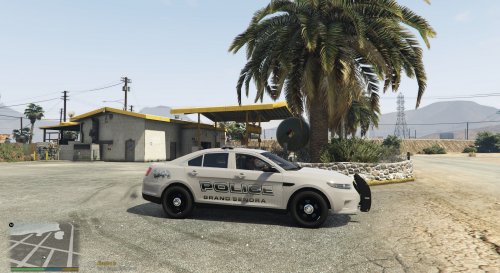 What model pack is this for??
 -
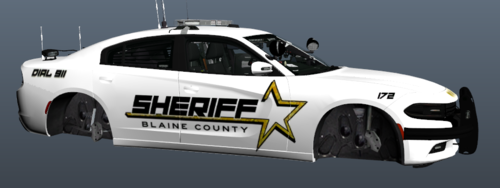 could you perhaps provide a link for the vehicle model pack?
 -
-
Worked perfectly. I also changed the key for backup to avoid interference. Thanks!!
-
Thanks, will do.
-
Hi, Like the title says, every time I open the stop the ped menu (E) on a traffic stop or within an investigation, my character yells “Police. Stop whatever the hell........”. Is this a conflict with LSPDFR of some sort or is it normal? It’s kinda annoying....
-
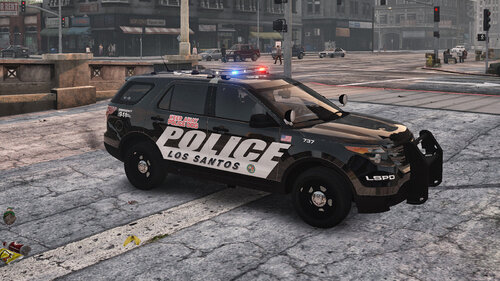 I started this a few years ago, recently came back to lspdrfr and decided to give it a shot a finish it. It's my first ever upload and more of a fun project, but I hope you guys like it. It's inspired by Costa Mesa PD, not a fully accurate representation. But I always liked the design and I might add a CSI and transporter some day. Optimized for thegreathah's LSPD pack (all vehicles) and Slendis' Rockford Hills Police Department Pack (just the FPIU), because they both use the RX2700, which is suitable for the CMPD. Be sure to also replace the "emergrx" texture file, if you want to have the lightbar colored black on top. Full credit for the templates go to the authors of the model packs thegreathah, Slendis and Candice. Please do not re-upload, modify or claim as your own. Textures added for: - 2011 CVPI - 2013 FPIU - 2013 FPIU K-9 - 2014 Charger - 2015 Tahoe - 2016 Charger - 2016 FPIS - 2016 FPIU - Chevy Express (CSI/Coroner) Have fun! Stu For the 2013 FPIU: For the Coroner:
- 1 review
-
-

- 1
-
-
 well, it looks great and useful, but it didn't quite work for me (yet). there are so many key command conflicts on my setup (with i.e. smart radio, traffic control) that I first have to figure out where to map the commands to. plus I didn't get the cars to act like I wanted, some just started to drive away again as I was looking/aiming for a spot to command them to. ultimately it crashed my lspdfr plugin. so I think I will wait for a while and some updates before I give it another try.
- 101 comments
- 18 reviews
-
 Why is there a (newer) version 1.0.380 on gta5-mods.com? Is this version outdated? Should I get the other one? Stu
- 42 comments
- 19 reviews
-
 When I use the colored glass for the light bars, they get dirty over time as the car gets dirty, blocking all the light that comes from them. Is there a way to fix this? I don't have this issue when I use the transparent light bar glass..... Stu
- 147 comments
- 65 reviews
-
 Well, I tried the gameconfig you suggested with no success. I got the same crash a usual while checking the ped after I checked the plate. The last lines in the crash report look like this: [28.02.2018 20:31:26.579] LSPD First Response: C+: Found arrest report for ped [28.02.2018 20:31:26.582] LSPD First Response: C+: Found citations for ped [28.02.2018 20:31:26.583] LSPD First Response: C+ DEV: Creating ComputerPedViewExtendedContainer [28.02.2018 20:31:26.586] LSPD First Response: C+ DEV: Creating ComputerPedViewExtended [28.02.2018 20:31:26.588] LSPD First Response: C+ DEV: Creating ComputerPedView [28.02.2018 20:31:26.590] LSPD First Response: C+ DEV: InitializeLayout ComputerPedView [28.02.2018 20:31:26.591] LSPD First Response: C+ DEV: Loading image for model from Plugins\LSPDFR\ComputerPlus\no_ped_image.jpg [28.02.2018 20:31:26.595] LSPD First Response: C+: Citation time is 18.12.2016 20:32:42 [28.02.2018 20:31:26.613] LSPD First Response: C+: LogPositionAndSize : W 200 H 20 X 467 Y 0
- 1,743 comments
- 172 reviews
-
Quick followup (because I was asked this): As it turns out, it wasn't exactly an issue with the vehicle.meta itself, although I kinda fixed it through some modifications there in the first place. But I wasn't happy with it. What solved it in the end was getting rid of VisualV. On my system it caused a lot of issues and (for some reason) it also messed up the tail lights of the FPIUs (I tried different models and slots, always got the same bug). As I said, I don't exactly know why VisualV caused this, but since I unsinstalled it everything looks normal again. Except from the black areas in the "broken" lights, bu maybe that's how it's supposed to look, I can't remember.... :)
-
I'm too getting crashes almost every time I use it. Mostly when I check a ped, and THEN also check the vehicle or the other way around. Game crashes to desktop almost instantly. For now I tend to avoid using the computer.
- 1,743 comments
- 172 reviews
-
Fixed it. I messed something up in the vehicles.meta. -solved-
-
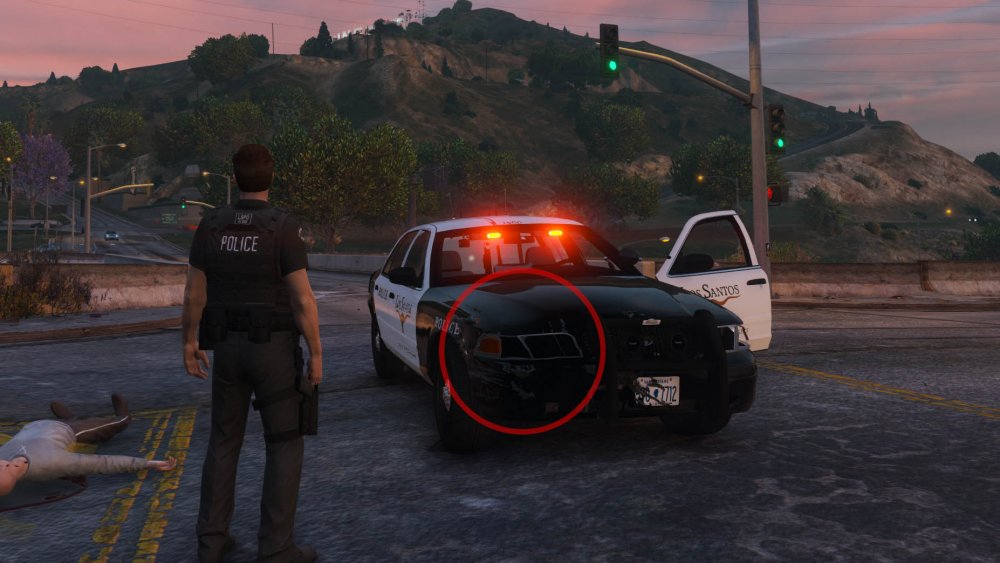
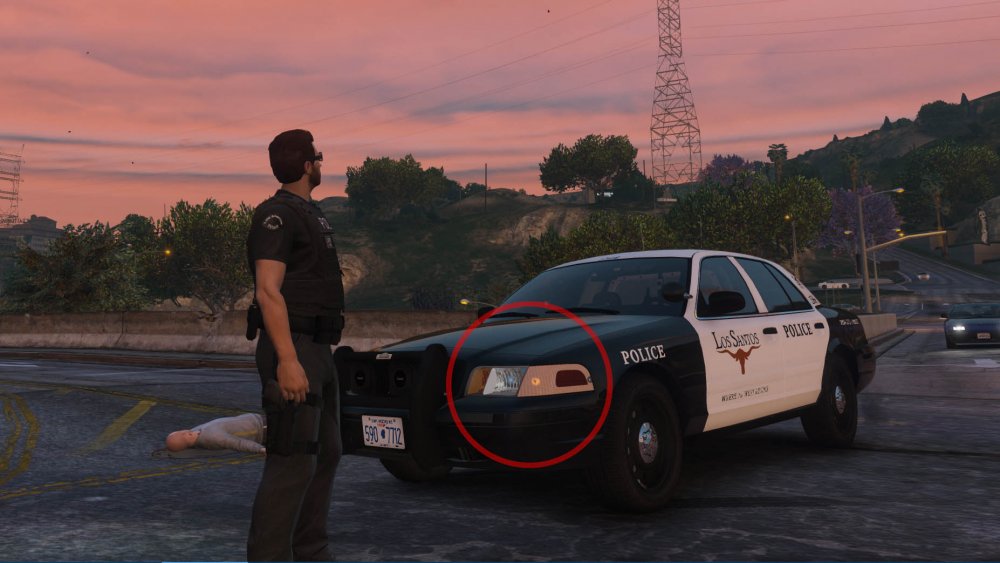
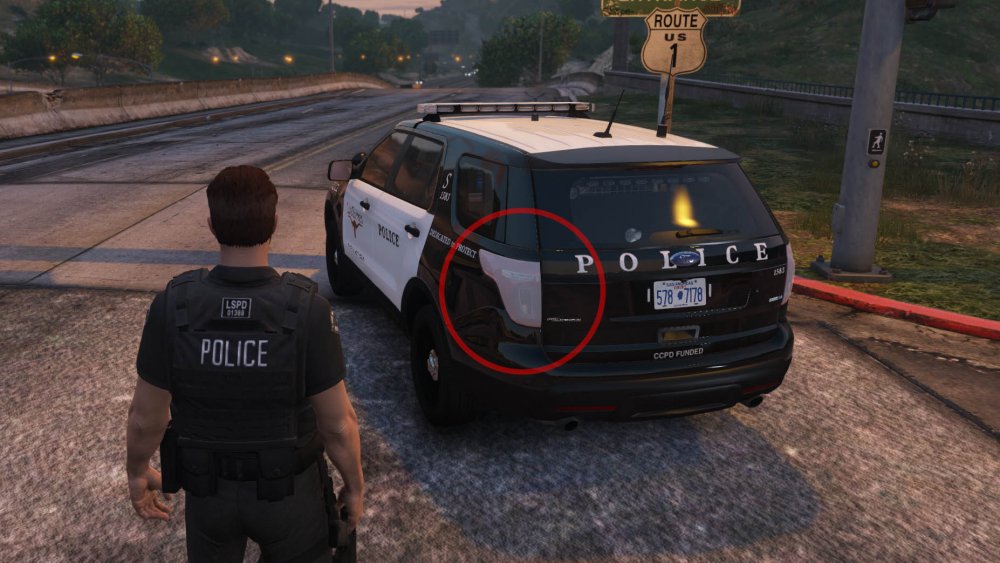
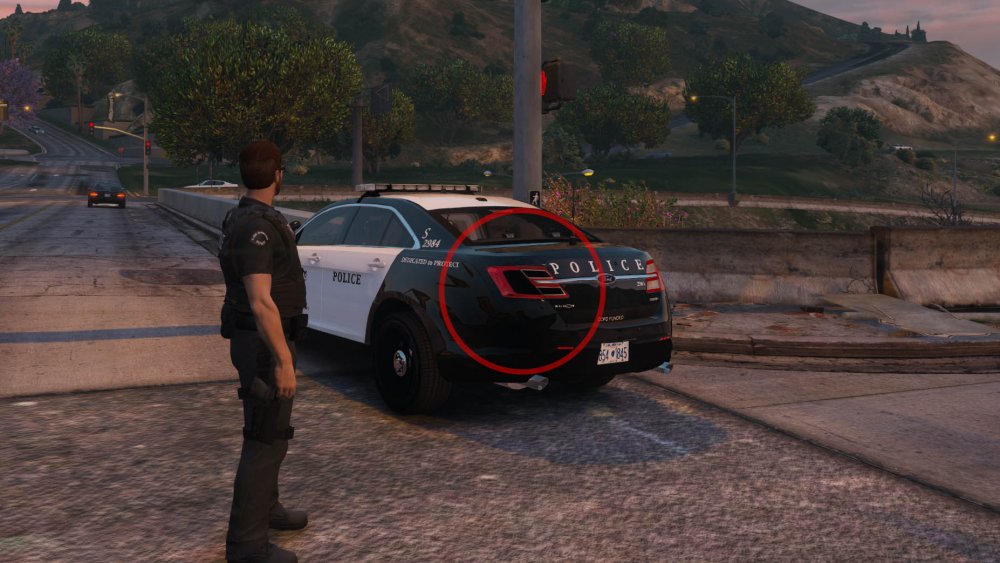
Hi there, I recently noticed that my tail- and headlights act very strange, I don't know what caused that. Does anyone have a clue for me how I can fix this? Some tail- and indicator lights are pale or "milky" and when they brake, they look oddly ptch black. Please see my screenshot below. I tried several car packs (tony, bradM etc.), the error occurs on most of them, so I assume there's somethin wrong with some base textures or shaders. I also played around with the settings, nothing worked. I want to avoid a complete reinstall, so maybe someone knows how to fix it :) Thanks, Stu
-
-
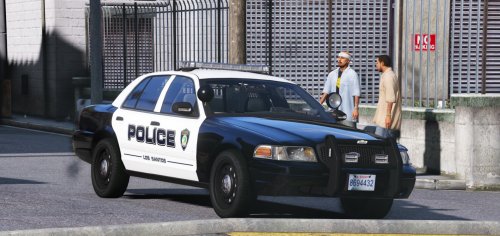 Love the pack but could you please make one for "the other" 2015/2016 Charger-Template? I tried so many different models but the skin is always a little off by the same amount, so I guess there is a pretty common other template around.... For instance, I'd like to use BradM's LSPD vehicle pack, the '16 charger is the only one that doesn't play along..... :) Thanks!
- 32 comments
- 4 reviews
-
@PNWParksFan Thank you so much man, it worked!!! :) I reduced the described values to a reasonable level, everything works perfectly now! BTW, I used the "Better ELS"-file (see below), which has those high values put in by the author. I guess somebody should tell him that his modifications can cause crashes with certain other plugins....
-
@PNWParksFan Here you go: // EMERGENCY LIGHTING SYSTEM V (Ver. 1.05) // Copyright (C) 2016 Luxart Systems // Made by Lt.Caine // --- MAIN CONFIGURATION FILE --- [ ADMIN ] VcfContainerFolder = pack_default / --- MAIN CONFIGURATION FILE --- [ ADMIN ] VcfContainerFolder = pack_default [ LIGHTING ] LightFlashDelayMainLts = 26 LightFlashDelayCoronas = 5 EnvLtMultExtraLts_Siz = 2.0 EnvLtMultExtraLts_Rng = 2.0 EnvLtMultExtraLts_Int = 2.0 EnvLtMultTakedwns_Siz = 1.0 EnvLtMultTakedwns_Rng = 1.0 EnvLtMultTakedwns_Int = 1.0 EnvLtMultCrnaHalo_Siz = 1.0 EnvLtMultCrnaHalo_Rng = 1.0 EnvLtMultCrnaHalo_Int = 1.0 EnvLtMultCrnaOthr_Siz = 2.0 EnvLtMultCrnaOthr_Rng = 2.0 EnvLtMultCrnaOthr_Int = 2.0 LodCoronaInitDistance = 50 [ AUDIO ] BtnClicksBtwnSrnTones = true BtnClicksBtwnHrnTones = true [ GENERAL ] MaxActiveVehs = 99 ElsMaxRangePl = 9999999999 ElsMaxRangeAi = 9999999999 ElsActiveOnAi = true ElsTrafCtrlOn = false [ CONTROL ] AllowController = true Toggle_LSTG = 74 Toggle_SECL = 75 Toggle_WRNL = 76 Toggle_CRSL = 219 Toggle_TKDL = 221 Toggle_BLKT = 220 Toggle_SIRN = 71 ChgPat_PRML = 85 ChgPat_SECL = 73 ChgPat_WRNL = 79 Sound_Ahorn = 89 Sound_Manul = 84 Snd_SrnTon1 = 49 Snd_SrnTon2 = 50 Snd_SrnTon3 = 51 Snd_SrnTon4 = 52 Snd_SrnScan = 53 Snd_SrnTonX = 54 Snd_SrnPnic = 71 TogInfoPanl = 80 TogKeysLock = 145
-
LSPDFR crashes instantly after calling EMS via smart radio. didn't get it to work once. any solution? [13.01.2018 12:03:37.754] LSPD First Response: Creating stolen vehicle event [13.01.2018 12:03:44.774] 545196 [13.01.2018 12:03:46.616] 547036 [13.01.2018 12:03:53.050] LSPD First Response: Added ambient event fibers to cleanup [13.01.2018 12:03:53.357] LSPD First Response: [Better EMS]: Loading response manager [13.01.2018 12:03:53.359] LSPD First Response: [Better EMS]: Responding to X:391,9341 Y:-873,8809 Z:29,29169 [13.01.2018 12:03:53.363] LSPD First Response: Assembly is requesting an LSPDFR+ SecurityGuid: BetterEMS [13.01.2018 12:03:53.363] LSPD First Response: LSPDFR+ SecurityGuid validated & issued successfully. [13.01.2018 12:03:53.365] LSPD First Response: LSPDFR+ API: Plugin: Better EMS is increasing statistic: EMS Calls [13.01.2018 12:03:55.210] LSPD First Response: [Better EMS]: First responder not specified by API; will be decided by settings. [13.01.2018 12:03:55.211] LSPD First Response: [Better EMS]: Initiating response unit for FIRE [13.01.2018 12:03:55.227] LSPD First Response: Chose vehicle FIRETRUK [13.01.2018 12:03:55.228] LSPD First Response: Choose between 4 and 4 peds [13.01.2018 12:03:55.229] LSPD First Response: Choosing 4 peds [13.01.2018 12:03:55.229] LSPD First Response: Chosen ped 3: S_M_Y_FIREMAN_01 [13.01.2018 12:03:55.229] LSPD First Response: Chosen ped 2: S_M_Y_FIREMAN_01 [13.01.2018 12:03:55.230] LSPD First Response: Chosen ped 1: S_M_Y_FIREMAN_01 [13.01.2018 12:03:55.230] LSPD First Response: Chosen ped 0: S_M_Y_FIREMAN_01 [13.01.2018 12:03:55.230] LSPD First Response: Choosing spawn radius between 50 and 100 [13.01.2018 12:03:55.230] LSPD First Response: Chose spawn radius of 63 [13.01.2018 12:03:55.238] LSPD First Response: Configuring extras on vehicle [13.01.2018 12:03:55.238] LSPD First Response: Configuring extras on vehicle [13.01.2018 12:03:55.248] LSPD First Response: Setting up ped components for S_M_Y_FIREMAN_01 [13.01.2018 12:03:55.255] LSPD First Response: Current ped variations: 8, 1, 0 [13.01.2018 12:03:55.255] LSPD First Response: Max ped variations: 8, 2, 0 [13.01.2018 12:03:55.255] LSPD First Response: Setting ped variation: 8, 0, 0 [13.01.2018 12:03:55.256] LSPD First Response: Setting ped head/hat prop to 0 [13.01.2018 12:03:55.266] LSPD First Response: Setting up ped components for S_M_Y_FIREMAN_01 [13.01.2018 12:03:55.267] LSPD First Response: Current ped variations: 8, 2, 0 [13.01.2018 12:03:55.267] LSPD First Response: Max ped variations: 8, 2, 0 [13.01.2018 12:03:55.267] LSPD First Response: Setting ped variation: 8, 0, 0 [13.01.2018 12:03:55.267] LSPD First Response: Setting ped head/hat prop to 0 [13.01.2018 12:03:55.268] LSPD First Response: Setting up ped components for S_M_Y_FIREMAN_01 [13.01.2018 12:03:55.268] LSPD First Response: Current ped variations: 8, 2, 0 [13.01.2018 12:03:55.268] LSPD First Response: Max ped variations: 8, 2, 0 [13.01.2018 12:03:55.269] LSPD First Response: Setting ped variation: 8, 0, 0 [13.01.2018 12:03:55.269] LSPD First Response: Setting ped head/hat prop to 0 [13.01.2018 12:03:55.269] LSPD First Response: Setting up ped components for S_M_Y_FIREMAN_01 [13.01.2018 12:03:55.270] LSPD First Response: Current ped variations: 8, 1, 0 [13.01.2018 12:03:55.270] LSPD First Response: Max ped variations: 8, 2, 0 [13.01.2018 12:03:55.270] LSPD First Response: Setting ped variation: 8, 0, 0 [13.01.2018 12:03:55.270] LSPD First Response: Setting ped head/hat prop to 0 [13.01.2018 12:03:55.305] LSPD First Response: [13.01.2018 12:03:55.306] LSPD First Response: ============================== [13.01.2018 12:03:55.306] LSPD First Response: UNHANDLED EXCEPTION DURING GAME FIBER TICK [13.01.2018 12:03:55.306] LSPD First Response: ------------------------------ [13.01.2018 12:03:55.306] LSPD First Response: Origin: Game fiber "ResponseManager Respond". [13.01.2018 12:03:55.307] LSPD First Response: ------------------------------ [13.01.2018 12:03:55.307] LSPD First Response: Exception type: System.TypeInitializationException [13.01.2018 12:03:55.307] LSPD First Response: Exception message: Der Typeninitialisierer für "ParksCommon.ELS.ELSCompatabilityCheck" hat eine Ausnahme verursacht. [13.01.2018 12:03:55.307] LSPD First Response: ------------------------------ [13.01.2018 12:03:55.307] LSPD First Response: Inner exceptions: [13.01.2018 12:03:55.308] LSPD First Response: Exception type: System.OverflowException [13.01.2018 12:03:55.308] LSPD First Response: Exception message: Der Wert für einen Int32 war zu groß oder zu klein. [13.01.2018 12:03:55.308] LSPD First Response: ------------------------------ [13.01.2018 12:03:55.308] LSPD First Response: Stack trace: [13.01.2018 12:03:55.308] LSPD First Response: bei System.Number.ParseInt32(String s, NumberStyles style, NumberFormatInfo info) [13.01.2018 12:03:55.308] bei Rage.InitializationFile.ReadInt32(String sectionName, String keyName, Int32 defaultValue) [13.01.2018 12:03:55.309] bei ParksCommon.ELS.ELSCompatabilityCheck..cctor() [13.01.2018 12:03:55.309] LSPD First Response: ============================== [13.01.2018 12:03:55.309] LSPD First Response: [13.01.2018 12:03:55.309] LSPD First Response: ------------------------------ [13.01.2018 12:03:55.309] LSPD First Response: Stack trace: [13.01.2018 12:03:55.310] LSPD First Response: bei ParksCommon.ELS.ELSCompatabilityCheck.CheckVehiclePromptUser(Vehicle vehicle, Boolean reShow) [13.01.2018 12:03:55.310] bei ?????????????????????????????????????????.?????????????????????????????????????????() [13.01.2018 12:03:55.310] bei ?????????????????????????????????????????.?????????????????????????????????????????.?????????????????????????????????????????() [13.01.2018 12:03:55.310] bei Rage.GameFiber.Main() [13.01.2018 12:03:55.310] LSPD First Response: ============================== [13.01.2018 12:03:55.310] LSPD First Response: [13.01.2018 12:03:59.345] LSPD First Response: All signs removed
-