


Him1250
Members
-
Joined
Everything posted by Him1250
-
-
Here you go! http://www.flickr.com/photos/rulenumberone2/8529668391/ http://www.flickr.com/photos/sean94110/2370718035/ http://www.flickr.com/photos/19180182@N07/4059854851/ I have a friend who lives in LA and I will see if I can get him to go up there.
-
Oh, You would have to use Dashcam.
-
Where did you add them? At the end?
-
Just disable the keys and make sure to read the readme. YOu use put the trainer into your main GTA IV Directory.
-
Oh, Crap! Sorry Dude. Sorry Dude. I read support and thought this was put under the support section. I do not think there is a Garage mod. I know you can change the color with the trainer. Yes Sir, the K9 script will work with LCPDFR. That is the reason it was created. lol.
-
First, Off wrong section. There is a plate reader that can be found in the download section. There are also ENBs and Timecycles out there. The K9 Script can also be found in the download section. Try using the search bar here on the website. And what do you mean by a mod garage?
-
Hello Everyone. Recently I have been crashing with Call-outs from LCPDFR and Braveheart's poling script. For LCPDFR its very minimal. For Braveheart's script, every time I take a call out I crash. I don't get it. Could it be something to do with other mods? Lists of Mods: 1. ELS 2. First Person 3. Trainer 4. LCPDFR 5. K9 Script 6. METT 7. Towing 8. Traffic Flow 9. Police Helper 10.Vehicle Search 11. Policing 12. Dashcam 13. Indicator ( i do know some of these scripts can go)
-
Use the support forums.
-
You need at last 8 GB of Ram. What are the mods you have installed? Do you have modded cars?
-
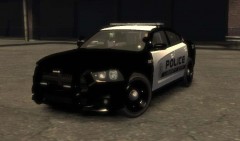 You my hero! I have been wanting a Liberty City Version of APD's Graphics! Proud NM! I have found my new favorite car!
 -
Its looks really good! I'll get in game later and I'll let you know.
-
Want to PM me a link to a media fire download?
-
Thanks Man! I really appreciate it! +1!
-
No, xlive is really picky. There is no way to play online.
-
The only trainer I think is version 6.5
-
Cool! That would be great!
-
Hello Everyone! I give up on editing skins. LOL! But I was wondering if someone could alter this skin for me, to a Ford CVPI and Interceptor. And then send it to me via mediafire. Thanks! (Skin was created by taximan5.) All credit goes to him!
-
I love you! That skin is based of of the Albuquerque, NM PD right?
-
You will have to re install.
-
Did it say you needed to update your driver? If so refer to the maker of the graphics card's website.
-
I could really care less about the AI cops joining. When the suspects open fire with the policing scripts, the AI cops join. That makes my game crash.
-
Would it be possible to add like a drive-by shooting in progress in like the projects or Beechwood city? For the random events the police helper adds.
-
You have to download Open Iv. This is a program that is used to replace ingame cars with modded cars and uniforms.
-
Nice Job Man! As you go on your commentary will get better!

