


pcGAMEZguy
Members
-
Joined
-
Last visited
Everything posted by pcGAMEZguy
-
-
 "Grand Theft Auto V\lspdfr\audio\scanner\Traffic Policer Audio\UNIT_TYPE" That is correct
- 3,646 comments
- 306 reviews
-
-
 Both Files in the scripts folder GTAV / scripts If you do not have a scripts folder just create one
- 168 comments
- 29 reviews
-
-
I know its cliche but did you try restarting your computer
-
Screenshot of Directory?
-
lol and are you good
-
Did you test it out
-
First Albocommon goes into your GTAV Directory (Make sure its 6.6.4.0) I would take out Spike Strips as its not supported (Your Call) You honestly dont need Arrest Manager if you have STP Your RageNativeUI goes in your Directory as well (Make Sure its 1.6.3.0 Take out Keep Calm as its intergrated in STP I do not know why there is an audio file in your Plugins/lspdfr folder? What is that? If your on 0.4.2 take out K9 Partner as its being updatedSend screenshots of your GTAV/ PLugins & GTAV/plugins/LSPDFR folders along with your RagePluginHook.logTry that vehicles.xmlAttach that and which vehicles did you edit If you have discord it's easier to communicate their. My discord is belowHave you done any vehicle edits at allWhat exactly is it doingYeah Try That, try only checking Borderless WindowDo you have Directx11 checked as well as Borderless Window checked in RagePluginHook settings?In RagePluginHook settings increase your PluginTimeoutThreshold to 60000
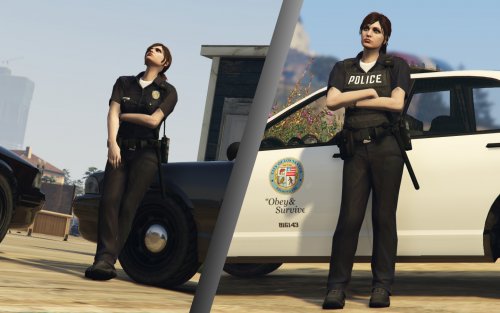 This her comment up above The EUP menu, I'm assuming will not assign the correct files relating to my mod. What I intended is a bit more clumsy unfortunately where you'd use a model switcher to switch to the MP Freemode F model then flick through the models clothes and textures to make the outfits possibly saving them for future use. I'm needing to get around to making this an easier install. At this point there's also some conflicts with EUP too.
- 45 comments
- 8 reviews
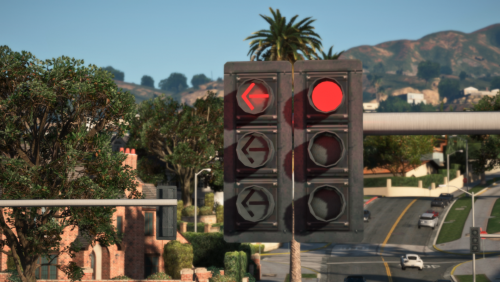 Absolutely awesome! Changes the look and feel of the streets. 4 Stars because i can walk into them and knock it down lol. @loleikz I think you should google "traffic signal poles" as they are quite common world wide.
- 53 comments
- 11 reviews
Try deleting your character and creating a new oneIf you have Emergency Strobes installed I do not believe it works on GtaV 1.0.1604 / RPH 0.64+ Try taking that out and see if it fixes your problem




.thumb.png.5f272fb01ba254065ffe7380fb7b9758_LI.jpg.9608e1110accbb1b242438630776d344.jpg)
