




bong
Members
-
Joined
-
Last visited
Everything posted by bong
-
Here are a couple of basic things to check: Ensure that you're using the latest versions of EUP Menu and its dependencies Verify that all of your EUP configurations (located in your Grand Theft Auto V\plugins\EUP directory) are formatted correctly. If you've made any recent changes to your EUP configuration or any of the assets referenced within the config file, be sure to also revert your changes or do a complete clean install of both EUP Menu and its dependencies. I hope this helps!
-
Based on your logs it looks like the plugin Megaphone UI 2.0 is causing this crash. Unfortunately, it looks like the plugin hasn't been updated since 2020 and is no longer supported. Please remove this plugin from your LSPDFR installation and let us know if this resolves the issue for you 🙂
-
Essentially the thing you need to remember is that your launcher will always look for the directory you initially specified when installing it ("Grand Theft Auto V" in most cases). This means you can rename your existing GTA V folder to something else (Example: Grand Theft Auto V - LSPDFR) and install a fresh copy of GTA V with no mods, which will create a new "Grand Theft Auto V" folder. You can then change the name of whichever version you want to play back to Grand Theft Auto V and that will be the version the launcher loads when opening the game. Here's a video tutorial which demonstrates this: It's also important to note that you cannot play online with RPH. To play vanilla GTA online you must have a completely unmodded Grand Theft Auto V. With all of this said, please be careful with this and remember what @Yasd said: Good luck!
-
Please ensure you have all of the following dependencies installed correctly: Gameconfig Packfile Limit Adjuster Heap Adjuster Let us know if this fixes the issue for you 🙂
-
Please update your installation of MCCallouts to the latest version and let us know if this fixes the issue for you 🙂
-
Your logs suggest an issue with DirectX. Please start by ensuring that your graphics card drivers are completely up to date and let us know if this resolves the issue for you 🙂
-
Open lspdfr.ini (located at GTA V/lspdfr/lspdfr.ini) and change Main.PreloadAllModels to false. Some folks have also had luck with this "patch": fwBoxStreamerVariable and decals limit patch Let us know if this resolves the issue for you 🙂
-
Your plugin Police Grappler is either outdated or misconfigured: Please remove this mod and confirm if you're able to play without crashes.
-
Please temporarily rename your mods folder to _mods and confirm if you're able to load the game with no mods. If so, you have one or more outdated/incompatible mods that must be removed. Also, be sure that you have the latest versions of Gameconfig, Heap Adjuster, and Packfile Adjuster resources installed.
-
Please update your version of SWLCallouts to the latest version. You're using version 0.4.5.6, the latest version as of the time of this post is 0.5.0.1. Let us know if this resolves your issue 🙂
-
Please double check the configuration within your lspdfr/data/duty_selection.xml file: I suggest reviewing this and other modified config files in your lspdfr/data/ directory and subdirectories and ensure that you're updating all necessary files when updating your LSPDFR install.
-
This appears to be an issue with one of your callout plugins. Based on the logs, MCCallouts was running at the time of the crash. Note that "CalloutManager" is not referencing a plugin/mod but rather part of LSPDFR's core engine, indicating that LSPDFR had an issue while handling a task related to a callout plugin. Specifically, the crash occurred immediately after MCCallouts spawned the peds and vehicles: Additionally, based on the logs and given that you're using the latest version of MCCallouts, I suggest confirming that all of the vehicle and ped models configured for MCCallouts are working correctly. For MCCallouts, these settings are are configured within the plugins/lspdfr/MCCallouts.ini file. If that doesn't work, I recommend temporarily removing all of your callout scripts by moving them out of your games plugins/ directory. If you're able to play with no issues for some time, we can confirm there is an issue with one or more callouts. From there, add your callout plugins back one by one to determine which plugin is causing the crash. I hope this helps!
-
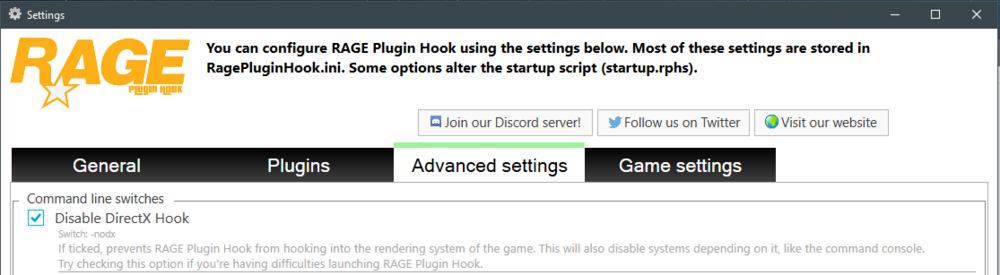
Based on your log file this appears to be a DirectX error: I suggest following these steps to rule out DirectX as an issue: Open RPH settings by holding shift while double clicking the RagePluginHook.exe icon Navigate to Advanced Settings Select Disable DirectX Hook Here's what it looks like when configured correctly: After that, click Save and launch and confirm whether or not your game loads correctly. If it does, I would recommend reinstalling your graphics card drivers with the latest version. Note: This is only a troubleshooting step and you should not attempt to play LSPDFR with the DirectX hook disabled long-term as it also disables other functionality in the game. I hope this helps!
-
This error is likely being caused by an incompatible or outdated plugin. I suggest disabling all of your plugins and launching GTA/LSPDFR again to see if you're able to load in successfully. If so, you should go through each of your plugins to ensure that they're all updated and compatible with your other scripts. I hope this helps!
-
Hi there 🙂 Please temporarily remove YobbinCallouts from your LSPDFR plugins folder and let me know if this fixes the issue for you.
-
Glad to hear that this resolves the issue for you! If you'd like to continue using RiskierTrafficStops, I recommend reaching out to the developer via the Discord server they list on the plugin release page, as the error suggests a potential issue with the script itself. For reference, here's the exact portion of your RagePluginHook.log file which caused your crash: [12/1/2024 7:44:40 PM.615] LSPD First Response: [12/1/2024 7:44:40 PM.615] LSPD First Response: ============================== [12/1/2024 7:44:40 PM.615] LSPD First Response: UNHANDLED EXCEPTION DURING GAME FIBER TICK [12/1/2024 7:44:40 PM.615] LSPD First Response: ------------------------------ [12/1/2024 7:44:40 PM.615] LSPD First Response: Origin: Game fiber "<UNNAMED THREAD>". [12/1/2024 7:44:40 PM.615] LSPD First Response: ------------------------------ [12/1/2024 7:44:40 PM.615] LSPD First Response: Exception type: System.FormatException [12/1/2024 7:44:40 PM.615] LSPD First Response: Exception message: Input string was not in a correct format. [12/1/2024 7:44:40 PM.615] LSPD First Response: ------------------------------ [12/1/2024 7:44:40 PM.615] LSPD First Response: Inner exceptions: [12/1/2024 7:44:40 PM.615] LSPD First Response: ------------------------------ [12/1/2024 7:44:40 PM.615] LSPD First Response: Stack trace: [12/1/2024 7:44:40 PM.615] LSPD First Response: at System.Number.StringToNumber(String str, NumberStyles options, NumberBuffer& number, NumberFormatInfo info, Boolean parseDecimal) [12/1/2024 7:44:40 PM.615] at System.Number.ParseInt32(String s, NumberStyles style, NumberFormatInfo info) [12/1/2024 7:44:40 PM.615] at Rage.InitializationFile.ReadInt32(String sectionName, String keyName, Int32 defaultValue) [12/1/2024 7:44:40 PM.615] at RiskierTrafficStops.Engine.InternalSystems.Settings.IniFileSetup() in C:\Users\steve\Desktop\Desktop Files\Coding\Projects\RiskierTrafficStops\RiskierTrafficStops\Engine\InternalSystems\Settings.cs:line 44 [12/1/2024 7:44:40 PM.615] at RiskierTrafficStops.Main.<>c.<Functions_OnOnDutyStateChanged>b__2_0() in C:\Users\steve\Desktop\Desktop Files\Coding\Projects\RiskierTrafficStops\RiskierTrafficStops\Main.cs:line 26 [12/1/2024 7:44:40 PM.615] at Rage.GameFiber.Main() [12/1/2024 7:44:40 PM.615] LSPD First Response: ============================== [12/1/2024 7:44:40 PM.615] LSPD First Response: [12/1/2024 7:44:40 PM.622] LSPD First Response: [FATAL] Forced termination [12/1/2024 7:44:40 PM.624] LSPD First Response: [TRACE] Released 0 entities from DefaultContentManager [12/1/2024 7:44:42 PM.870] LSPD First Response: [INFO] LSPDFR has shut down [12/1/2024 7:44:42 PM.870] LSPD First Response: GameFiber::Main() - Critical error on fiber shutdown: TLS no longer matches initial TLS Best of luck!
-
This issue could indicate an issue with your Windows installation, GTA V, LSPDFR or RPH (as confirmed by Cyan in a previous post). Others who have reported this issue have seen success in reinstalling Windows, however you may want to start by reinstalling LSPDFR/RPH before taking more extreme measures. Also, per Cyan you may also want to check this this: Sorry that this wasn't much help, but I hope it helps points you in the right direction!
-
Hi there! First, please be sure that you're reading the documentation for all plugins you're installing to ensure that you're installing everything correctly, including all necessary dependencies. If this doesn't help, please reply back to this thread with a crash log or your RagePluginHook.log file from your Grand Theft Auto V folder to allow us to troubleshoot this further. 🙂 thanks!
-
Hey there! Please try temporarily removing the RiskierTrafficStops plugin from your LSPDFR setup and let me know if this resolves the issue for you 🙂
-
This doesn't appear to be an actual crash report. When GTA crashes, RPH should give you the option to create a crash report. Could you please post that here to allow us to help troubleshoot this further? Thanks!
-
Make sure that the gameconfig.xml file you're using is a newer version; it seems that the latest title update broke some of the older custom gameconfigs released out there. Here's the one I used after updating my LSPDFR install:
-
My pleasure! We've all been in your shoes at some point, and LSPDFR crashes are never fun. The errors in your new RPH log indicate some issues with RPH itself and/or your LSPDFR installation. Make sure you've updated all of your core files including RagePluginHook, LSPDFR 0.4.9 7874 and ScriptHook V, assuming you use it. Let me know if this helps! If not, we may need to dig deeper into some other logs 🙂
-
Start by ensuring that your plugins are updated. For example, your copy of UltimateBackup is likely out of date as you're missing the Localization.ini file included with the latest release, which looks like the cause of your crashes when using the ForceDuty command. Additionally, you may want to clear the contents of the commandline.txt file in your GTA V main directory as you're sending startup arguments twice. Let us know if this fixes your issue! 🙂
-
Hi - Please follow my instructions here and let us know if this fixes your issue:
-
I use Menyoo as well and was unable to get RPH or vanilla GTA V to launch even with the patch applied. Removing the LML files from my installation resolved this issue. Just wanted to add this update for the sake of bug fixing.




