



Jersedevl
Members
-
Joined
-
Last visited
Everything posted by Jersedevl
-
Well even if that is the case that particular "general" vehicles.meta for that path really doesn't have anything to do with addon cars that I'm messing with at the moment so it's unlikely that could be related I don't think. Appreciate you trying to help me though <3 !!
-
So I tried removing all addons and loading the game, only default DLC cars in the rpf left and it turns out none of the cars (jester2,ratloader2,etc...) from mpchristmas2 are spawning for some reason and obviously I didn't delete any default lines for those cars at all for the addons I simply added more lines belonging to the addon cars.
-
Replaced the gameconfig with the one provided same result however game runs okay but addon cars can't be spawn excepting for the same 2 which is weird because i dont understand why those 2 particular cars can spawn and the rest can't when they are sharing the same folder... From what I read in forums is the same thing over and over that the game somehow isn't able to locate the vehicles in question but i mean I know for a fact I'm not misspelling the vehicles' model name so I got no clue my friend #feelsbadman
-
Kal on previous occassions that I encountered issues with the game with your help and some fiddling I have been able to point out what my issues were but this time around I legitimately have no clue what is making my game behave this way. Keep in mind I only have 9 or 10 vehicles as addons, every single one is in the same DLCpack(mpchristmas2), both carvars and vehicle.meta files are customized properly to fit the addon cars, the game was totally ok up until 48hrs ago when I added another car at the time of spawning it with vehiclename it did but then the other addons were no longer being recognized by the game so at this very moment all replacement cars for default slots load no problem but the game for some reason isn't finding the cars in the DLCpack not all of them at least, 2 out of the 10 do spawn whereas the rest will just say "invalid model". I did a fresh install this afternoon and nothing also tried switching the DLCpack from mpchristmas2 to something else like mpluxe2 with the proper steps and same result I'm pulling my hair atm.
-
Someone? Any ideas?
-
Also forgot to mention that all of my addon vehicles are located and installed in the same dlc folder "mpchristmas2" I'm talking about 9 addon cars and they were working just fine before the last 2 cars were included, strangely enough out of all 9 vehicles 3 of them actually will spawn no problems but the other 6 are still showing "INVALID MODEL" after trying to spawn them...
-
So I added 2 more addon vehicles to my game tonight and one of them wasn't ELS the rest of my fleet is fully ELS but I ended up not liking the NON_ELS car and removed it from my game completely after to my surprise I was trying to spawn my other addon cars with simple trainer by "vehiclename" and it said "INVALID VEHICLE", even in my save/load car menu the ones I had saved read "carnotfound" so I really don't know what to do because obviously I removed the entry lines of the NON_ELS car from my carvariations and vehicles.meta and still the other cars aren't working anymore and here I am stuck... Can anyone point me to what I did wrong or what I should try to do?
-
Hello guys around 4:45pm EST I will be streaming how to edit or make skins for your police fleet whenever you want for LSPDFR use, so if you're interested in knowing just how to get into the basics of handling texture packs for your cars then you're welcome to come and watch! Programs you will need to work with textures are: Adobe Photoshop CC or Paint.NET Texture packs to work with or you can make one yourself with whatever elements you like I'll see you soon www.twitch.tv/criimsonlive
-
More emoticons or riot.... kk a protest... a loud disagreement? I swear it wasn't my idea Kallus made me say it!!!!
-
Who is this Kallus guy you're talking about? Ohhhhh that one guy that is a walking mod-encyclopedia? Right... Dude on a serious note you're ridiculously useful and helpful much love!! BTW yeah don't act like you didn't appear on twitch chat in a cop video on youtube because I spotted you LMAOO ( mods reading this please add more emoticons its a MUST)!!
-
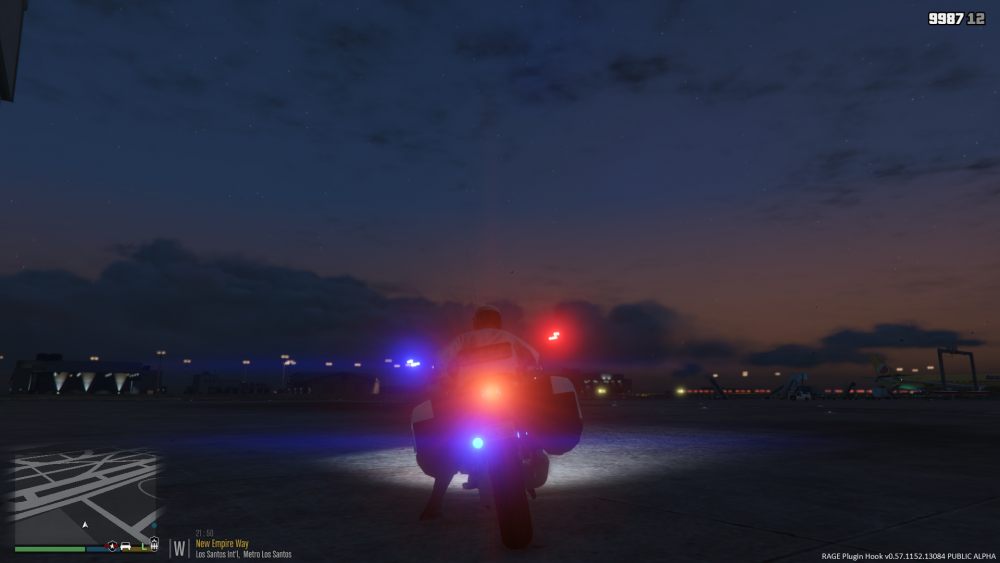
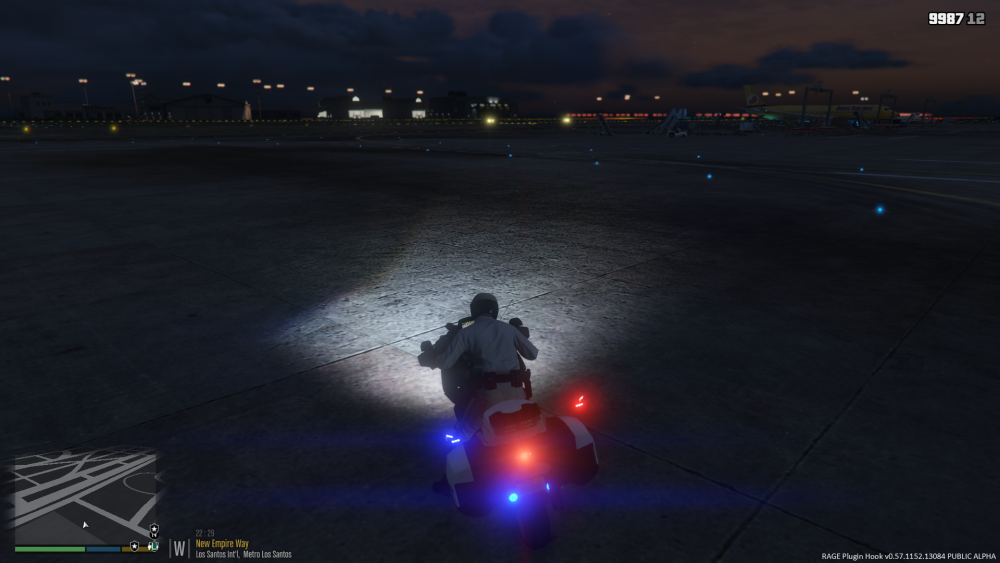
So idk how or when but just noticed the lights of my bike aren't where they're supposed to be as they were before not sure if it is an ELS related issue but everything with the bike works fine, the driver seats properly and siren is ok and lights turn on/off at command only thing is this weird glitch (floating tail emergency lights LOL):
-
Indeed buddy! I have never been a patient person but ever since I chose to learn how to mod GTA I became a VERY patient person LMAO... Amount of times this requires to get this running just right ugh!!! Testing back and forth with mods and especially when a new patch comes out? Yeah dude 110% patience needed to mod
-
Awesome thank you so much I really want to add that extra layer of variety to my game and most definitely would like different vehicles with different liveries just like you see in the real world I'll look into these scripts and check out how they work first minute I feel stuck I'll comeback for help!
-
Ok sorry if title is hard to understand I'm not sure how to go about this but does anyone know if there's an actual way for me to change the game settings so that I can modify which vehicles spawn based on my location? What I'm trying to do or what I'd like to do at least is kinda have different addon cars with different liveries such as paleto bay or blaine county sheriff department cars spawn in those designated areas so I want to sort of name uniquely each model and sorta make the game read these models and spawn them instead of the generic police slots it has, that being said does anybody know if this is possible?
-
It turns out that this particular model did have a special meta entry line so I just went to the model folder itself and copy pasted it where it belongs. Everything is up and running thank you so much you're awesome! Lowkey you need a raise just sayin
-
Once again the error got the best of me and didn't think of the possibilities here thanks you're so patient LOL. NOPE you are absolutely right crash is happening only with POLICE6 the other ones are spawning just FINE...
-
I did just switched all models to mpchristmas2 and copy pasted the addon entries for carvars and meta in that DLC's files so no i dont have the default slots entries in either one but the game still crashing upon addon vehicle spawn.
-
Alright will do and you said spawning addons meant a problem with the carvar or meta of that specific DLC where the models are located so basically I have the default files of mpvalentines2 as i moved everything there, added entry lines for the 4 addon cars in meta and carvars and the models in mpvalentines.rpf, my replacements for default slots only have their window tint value changed in the meta of the path you instructed before so I don't know what exactly in the carvar or meta of the DLC is making the vehicles crash the game.
-
I researched abit and came across a page where it said that if certains scenarios were happening edit some lines with less values and stuff so i tried that but crashing came back after a bit so i just opted to get a gameconfig.xml from someone that was running the latest version of the game and so far its been working for me as long as I dont use the addon cars everything works okay.
-
@Hystery man how can I solve my game crashing after trying to spawn an addon-vehicle? Also I gotta say the location is totally fine as it was working well before the latest update on the game, so I'm assuming it broke my gameconfig.xml but I still don't know after stabilizing my gameconfig why just manually spawning the car crashes my game completely and this only happens with these standalone cars not the default replacement ones I have.
-
Kallus so I edited my gameconfig.xml to the point where I have all of my cars in place now where addons are in a dlc folder and all the replacements in the latest patchday game isnt crashing at launch anymore however when I do try to spawn any of the addon cars then the crash happens.
-
So after a long time testing and testing I narrowed it down to this so far: -Latest patch of the game with latest RPH and latest SHV will run with all replacement models in the latest patchday however if I try to modify the default vehicles.meta in update / update.rpf/ common / data / levels / gta5 meaning a change in size of this file as of right now will trigger crashing again so models will load and game wont crash if the meta is the default. -Same scenario with my modified carvariations and vehicles.meta for the addons in "mpchristmas2" with no addon-car models in its rpf yet will still trigger crashing. So at this point man I honestly have no idea what happened in the latest update of the game that the minimal change in carvars or meta files will singlehandedly cause crashing after RPH starts loading I'm at the RPH discord and the amount of people with the same issue is nuts!
-
Got a question so in total i got 4 addon cars so all 4 can fit in mpchristmas2 DLC for sure now once i'm done with their carvars and vehicles.meta file entries where do I go to change the entries of the models I'm using as replacement of the default ones? I guess my actual question would be if I decide to put my default slot replacement models inside a DLC pack such as mpchristmas do I need to edit the meta of the default slot vehicles in this DLC pack or can I leave it as it is? I know for addon cars for sure because they won't exist otherwise but for the replacements can I just leave the files in there and call it a night?
-
Right! Okay will do that because my vehicles.meta in comparison to the base one and other files of the like is really big went from like 400KB to 1676KB so yeah that might be an issue.
-
Say I choose mpchristmas2 and another dlc folder and say what I put inside is 2 addon cars in each one, I gotta modify the carvars of both folders to match my addon1 and addon3 for example? Also is there any way to make my vehicles.meta smaller?



