Skip to content
View in the app

A better way to browse. Learn more.

LCPDFR.com

A full-screen app on your home screen with push notifications, badges and more.

To install this app on iOS and iPadOS
  1. Tap the Share icon in Safari
  2. Scroll the menu and tap Add to Home Screen.
  3. Tap Add in the top-right corner.
To install this app on Android
  1. Tap the 3-dot menu (⋮) in the top-right corner of the browser.
  2. Tap Add to Home screen or Install app.
  3. Confirm by tapping Install.

Epic Gaming

Members
  • Joined

  • Last visited

  1.    craio2lk reacted to a review on a file: [ELS][REPLACE] Arizona Dept. Of Public Safety
  2.    christian.smithk reacted to a comment on a file: [ELS] Utah Highway Patrol Dodge Charger
  3.    Cop7847 reacted to a comment on a file: ReportsPlus - External MDT [NEW Custom Reports]
  4.    andreacw reacted to a comment on a file: ReportsPlus - External MDT [NEW Custom Reports]
  5. Anthony96 started following Epic Gaming
  6.    Zhivko reacted to a comment on a file: ReportsPlus - External MDT [NEW Custom Reports]
  7.    Klim325 reacted to a comment on a file: ReportsPlus - External MDT [NEW Custom Reports]
  8. TheG.O.A.T started following Epic Gaming
  9.    Unaarius reacted to a comment on a file: ReportsPlus - External MDT [NEW Custom Reports]
  10. First off, I love this. I have always wanted something like this for LSPDFR. Throughout my testing, I noticed a few things that could be improved and I hope you will consider. But all in all, I really like where this is heading, and can't wait to see where it goes in the future. Definitely will be using on my patrols! Bugs: No option to have multiple IDs up or switch between two at once. If I stop a car with two people in it, it overrides each other's IDs. On the citations, I can't seem to get it to submit. It always says "please fill out the form" but doesn't highlight anything that needs to be fixed Suggestions: Full dark mode (the main screen under shift info and logs, not just the side and top bar) Department/Area customization - a config file would be amazing to customize the department names, ranks, and specialty units for non-lore use. Separating the lookup tab into two separate options rather than a dropdown for easier access. Ability to copy driver/vehicle info from the search to a citation or report directly. Ability to add notes or clear a call in the callout manager. An option to auto-log your calls or traffic stops and the ability to edit them.
  11. Is this supposed to work on traffic stops and just running plates on the road? Or callouts only
  12. Epic Gaming     Responded to a WreckedVehicle in Paleto Forest, Paleto Blvd
  13. Epic Gaming     Finished responding to a [UC] Reports of an Armed Clown in Paleto Forest, Paleto Blvd
  14. Epic Gaming     Finished responding to a [UC] Warrant for Arrest in Paleto Forest, Paleto Blvd
  15. Epic Gaming     Finished responding to a [UC] Traffic Stop Backup Required in Paleto Forest, Paleto Blvd
  16. Epic Gaming     Finished responding to a [UC] Reports of a Stolen Emergency Vehicle (2) in Paleto Forest, Paleto Blvd
  17. Epic Gaming     Finished responding to a [UC] Stolen Bus Incident in Paleto Forest, Paleto Blvd
  18. Epic Gaming     Responded to a Manslaughter in Cassidy Creek, Cassidy Trail
  19. Epic Gaming     Finished responding to a IllegalCamping in Cassidy Creek, Cassidy Trail
  20. Epic Gaming     Responded to a IllegalCamping in Paleto Bay, Paleto Blvd
  21. Epic Gaming     Performed a traffic stop on a Graphite Black Bison with registration EA8 G7O in Paleto Bay, Pyrite Ave
  22. Epic Gaming     Reported a PC148 in Rancho, Little Bighorn Ave
  23. Epic Gaming     Performed a traffic stop on a Dark Silver Glendale with registration SK5 H9A in Rancho, Little Bighorn Ave
  24. Epic Gaming     Performed a traffic stop on a Dark Silver Glendale with registration SK5 H9A in Rancho, Macdonald St
  25. Epic Gaming     Performed a traffic stop on a Dark Silver Glendale with registration SK5 H9A in Rancho, Macdonald St
  26. Epic Gaming     Performed a traffic stop on a Ice White Taco Van with registration OK6 R8U in La Mesa, Capital Blvd
  27. Epic Gaming     Performed a traffic stop on a Black Cavalcade with registration GN7 M9G in La Mesa, Popular St
  28. Epic Gaming     Performed a traffic stop on a Cabernet Red Cavalcade with registration TZ1 A4X in La Mesa, Popular St
  29. Epic Gaming     Reported a PC503 in Cypress Flats, Popular St
  30. Epic Gaming     Performed a traffic stop on a Matte Black Gauntlet with registration SI7 K1T in Cypress Flats, Popular St
  31. Epic Gaming     Finished responding to a Domestic Disturbance in Rancho, Jamestown St
  32. A fleet 2 would be awesome, I’ve got reference pictures if you need some
  33.    Epic Gaming reacted to a comment on a file: [ELS] Paleto Bay Police Pack
  34. Whenever I am on a traffic stop using the police computer, AI traffic goes crazy stopping in the road.. anyone else having this issue?
  35. Officer M. RICE started following Epic Gaming
  36. dayday1996 started following Epic Gaming
  37. MrMagoo7 started following Epic Gaming
  38. I don't understand why you think I would join your discord to download something advertised on this website. Especially providing a link in the download to download it somewhere else... Upload the file here
  39. There is plenty of free resources out there for some of the things I mentioned. All you have to do is look. I take "Real life vehicles, accurate lighting patterns" as your going for realism on the pack. Again it's just my feedback on the pack on how you could make it better and more realistic. If you want to use it that's great if not whatever, up to you.
    Since you claim this as a realistic and accurate Arizona DPS pack, I am going to review it as such. There are many discrepancies here between this pack and the real life cars. For starters with all the cars the lighting patterns are not completely accurate. Few issues with the valor patterns and pushbar patterns. Also AZDPS doesn't have vehicles with ALPRs on them. The interior of all the vehicles are also incorrect, wrong equipment, no window bars, etc... the wires also need some work. Below is a brief list of some of the other issues I noticed per car. Charger Marked - Wrong push bar and no siren speaker - Push bar lights and lighting placement incorrect - Wrong antennas and placement and spotlight - Wrong rims - Wrong rear bumper lights and placement Charger Slicktop - Same issues as marked charger - No pushbar IRL - Missing some lights Explorer - Wrong pushbar with wrong lights and no siren speaker, even if it was your missing the rubber - Wrong antennas and placement and spotlight - Wrong trunk lights and placement Tahoe - Wrong antennas and placement and spotlight - Correct pushbar, no siren speaker Taurus Marked - Wrong pushbar lights and no siren speaker - Wrong antennas and placement and spotlight Taurus Slicktop - Same issues as marked taurus - No rear bumper lights IRL I can tell there is some effort put into these but not enough. Hopefully you will take this feedback to improve the pack. There are more issues than listed above but I didn't want to write a book on other minor things.
  40. ocso911 started following Epic Gaming
  41. leopaul25 started following Epic Gaming
  42. baileyTheUkulele started following Epic Gaming
  43. Epic Gaming changed their profile photo
  44.    Epic Gaming reacted to a comment on a gallery image: LSPD - St. Charles MO
  45. DeputyJB started following Epic Gaming
  46. Awesome! They all look great, I may have to use them in some projects!
  47.    Epic Gaming reacted to a comment on a file: [ELS] Senora Valley Mini-Pack
  48. Looks great! You have come a long way from some of your earlier work keep it up! One thing I would like to point out is your ytd size, almost 15k kb is way to high, anything over 10k is way to high in my opinion. When you have a lot of cars spawned in one area with that high of file size texture loss will happen. I would try to keep that around 5-8k range if possible. To reduce this you can go through some of your textures and downsize them, a lot of them are 1k or 2k. For example the spotlight, radar, ready for the road emis, radio, ion textures, etc. don't need to be that high. Try to cut those in half and you will see that file size go down. Also if you know how you can use the ion texture from the ready for road texture to remove an unnecessary file. Hope that helps and keep up the great work man!
  49.    Epic Gaming reacted to a comment on a gallery image: Miami Dade
  50.    Epic Gaming reacted to a comment on a gallery image: Welcome to Mirror Park
  51. thanks! I could yes I think that would be a nice touch. I will post an update tomorrow
  52. There is a handling line in the download you can use, but I tested it in police3 without and it works just fine!
  53. thank you! I will see what I can do to fix that. It is just the lightbar textures that came with it. I will add one soon! Found out they just started using chargers irl
    • 4,793 downloads
    • Version 1.0.0
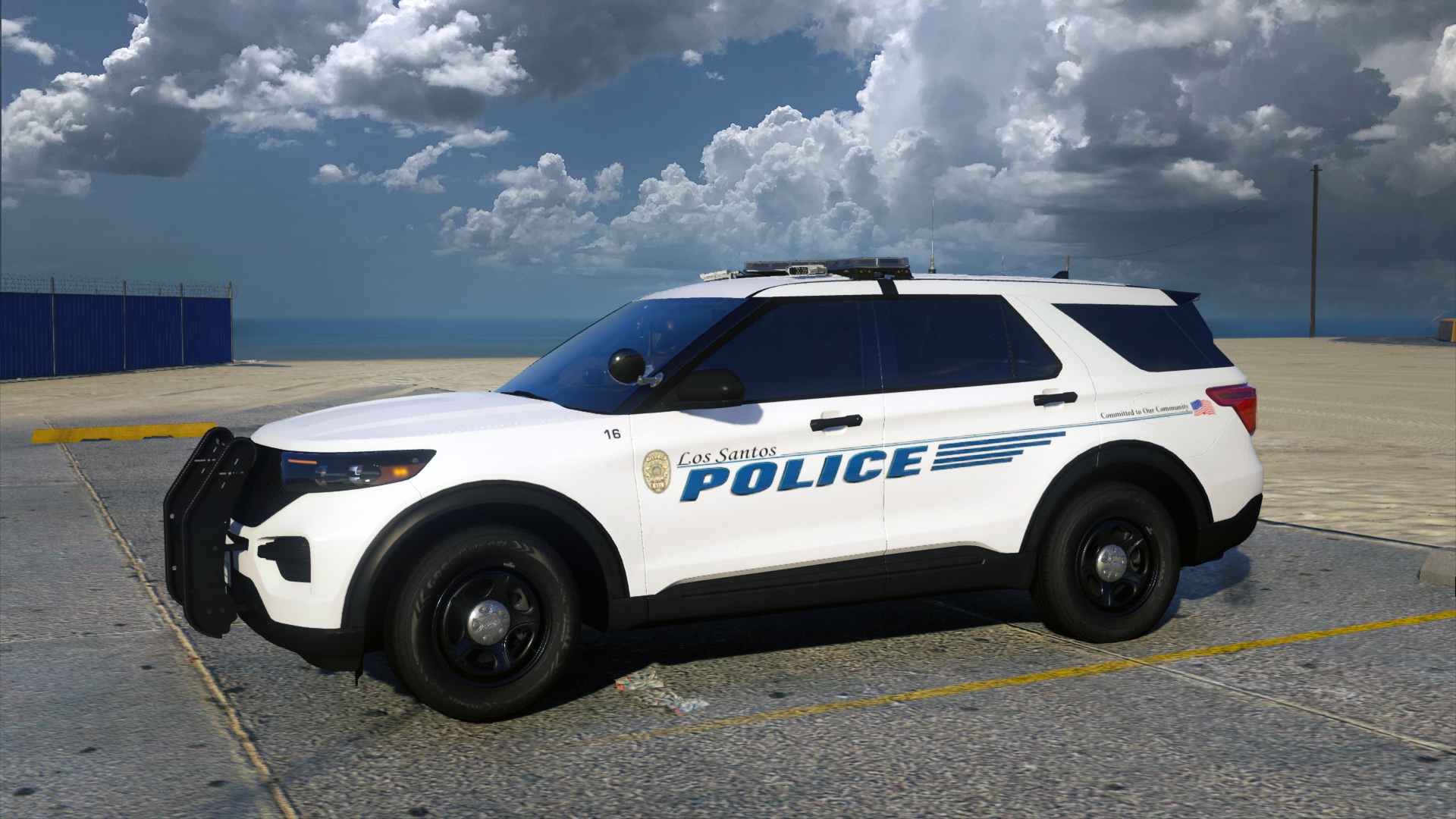
    Vespucci Beach Police Pack Inspired by Fort Walton Beach PD File Info: Welcome to my second pack! I present to you today my new Vespucci Beach PD Pack inspired by the Fort Walton Beach PD in Florida. I visited FWB a few years ago and saw their police cars and always wanted to make them. They are so unique design wise. I've been working on this pack for the past few weeks and really happy with the outcome! Hope you guys enjoy as well. Also using Kane's new explorer base, looking absolutely fantastic! You can expect some more releases soon! ____________________________________________________________________________________ What's Included: - 2016 Ford Explorer - 2016 Ford Taurus - 2011 CVPI (Older Design) Terms of Use: - FiveM use: Knock yourself out, no support will be given. - Ripping, reselling, re-uploading etc: No, I don't think so. - Feel free to use in screenshots or videos, just ensure you give credit to me. - Enjoy! Installation support will NOT be given on any of my files. If you don't already know how to install something, you at least know how to use google to find out how. There are hundreds of great tutorials out there for any issue your having. ____________________________________________________________________________________ Known Bugs: None (If you find any bugs, please report it in the comments section so I can get it fixed!)

Account

Navigation

Search

Search

Configure browser push notifications

Chrome (Android)
  1. Tap the lock icon next to the address bar.
  2. Tap Permissions → Notifications.
  3. Adjust your preference.
Chrome (Desktop)
  1. Click the padlock icon in the address bar.
  2. Select Site settings.
  3. Find Notifications and adjust your preference.