


gmantonz
Members
-
Joined
-
Last visited
Everything posted by gmantonz
-
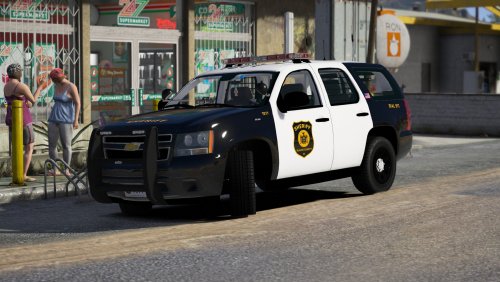 Really enjoyed this pack by @Jedahdiah, awesome job! The all red lights at the front reminded me of a time when Toronto Police had all reds (which wasn't all that too long ago). And I also love the strip of yellow color at the back, adds a nice pop 🙂 Keep it up!
- 18 comments
- 16 reviews
-
-

- 1
-
-
So is it Yanny or Laurel? 😄
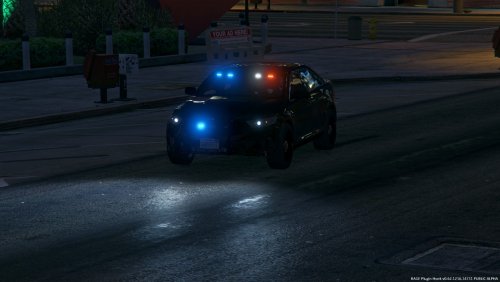 Great pack @krul! Had a ton of fun using both the Charger and the FPIU on my latest LSPDFR patrol 🙂 Looking forward to seeing the FPIS and the Tahoe as well, keep up the great job!
- 80 comments
- 28 reviews
-
-
- 1
-
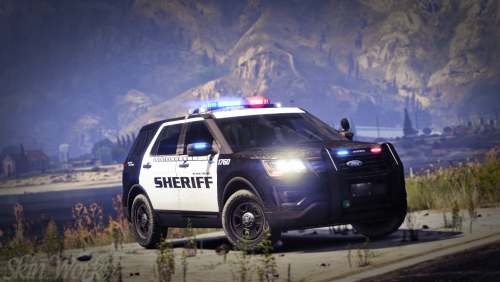 @harrison90 never disappoints and delivers another awesome looking texture pack! Great lore friendly pack based on real world cars with a lot of detail. Just put the textures on a Charger from the BCSO pack by @Maurice97 in my latest episode and it looked superb. Keep up the great work harrison!
- 6 comments
- 10 reviews
-
-
- 1
-
Changed up my format a bit now with my episodes moving forward :)Looks exciting!Check out this awesome Charger designed for me by @McGinlay Customs!Solving another case thanks to @Fiskey111's LS Noir mod!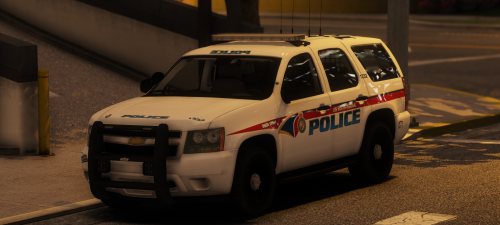 Noooooo @Maurice97 I just used the Chargers, FPIS and the FPIU yesterday on both an episode and a livestream and missed the Tahoe! I guess now I gotta put it into it's own dedicated LSPDFR episode :)
- 9 comments
- 10 reviews
-
-
- 1
-
Time for a Park Ranger patrol in Blaine County National Park! Great vehicle by @Torzzz! I used it in both a livestream and now an LSPDFR episode as a Park Ranger and had a lot of fun with it. The light set up on it is fantastic, I LOVED all of the lights. Those takedown lights, boy you better watch out! Lots of details on the model, and it handles good as well. Rating it 4/5 as I did see some LOD issues with the car, and it does have a lot of polys which is taxing on the game, but definitely a must try! Thanks for all your hard work bringing this to the game! Here is my full episode dedicated to the Jeep Wrangler Rubicon:
- 85 comments
- 40 reviews
-
-
- 1
-
Checking out the LS Noir Mod!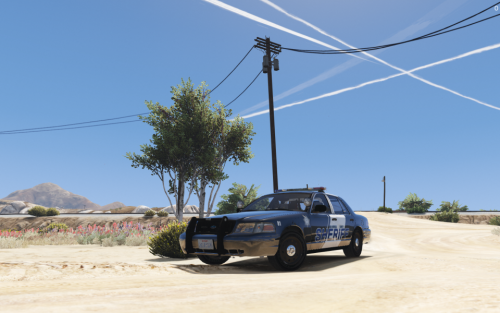 Hey @Thero, great job with this pack! I just used the F-150 on my patrol and it is a great vehicle, I absolutely love the lights! Looking forward to checking out some more cars from this pack as well as from the other ones you released, I'll probably end up doing more episodes and some livestreams as well. Keep up the great work! 5/5
- 24 comments
- 9 reviews
-
-
- 1
-
Checking out some of @OJdoesIt callouts in this episode!Account
Navigation
Search
Configure browser push notifications
Chrome (Android)
- Tap the lock icon next to the address bar.
- Tap Permissions → Notifications.
- Adjust your preference.
Chrome (Desktop)
- Click the padlock icon in the address bar.
- Select Site settings.
- Find Notifications and adjust your preference.
Safari (iOS 16.4+)
- Ensure the site is installed via Add to Home Screen.
- Open Settings App → Notifications.
- Find your app name and adjust your preference.
Safari (macOS)
- Go to Safari → Preferences.
- Click the Websites tab.
- Select Notifications in the sidebar.
- Find this website and adjust your preference.
Edge (Android)
- Tap the lock icon next to the address bar.
- Tap Permissions.
- Find Notifications and adjust your preference.
Edge (Desktop)
- Click the padlock icon in the address bar.
- Click Permissions for this site.
- Find Notifications and adjust your preference.
Firefox (Android)
- Go to Settings → Site permissions.
- Tap Notifications.
- Find this site in the list and adjust your preference.
Firefox (Desktop)
- Open Firefox Settings.
- Search for Notifications.
- Find this site in the list and adjust your preference.

