thecad
Members
-
Joined
-
Last visited
Everything posted by thecad
-
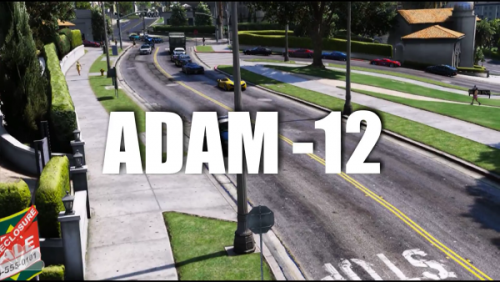 Neat idea, like how you have actor names shown just like in the actual Adam-12 opening credits. A couple of things though that I noticed. It seemed like the music was kinda low. Had to crank up the volume a bit just to hear it, higher than I use for game-play. Not sure if other's will have the same audio issue. Also, at the end the people on the sidewalk just glitch out. This is just a couple of the things I noticed. Overall, like the idea since I have Adam-12 loading screens.
- 6 comments
- 2 reviews
-
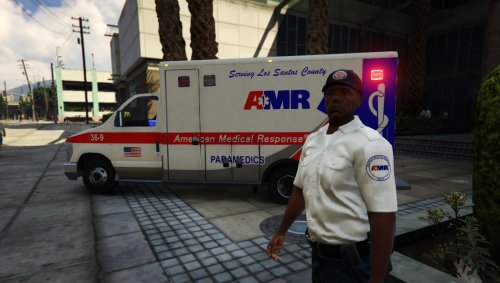 Looks and works great, plus goes real well with the AMR skin I have on my ambulances. Keep up the good work.
- 7 comments
- 2 reviews
-
-
 A mod I can't live without. Adds a bit of realism like both ambulance and firetruck showing up. Like that whoever shows up first will take the lead in doing CPR. This is a must have mod.
- 783 comments
- 86 reviews
-
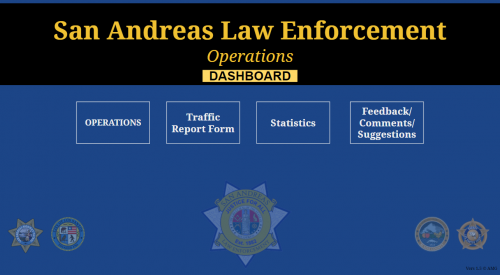 This is a great idea and I really love the statistics. I'm not in law enforcement but like @Troopercharles mentioned, I know that law enforcement uses statistics as a tool to focus on certain areas as needed. This adds a bit of realism to patrolling Los Santos. Another great thing are the operations, what a way to add more than just riding around waiting for callouts to pop up or looking for suspicious activities. Granted there are other things out there, like Paperwork Plus, that have forms and a database but this is something that is shared by the community. Keep up the good work @AMGnasher
- 11 comments
- 3 reviews
-
 What can I say, you can't do LSPDFR without EUP. At least that's my opinion. Love all the uniform options we have so far and adds to the immersion. I can't wait for the next update as I know it will even be better, as if it could get any better
- 2,349 comments
- 238 reviews
-
 It worked then stopped working and now works again . But since it started working again haven't had any problems. Weather is accurate and what I see out the window is what I see in game. Sometimes I can have a cloudy day and in game it will rain a little. But then where I live, I can have clouds and go 1/4 mile and it will be raining. So I can live with that. Like the message that pops up so you can see the conditions. Temperature seems to be accurate and is great tool to have so I can determine if my character needs to be in short or long sleeve or in a jacket. Overall a pretty good mod.
- 125 comments
- 11 reviews
-
 Works as advertised. Adds more realism and I don't have dead silence in between calls. It doesn't take long for the 27 lines to loop around when you are playing for a while so I hope that more lines will be added to help with it repeating. I have had some instances where the same chatter was repeated within 30 secs of each other but other than that I enjoy having this running when I am on patrol.
- 96 comments
- 33 reviews
-
 Been using this mod for a while and love it. Got tired of the uhhhhh, ummmm that the dispatch would use in darn near every call. Things sound so much more smoother and professional now with BDA. Keep up the good work and the updating as callouts are updated/created.
- 311 comments
- 39 reviews
-
-

- 1
-
-
 @BuddaRocks Not sure if you know, but the link to the blog isn't working. I got to it the long way, going to buddarocks.com/ and finding it that way. I notice that when I hover over the link in the description above the colon (:) is missing after the http. This is what the link is showing http//buddarocks.com/calling-all-cars-radiorealism-coming-soon-for-lspdfr/. Thought I would bring this to you attention.
- 30 comments
- 15 reviews
-
I use RadioRealism with BDA and it works great. I think RadioRealism is a great compliment to BDA IMO.
- 30 comments
- 15 reviews
-
-
- 1
-
-
These sounds are awesome . Nice and crisp and really enjoy the extra immersion. Can't wait for more updates and the final version. I will definitely keep an eye out for these updates and download them.
- 30 comments
- 15 reviews
-
-
- 1
-
-
FirstThirtyMinutes is the first YTuber that I came across featuring LSPDFR. I enjoy watching his videos and seeing the adventures he has patrolling Los Santos and the surrounding counties. Because of him I have found something that I can do different with GTAV. Who knows, I might make some YT videos myself. I may not get as big as FirstThirtyMinutes, but his videos have encouraged me to think about creating some myself. Keep up the good work and look forward to continue watching more of your videos.
-
oops, forgot the link....
-
Think I found the who needs 'em mod link, @Slendis is this the one you mentioned above?
-
Ok, this has been working great but now I can't even get the plugin to load. It's not showing up in my ragehook plugin list when I go into settings and not showing up when I type loadplugin into the console. Anyone else have this issue? Not sure if this has been abandoned or not but hopefully someone can help. I like this mod and kinda irritated that I'm having problems with it now.
- 125 comments
- 11 reviews
-
You put the gameconfig file in Grand Theft Auto V\mods\update\update.rpf\common\data\ I usually backup the original gameconfig file first in case I have issues with the downloaded one.
-
I agree with 0sc4r in that ELS is not very good with controllers. I use free my controller and that pretty much makes ELS usless with a controller. So, I just use Siren Mastery and use my controller to control the sirens and use the keyboard to control ELS lighting.
-
 Not sure if this is LSPDFR, LSPDFR+ or TrafficPolicer issue so please let me know if this is the wrong place to post. By looking at the img below, when I do a traffic stop I will get two traffic stop menus, one on top of the other. I have looked in all the .ini files and other areas and can not figure out what is causing this. Not sure if there is a setting some where that I am missing or if there is a mod conflict when I do a stop. When my character walks away the bottom, small menu disappears and the bigger one stays up. I can still use the menu when I walk away a bit, it's just when they double up that can be a problem at times. If anyone is able to help me I would greatly appreciate it.
- 3,646 comments
- 306 reviews
-
 Love this pack. Makes installing vehicles, weapons and peds a whole lot easier and painless. Had a bit of a learning curve on the .meta files but the tutorial videos you created helped a lot. Wish I would've found this before I added vehicles, would've saved me a lot of time and headache. I almost want to wipe out my GTAV folder and start over just so things are a bit more organized. Hmmm, now that I said that I think I'll do that.
- 267 comments
- 36 reviews
-
-
- 2
-
-
 This thing is great, like everyone else here, been wanting something like this for a while and hope you will be able to integrate it into computer+. Will have to run it on my laptop so I don't have to keep tabbing in and out of the game. Besides that, love what you have started and can't wait for all the other planned features to show up. So far everything is working well for me, keep up the good work.
- 79 comments
- 28 reviews
-
 I'm hoping someone can help me out here. I can not figure this out. When I open the Computer+ in game it opens fine and I can navigate and close with no problem. But when I open it up and click on the simple note pad and start typing certain letters like P (which I hear the sound when the game is paused) it sorta locks up the game. The mouse barely moves and I can't type any further. I have to go into task manager just so I can close the game. I have attached a copy of my log file that was generated right after the last instance. I hope someone can help me figure this out. I've looked on the previous posts and didn't see any answer to this problem. Thanks, RagePluginHook_14042017_184925.log
- 1,743 comments
- 172 reviews