


luisit094
Members
-
Joined
-
Last visited
Everything posted by luisit094
-
I'm not sure what it's called in Blender, but look for something called average normal's that should fix your black spots on the hood. Also post up a wireframe so we can see your topology, and make sure you add supporting edge loops to hold the shape when you smooth.
-
 anyone know why my primaries dont change pattern? secondaries and warnings do.
- 2,699 comments
- 240 reviews
-
 Anyone gonna help me out? Still haven't figured this out tried updating all scripthooks, deleting mods, plugin and scripts folders, tried different gameconfig files and im still stuck on the infinite loading screen. Would appreciate some help...
- 1,524 comments
- 85 reviews
-
Unfortunately every time i try to run i just get stuck on an infinite loading screen. Any fix?
- 1,524 comments
- 85 reviews
-
.thumb.jpg.61de846de400ca98f85d205992527de1.jpg) i keep getting an error when trying to install the latest version with the .oiv the log says that the specified line could not be found -------------------------------------------------------------------------------- Start: 10/11/2016 11:17:18 AM ThreadID: 9752 OS: Windows 10 Home (6.3.14393, 64-bit) Path: C:\Users\valle\AppData\Local\New Technology Studio\Apps\OpenIV\OpenIV.exe -------------------------------------------------------------------------------- [10/11/2016 11:17:18 AM] [9752] INFO -> Current GameId: "Five" [10/11/2016 11:17:18 AM] [9752] INFO -> Current GamePlatform: "pc" [10/11/2016 11:17:18 AM] [9752] INFO -> Current GamePath: "D:\Steam\steamapps\common\Grand Theft Auto V\" [10/11/2016 11:17:20 AM] [6572] INFO -> Loading package [10/11/2016 11:17:20 AM] [6572] INFO -> Loading package from "C:\Users\valle\AppData\Local\Temp\Rar$DRa0.618\OPENIV_PACKAGE_INSTALLER\Red&Blue_Lights.oiv" [10/11/2016 11:17:20 AM] [6572] INFO -> Package file was opened successfully [10/11/2016 11:17:20 AM] [6572] INFO -> Loading assembly from "assembly.xml" [10/11/2016 11:17:20 AM] [6572] INFO -> Reading assembly file "assembly.xml" [10/11/2016 11:17:20 AM] [6572] INFO -> Format version: "2.0" [10/11/2016 11:17:20 AM] [6572] INFO -> Package info class: "TPackageInfo20" [10/11/2016 11:17:20 AM] [6572] INFO -> Reading package info [10/11/2016 11:17:20 AM] [6572] INFO -> Package ID: "{6D501E5D-DD68-42CB-ACA4-A920DFC905E3}" [10/11/2016 11:17:20 AM] [6572] INFO -> Package target: "Five" [10/11/2016 11:17:20 AM] [6572] INFO -> Package name: "2014 DODGE CHARGER PURSUIT PACKAGE" [10/11/2016 11:17:20 AM] [6572] INFO -> Package version: "1.4" [10/11/2016 11:17:20 AM] [6572] INFO -> Package version tag: "Legacy" [10/11/2016 11:17:20 AM] [6572] INFO -> Package author: "Bxbugs123 / Trooper Dashie" [10/11/2016 11:17:20 AM] [6572] ERROR -> The "footerLink" attribute is not found in node "metadata>licence" [10/11/2016 11:17:20 AM] [6572] INFO -> Package contains changes for RPF archives [10/11/2016 11:17:20 AM] [6572] INFO -> Package can be installed into "mods" folder [10/11/2016 11:17:20 AM] [6572] INFO -> Load package icon from "icon.png" [10/11/2016 11:17:20 AM] [6572] INFO -> Package loaded successfully [10/11/2016 11:16:21 AM] [9752] INFO -> The "mods" folder installed [10/11/2016 11:16:21 AM] [9752] INFO -> Show install options dialog before installation [10/11/2016 11:17:24 AM] [3224] INFO -> Install options { Content Index: "-1" Use "mods" Folder: "True" } [10/11/2016 11:17:24 AM] [3224] INFO -> Package installer class: "TPackageInstaller20" [10/11/2016 11:17:24 AM] [3224] INFO -> Validate content files [10/11/2016 11:17:24 AM] [3224] INFO -> Validate content files SUCCEEDED [10/11/2016 11:17:24 AM] [3224] INFO -> Installation [10/11/2016 11:17:24 AM] [3224] INFO -> Process ARCHIVE "GTA V" with path "D:\Steam\steamapps\common\Grand Theft Auto V\" [10/11/2016 11:17:24 AM] [3224] INFO -> Creating ARCHIVE { Path: "mods\update\x64\dlcpacks\bxchgr2\dlc.rpf" Parent archive: "D:\Steam\steamapps\common\Grand Theft Auto V\" } [10/11/2016 11:17:24 AM] [3224] INFO -> Process ARCHIVE "dlc.rpf" with path "D:\Steam\steamapps\common\Grand Theft Auto V\mods\update\x64\dlcpacks\bxchgr2\dlc.rpf" [10/11/2016 11:17:24 AM] [3224] INFO -> Add file into archive { Source: "content/DATA_FILES/bxbugsconfig.xml" Destination: "bxbugsconfig.xml" Archive: "D:\Steam\steamapps\common\Grand Theft Auto V\mods\update\x64\dlcpacks\bxchgr2\dlc.rpf" } [10/11/2016 11:17:24 AM] [3224] INFO -> Add file into archive { Source: "content/DATA_FILES/setup2.xml" Destination: "setup2.xml" Archive: "D:\Steam\steamapps\common\Grand Theft Auto V\mods\update\x64\dlcpacks\bxchgr2\dlc.rpf" } [10/11/2016 11:17:24 AM] [3224] INFO -> Add file into archive { Source: "content/DATA_FILES/carcols.meta" Destination: "dash\carcols.meta" Archive: "D:\Steam\steamapps\common\Grand Theft Auto V\mods\update\x64\dlcpacks\bxchgr2\dlc.rpf" } [10/11/2016 11:17:24 AM] [3224] INFO -> Add file into archive { Source: "content/DATA_FILES/carvariations.meta" Destination: "dash\carvariations.meta" Archive: "D:\Steam\steamapps\common\Grand Theft Auto V\mods\update\x64\dlcpacks\bxchgr2\dlc.rpf" } [10/11/2016 11:17:24 AM] [3224] INFO -> Add file into archive { Source: "content/DATA_FILES/dlctext.meta" Destination: "dash\dlctext.meta" Archive: "D:\Steam\steamapps\common\Grand Theft Auto V\mods\update\x64\dlcpacks\bxchgr2\dlc.rpf" } [10/11/2016 11:17:24 AM] [3224] INFO -> Creating ARCHIVE { Path: "x64\levels\gta5\vehicles.rpf" Parent archive: "D:\Steam\steamapps\common\Grand Theft Auto V\mods\update\x64\dlcpacks\bxchgr2\dlc.rpf" } [10/11/2016 11:17:24 AM] [3224] INFO -> Process ARCHIVE "vehicles.rpf" with path "D:\Steam\steamapps\common\Grand Theft Auto V\mods\update\x64\dlcpacks\bxchgr2\dlc.rpf|x64\levels\gta5\vehicles.rpf" [10/11/2016 11:17:24 AM] [3224] INFO -> Add file into archive { Source: "content/VEHICLE_FILES/police2.yft" Destination: "police2.yft" Archive: "D:\Steam\steamapps\common\Grand Theft Auto V\mods\update\x64\dlcpacks\bxchgr2\dlc.rpf|x64\levels\gta5\vehicles.rpf" } [10/11/2016 11:17:24 AM] [3224] INFO -> Add file into archive { Source: "content/VEHICLE_FILES/police2_hi.yft" Destination: "police2_hi.yft" Archive: "D:\Steam\steamapps\common\Grand Theft Auto V\mods\update\x64\dlcpacks\bxchgr2\dlc.rpf|x64\levels\gta5\vehicles.rpf" } [10/11/2016 11:17:24 AM] [3224] INFO -> Add file into archive { Source: "content/VEHICLE_FILES/police2.ytd" Destination: "police2.ytd" Archive: "D:\Steam\steamapps\common\Grand Theft Auto V\mods\update\x64\dlcpacks\bxchgr2\dlc.rpf|x64\levels\gta5\vehicles.rpf" } [10/11/2016 11:17:24 AM] [3224] INFO -> Add file into archive { Source: "content/VEHICLE_FILES/police2+hi.ytd" Destination: "police2+hi.ytd" Archive: "D:\Steam\steamapps\common\Grand Theft Auto V\mods\update\x64\dlcpacks\bxchgr2\dlc.rpf|x64\levels\gta5\vehicles.rpf" } [10/11/2016 11:17:25 AM] [3224] INFO -> ARCHIVE "vehicles.rpf" processed [10/11/2016 11:17:25 AM] [3224] INFO -> ARCHIVE "dlc.rpf" processed [10/11/2016 11:17:25 AM] [3224] INFO -> Process ARCHIVE "update.rpf" with path "D:\Steam\steamapps\common\Grand Theft Auto V\mods\update\update.rpf" [10/11/2016 11:17:25 AM] [3224] INFO -> Process TEXT FILE "dlclist.xml" with path "common\data\dlclist.xml" in archive "D:\Steam\steamapps\common\Grand Theft Auto V\mods\update\update.rpf" [10/11/2016 11:17:25 AM] [3224] INFO -> Insert line into text file { New line: " <Item>dlcpacks:\bxchgr2\</Item>" Search for: "*/paths*" Search condition: "Mask" Insert: "Before" Line Index: "-1" } [10/11/2016 11:17:25 AM] [3224] ERROR -> The specified line is not found" [10/11/2016 11:17:25 AM] [3224] INFO -> TEXT FILE "dlclist.xml" processed [10/11/2016 11:17:25 AM] [3224] INFO -> ARCHIVE "update.rpf" processed [10/11/2016 11:17:25 AM] [3224] INFO -> ARCHIVE "GTA V" processed [10/11/2016 11:17:25 AM] [3224] INFO -> Installation FAILED fixed it, dlclist.xml in mod folder was completely empty so i threw in an original one and manually added in the line then ran the .oiv again just in case and it succeeded
i keep getting an error when trying to install the latest version with the .oiv the log says that the specified line could not be found -------------------------------------------------------------------------------- Start: 10/11/2016 11:17:18 AM ThreadID: 9752 OS: Windows 10 Home (6.3.14393, 64-bit) Path: C:\Users\valle\AppData\Local\New Technology Studio\Apps\OpenIV\OpenIV.exe -------------------------------------------------------------------------------- [10/11/2016 11:17:18 AM] [9752] INFO -> Current GameId: "Five" [10/11/2016 11:17:18 AM] [9752] INFO -> Current GamePlatform: "pc" [10/11/2016 11:17:18 AM] [9752] INFO -> Current GamePath: "D:\Steam\steamapps\common\Grand Theft Auto V\" [10/11/2016 11:17:20 AM] [6572] INFO -> Loading package [10/11/2016 11:17:20 AM] [6572] INFO -> Loading package from "C:\Users\valle\AppData\Local\Temp\Rar$DRa0.618\OPENIV_PACKAGE_INSTALLER\Red&Blue_Lights.oiv" [10/11/2016 11:17:20 AM] [6572] INFO -> Package file was opened successfully [10/11/2016 11:17:20 AM] [6572] INFO -> Loading assembly from "assembly.xml" [10/11/2016 11:17:20 AM] [6572] INFO -> Reading assembly file "assembly.xml" [10/11/2016 11:17:20 AM] [6572] INFO -> Format version: "2.0" [10/11/2016 11:17:20 AM] [6572] INFO -> Package info class: "TPackageInfo20" [10/11/2016 11:17:20 AM] [6572] INFO -> Reading package info [10/11/2016 11:17:20 AM] [6572] INFO -> Package ID: "{6D501E5D-DD68-42CB-ACA4-A920DFC905E3}" [10/11/2016 11:17:20 AM] [6572] INFO -> Package target: "Five" [10/11/2016 11:17:20 AM] [6572] INFO -> Package name: "2014 DODGE CHARGER PURSUIT PACKAGE" [10/11/2016 11:17:20 AM] [6572] INFO -> Package version: "1.4" [10/11/2016 11:17:20 AM] [6572] INFO -> Package version tag: "Legacy" [10/11/2016 11:17:20 AM] [6572] INFO -> Package author: "Bxbugs123 / Trooper Dashie" [10/11/2016 11:17:20 AM] [6572] ERROR -> The "footerLink" attribute is not found in node "metadata>licence" [10/11/2016 11:17:20 AM] [6572] INFO -> Package contains changes for RPF archives [10/11/2016 11:17:20 AM] [6572] INFO -> Package can be installed into "mods" folder [10/11/2016 11:17:20 AM] [6572] INFO -> Load package icon from "icon.png" [10/11/2016 11:17:20 AM] [6572] INFO -> Package loaded successfully [10/11/2016 11:16:21 AM] [9752] INFO -> The "mods" folder installed [10/11/2016 11:16:21 AM] [9752] INFO -> Show install options dialog before installation [10/11/2016 11:17:24 AM] [3224] INFO -> Install options { Content Index: "-1" Use "mods" Folder: "True" } [10/11/2016 11:17:24 AM] [3224] INFO -> Package installer class: "TPackageInstaller20" [10/11/2016 11:17:24 AM] [3224] INFO -> Validate content files [10/11/2016 11:17:24 AM] [3224] INFO -> Validate content files SUCCEEDED [10/11/2016 11:17:24 AM] [3224] INFO -> Installation [10/11/2016 11:17:24 AM] [3224] INFO -> Process ARCHIVE "GTA V" with path "D:\Steam\steamapps\common\Grand Theft Auto V\" [10/11/2016 11:17:24 AM] [3224] INFO -> Creating ARCHIVE { Path: "mods\update\x64\dlcpacks\bxchgr2\dlc.rpf" Parent archive: "D:\Steam\steamapps\common\Grand Theft Auto V\" } [10/11/2016 11:17:24 AM] [3224] INFO -> Process ARCHIVE "dlc.rpf" with path "D:\Steam\steamapps\common\Grand Theft Auto V\mods\update\x64\dlcpacks\bxchgr2\dlc.rpf" [10/11/2016 11:17:24 AM] [3224] INFO -> Add file into archive { Source: "content/DATA_FILES/bxbugsconfig.xml" Destination: "bxbugsconfig.xml" Archive: "D:\Steam\steamapps\common\Grand Theft Auto V\mods\update\x64\dlcpacks\bxchgr2\dlc.rpf" } [10/11/2016 11:17:24 AM] [3224] INFO -> Add file into archive { Source: "content/DATA_FILES/setup2.xml" Destination: "setup2.xml" Archive: "D:\Steam\steamapps\common\Grand Theft Auto V\mods\update\x64\dlcpacks\bxchgr2\dlc.rpf" } [10/11/2016 11:17:24 AM] [3224] INFO -> Add file into archive { Source: "content/DATA_FILES/carcols.meta" Destination: "dash\carcols.meta" Archive: "D:\Steam\steamapps\common\Grand Theft Auto V\mods\update\x64\dlcpacks\bxchgr2\dlc.rpf" } [10/11/2016 11:17:24 AM] [3224] INFO -> Add file into archive { Source: "content/DATA_FILES/carvariations.meta" Destination: "dash\carvariations.meta" Archive: "D:\Steam\steamapps\common\Grand Theft Auto V\mods\update\x64\dlcpacks\bxchgr2\dlc.rpf" } [10/11/2016 11:17:24 AM] [3224] INFO -> Add file into archive { Source: "content/DATA_FILES/dlctext.meta" Destination: "dash\dlctext.meta" Archive: "D:\Steam\steamapps\common\Grand Theft Auto V\mods\update\x64\dlcpacks\bxchgr2\dlc.rpf" } [10/11/2016 11:17:24 AM] [3224] INFO -> Creating ARCHIVE { Path: "x64\levels\gta5\vehicles.rpf" Parent archive: "D:\Steam\steamapps\common\Grand Theft Auto V\mods\update\x64\dlcpacks\bxchgr2\dlc.rpf" } [10/11/2016 11:17:24 AM] [3224] INFO -> Process ARCHIVE "vehicles.rpf" with path "D:\Steam\steamapps\common\Grand Theft Auto V\mods\update\x64\dlcpacks\bxchgr2\dlc.rpf|x64\levels\gta5\vehicles.rpf" [10/11/2016 11:17:24 AM] [3224] INFO -> Add file into archive { Source: "content/VEHICLE_FILES/police2.yft" Destination: "police2.yft" Archive: "D:\Steam\steamapps\common\Grand Theft Auto V\mods\update\x64\dlcpacks\bxchgr2\dlc.rpf|x64\levels\gta5\vehicles.rpf" } [10/11/2016 11:17:24 AM] [3224] INFO -> Add file into archive { Source: "content/VEHICLE_FILES/police2_hi.yft" Destination: "police2_hi.yft" Archive: "D:\Steam\steamapps\common\Grand Theft Auto V\mods\update\x64\dlcpacks\bxchgr2\dlc.rpf|x64\levels\gta5\vehicles.rpf" } [10/11/2016 11:17:24 AM] [3224] INFO -> Add file into archive { Source: "content/VEHICLE_FILES/police2.ytd" Destination: "police2.ytd" Archive: "D:\Steam\steamapps\common\Grand Theft Auto V\mods\update\x64\dlcpacks\bxchgr2\dlc.rpf|x64\levels\gta5\vehicles.rpf" } [10/11/2016 11:17:24 AM] [3224] INFO -> Add file into archive { Source: "content/VEHICLE_FILES/police2+hi.ytd" Destination: "police2+hi.ytd" Archive: "D:\Steam\steamapps\common\Grand Theft Auto V\mods\update\x64\dlcpacks\bxchgr2\dlc.rpf|x64\levels\gta5\vehicles.rpf" } [10/11/2016 11:17:25 AM] [3224] INFO -> ARCHIVE "vehicles.rpf" processed [10/11/2016 11:17:25 AM] [3224] INFO -> ARCHIVE "dlc.rpf" processed [10/11/2016 11:17:25 AM] [3224] INFO -> Process ARCHIVE "update.rpf" with path "D:\Steam\steamapps\common\Grand Theft Auto V\mods\update\update.rpf" [10/11/2016 11:17:25 AM] [3224] INFO -> Process TEXT FILE "dlclist.xml" with path "common\data\dlclist.xml" in archive "D:\Steam\steamapps\common\Grand Theft Auto V\mods\update\update.rpf" [10/11/2016 11:17:25 AM] [3224] INFO -> Insert line into text file { New line: " <Item>dlcpacks:\bxchgr2\</Item>" Search for: "*/paths*" Search condition: "Mask" Insert: "Before" Line Index: "-1" } [10/11/2016 11:17:25 AM] [3224] ERROR -> The specified line is not found" [10/11/2016 11:17:25 AM] [3224] INFO -> TEXT FILE "dlclist.xml" processed [10/11/2016 11:17:25 AM] [3224] INFO -> ARCHIVE "update.rpf" processed [10/11/2016 11:17:25 AM] [3224] INFO -> ARCHIVE "GTA V" processed [10/11/2016 11:17:25 AM] [3224] INFO -> Installation FAILED fixed it, dlclist.xml in mod folder was completely empty so i threw in an original one and manually added in the line then ran the .oiv again just in case and it succeeded- 265 comments
- 83 reviews
-
badass cant wait to have more fun with the military!
-
Yes i do, and nahimi 2 that comes pre installed on my msi gt72 6qe
-
 my front strobes (the ones on the ram bar) aren't working. Any tips on how to fix this?
- 95 comments
- 29 reviews
-
 Am i doing something wrong? I added a car under HWAYCAR, HWAYCAR2 and put in their vehicle model in he xml, but it wont work in game. Here is my .xml http://pastebin.com/jfPtn4FA nvm now its working i forgot to replace the.meta for the new cars i added
- 852 comments
- 108 reviews
-
Oops jus realized my previous comment was meant for siren mastery sorry. Anyway it can be deleted?
- 40 comments
- 16 reviews
-
Any news? i removed your plug in for now. I hope you're able to figure out why mine was crashing can't wait to use your mod!
-
Working flawlessly, but i'm getting speaker pop when i switch siren toggles. Any way i can fix this? (never had this issue before)
- 40 comments
- 16 reviews
-
Going to bed I hope you are able to figure something out i'm really anticipating this mod. Get some rest yourself! goodnight
-
yup actually saw this. [9/2/2016 12:28:22 AM.065] LSPD First Response: VocalDispatch: Beginning recognizing. [9/2/2016 12:28:22 AM.205] LSPD First Response: VocalDispatch: Recog_RecognizeCompleted error: System.Runtime.InteropServices.COMException (0x88890008): Internal error occurred in the recognition process. Just tried it again it didnt close to desktop when i pressed up on the dpad it played the tone signifying it was listening then i said "dispatch we have shots fired" nothing happened and i got a pop up saying speech not recognize repeat (or something along those lines)
-
My game closes to desktop and gets stuck on the rage pop up saying loading modules (right before it created the .log file) sometimes it works but wont recognize my voice, then it'll crash as stated before any help? Not sure how i can provide a lof with the other issue i stated. I really want to try this out
-
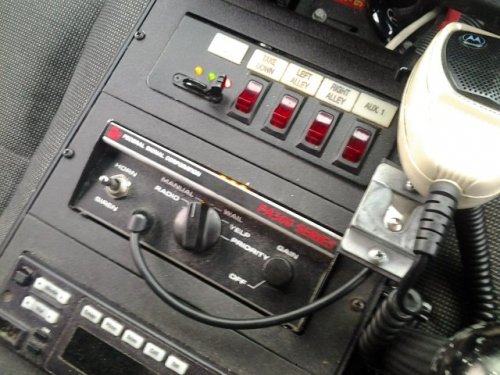 This is amazing! I live in Leominster, MA so these are the exact ones i hear on a daily, been trying to match these with american siren and fss but you beat them both thank you so much.
- 30 comments
- 10 reviews
-
-

- 1
-

.thumb.jpg.61de846de400ca98f85d205992527de1.jpg)

