


Creators: Due to background reprocessing of files, approvals and file security checks may be delayed. Thanks for your patience.


ASTTrprDillon95
Members
-
Joined
Everything posted by ASTTrprDillon95
-
Well I like it how it is.... Now I can keep track of my Battery Percentage, my memory space and blah blah blah EDIT: SO I updated my background Image again!!! MAN I LOVE THE Alaska State Troopers!!!! I believe I can do better with in game pictures.... This one is a little Fucked up..... Well I will keep updating this post.... don't get too excited about the car in there lol they are still a WIP EDIT 2: Decided to go with the AST Charger because it looks Badass....
-
So because I am in love with rainmeter I did this....... Man I love my Desktop... and I do have to thank Michael V. for this!!!
-
well I can tell you based on my 4 week research on LAPD car this is the most exact set up ever done.I myself have done a LAPD CVPI and this models here are the exact copy of what I did with the most realistic one done and released yet.
- 19 comments
- 34 reviews
-
I believe the problem is the mechanic mod is having conflicts with the police helper. The police helper has a mechanic it self.
-
Crashing can be caused by a lot of things..... Well for me, I have modded my whole game, replaced every so how civi car, used extremely high poly cars, ELS v6, beta testers' version of the PoliceHelper, METT, Towing script, Siren tool, policing script 2.2, LCPDFR 0.95 RC2 R2, indicator script with very rare crashing..... I can play IV for more than 4 hours straight with no crashing. Try using low poly models it would work.
-
You hav to download simple native trainer to do that
-
![[WIP] 2011 Alaska State Troopers Crown Victoria Police Interceptor(AST vehicle mega pack)](//s3-gallery.int-cdn.lcpdfrusercontent.com/gallery/album_628/sml_gallery_2982_628_29510.jpg) That I believe will come in v2 when I include the 2013 set ups. I pretty busy with school now and my 2 slicktop's I released need to be updated with the accurate interior set up. And the lighting set up as well
That I believe will come in v2 when I include the 2013 set ups. I pretty busy with school now and my 2 slicktop's I released need to be updated with the accurate interior set up. And the lighting set up as well -
One simple way is to have low poly models in game. With ENB and high poly models for you PC, it tends to eat up your FPS. I recommend you use models that are by Cj24 or Tim98 that are of low poly. Like the recent LCPD pack by Cj24. The vehicles are of low poly.
-
I believe it's your texture quality settings in game.
-
Wait I understand what you mean now lol. Your definition is off therefore the blurry vision. Press P to turn it off.
-
Hmm that is weird....
-
Ok. It also might be the quality of the texture Alright here is what Tim told me: the reason to that is that someparts of the car are mapped to a very small part. its like the back trunk.
-
I am not sure why. I will refer this to Tim for you. Might be the game itself having problems with the texture
-
There are few AST cars out there in the download section. Tim98 has few released. My mega pack which is crazy accurate, will be scheduled for release come March. I still have to study more videos to perfect the Dodge Charger and expedition. I may include the 2013 setup in version 2 of that pack. Just keep a look out in WIP album. I am currently doing up the marked charger to be as accurate as how accurate the CVPI is.
-
I believe this has been an ongoing issue lately. It might be that RGSC account being linked to GFWL but both accounts did not register each other. I have been having this issue for the pass month and of course I am disappointed with the way Rockstar Provided me support. Microsoft didnt even do shit.
-
Right click on the desktop to switch your graphic settings. Ensure that your settings are not set to fraphics but performanae
-
I am not sure whether I would do another variant of the marked units for the secondary set up. But I might do one.
-
So here is the list: 1. 2011 AST CVPI 2. 2011 AST Unmarked/Slicktop CVPI 3. 2009 AST CVPI 4. 2007 AST CVPI 5. 2007 AST Slicktop/unmarked CVPI 6. 2010 AST Dodge Charger 7. 2010 AST Unmarked/Slicktop Dodge Charger 8. 2010 AST Expedition 9. 2010 AST Slicktop K9 Expedition 10. 2010 AST Non-Slicktop K9 Expedition 11. 2010 AST Unmarked/Slicktop Expedition So I failed my math.... Lol it is supposed to be 11 cars
-
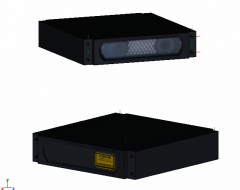 This is an ALPR or ANPR : Automated Licence Plate Reader OR Automated Number Plate Reader
 -
Hmmm it seems you need to change your settings out of the game first before changing it in game. I run the game fine on a regular laptop with a decent ENB. So for those who say laptops can't run this game properly you are wrong it runs fine. Just that laptop has its disadvantage for this game....
-
Firstly I can see that you are really excited about this and I really appreciate that. Secondly the bad news is because this is a huge pack, it will take awhile. I have 4 cars out of the 9 cars done and I still have a lot of videos to study to replicate the exact cars but you can expect it soon.
-
You still need permission to upload and share files that are from other authors.
-
Yes bro
-
Holy shit!!!! I am so getting this!!!! It fits in to an AST patrol!!!!
-
![[WIP] 2011 Alaska State Troopers Crown Victoria Police Interceptor(AST vehicle mega pack)](//s3-gallery.int-cdn.lcpdfrusercontent.com/gallery/album_628/sml_gallery_2982_628_3861.jpg)
From the album: WIP (ASTTrprDillon95)
After 4 weeks of me spending more than 15 days watch videos of the AST CVPI, I can finally say I have achieved something that I never expected that I would achieve. And that is to reproduce the most accurate Alaska State Troopers CVPI with the exact lighting set up, exact interior. The interior was the most difficult to reproduce as most videos I watched only show the exterior. I managed to get few videos showing the interior and reproduced it. The pack is 50% done and do look out for aVsg1rl's video of it on YouTube.

![[WIP] 2011 Alaska State Troopers Crown Victoria Police Interceptor(AST vehicle mega pack)](http://s3-gallery.int-cdn.lcpdfrusercontent.com/gallery/album_628/sml_gallery_2982_628_29510.jpg)
![[WIP] 2011 Alaska State Troopers Crown Victoria Police Interceptor(AST vehicle mega pack)](http://s3-gallery.int-cdn.lcpdfrusercontent.com/gallery/album_628/sml_gallery_2982_628_3861.jpg)
