t0y
Members
-
Joined
-
Last visited
Everything posted by t0y
-
 RIP maybe one day you can use ELS, it truly is great haha. And yea I like this livery too, I am going to probably use them on my Sandy Shores pack :d
 -
thanks, lol. Very old picture, I redid the lighting setup a lot and completely redid the interior as a part of my new PBPD pack.
-
 Photoshop is the way to go
 -
From the album: t0y's Projects
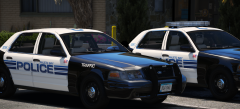
Yeah... So I added Steelie versions for both the CVPIs, but the hubcap versions will still be available in the downloads. I also added an all black livery for the slicktop vic so you can either go unmarked or Traffic.© t0y
-
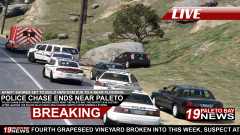 It's saving the planet though, so whose the real winner.
 -
From the album: Paleto Bay 19 News
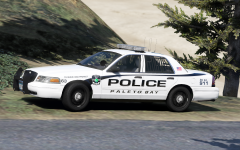
6/2/2017 (Paleto Bay, SA) Earlier today at around 10:00am in Sandy Shores, San Andreas the SSPD got reports of a 47 year man, now identified as John Brookfield going on an armed robbery spree, robbing 3 stores in the area in just under an hour. The police were able to get his license plate, and tracked him down on the edge of the Sandy Shores, as he was fleeing from his latest robbery of the 24/7 store. The Sandy Shores police initiated the pursuit, as he led them on the chase through the streets of Sandy Shores before heading onto the highway towards Paleto Bay. Another 15m in the Paleto Bay Police Department initiated their officers in the pursuit who used the P.I.T. (Pursuit Intervention Technique) Maneuver to end the pursuit. Brookfield crashed his Toyota Prius into a nearby rock where officers pulled him from the vehicle, placing him into custody. Through the extent of the pursuit and his actions leading up to the pursuit nobody, including the suspect was injured. All the stolen goods and money has been returned to it's respective businesses.© t0y
-
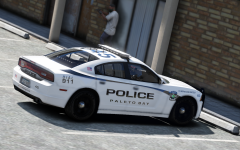 Ty :)
Ty :) -
no u. ;) And not really on the release plans, I am probably adding 1-2 more vehicles, then hopefully the beta testers will have figured out all the bugs by then, and I will be able to release when im done with those 2 but no 100% plans. Probably another week or two.
-
From the album: t0y's Projects
(The caption is a joke bc of Franklin killing someone in the background, get it? lol xd rawr)© t0y
-
-
-
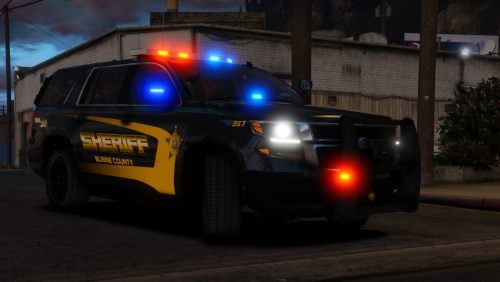 Is the red lighting an automatic ELS feature? :( Because ive been using the neon f dummies
- 38 comments
- 21 reviews
-
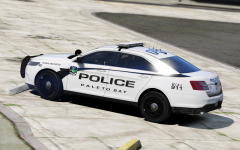 Thanks, im going to be doing this newer style fleet FPIS, FPIU, Impala, and the Charger with the Liberty as opposed to the Freedom with the older cars
 -
Thank ya :)
-
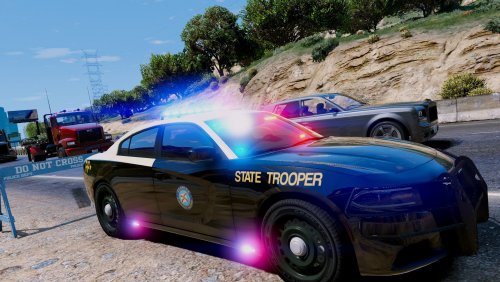 It can't really be fictional if it's a real department. I would've done San Andreas Highway Patrol.
- 48 comments
- 5 reviews
-
-

- 3
-
-
From the album: t0y's Projects
© t0y
-
-
Ok sweet, sounds good.
-
 Cutie
Cutie -
 Thank yaa
 -
Hi there so I was recently looking at some files that have been out for a while or that just came out and I was noticing really good models had pretty terrible reviews. So I checked some of them, and a lot of the bad reviews were from brand new accounts giving them bad reviews for a tiny reason that they misunderstood, or even the opposite that some files had like 10 reviews just from brand new accounts who were giving short one worded reviews even if the file was not as good as they were saying. I think a good way to prevent these kinds of reviews would be to require someone to reach a certain milestone in their account to unlock the ability to give reviews. For example (can be something other than this) like when an account hits 50 reputation points, or if they have been on the website for a certain amount of months/weeks. Therefore there wouldn't be as many uneducated reviews. I'm not trying to blame them, I think they really mean well but they just don't really understand some parts of files that are uploaded. Another way could be to give people the ability to edit their reviews. For example on thegreathah's recent Tahoe file someone gave him a 4 star review because the flash pattern was too slow, and another gave him a 4 star review because they thought the wheels weren't sized correctly (not trying to call you guys out, I understand the reviews, and you thought you were doing the right thing.) They thought they were right, which I understand but hah showed they it was supposed to be like that/they could change it themselves and they understood then, but now hes still stuck with a lower rating on his file which definitely pushes people away from downloading it. Obviously the point of files isn't for the reviews, but I think there could be a way to prevent low reviews based on stuff that isn't correct. Obviously it isn't the biggest deal having people less inclined to download your file, but I still think it is something that can be improved upon.
-
-
From the album: t0y's Projects
© t0y
-
@xExecutorx Ctrl+P and hit "u" to change the flash patterns. Nothing can be done with the specific model to change the speed of the flash patterns, only the actual patterns unless it is edited in the VCF. You can easily change it in game, or if you want it to be permanent just edit it in the VCF for your own use.
- 38 comments
- 21 reviews
-
-
- 2
-
-