


t0y
Members
-
Joined
-
Last visited
Everything posted by t0y
-
From the album: t0y's Projects
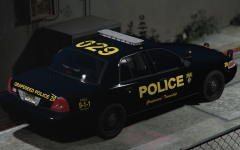
Grapeseed Township, give me your opinions please I don't know if I like it or not yet. Badge and plates by @Slendis© t0y, Slendis
-
So close
-
 I could lift you up I could show you what you want to see And take you where you want to be You could be my luck Even if the sky is falling down I know that we'll be safe and sound We're safe and sound I could fill your cup You know my river won't evaporate This world we still appreciate You could be my luck Even in a hurricane of frowns I know that we'll be safe and sound (safe and sound) We're safe and sound (safe and sound) We're safe and sound (Hold your ground) We're safe and sound (safe and sound) I could show you love In a tidal wave of mystery You'll still be standing next to me You could be my luck Even if we're six feet underground I know that we'll be safe and sound We're safe and sound I could lift you up I could show you what you want to see And take you where you want to be You could be my luck Even if the sky is falling down I know that we'll be safe and sound I could lift you up I could show you what you want to see And take you where you want to be You could be my luck Even if the sky is falling down I know that we'll be safe and sound We're safe and sound We're safe and sound We're safe and sound We're safe and sound (safe and sound) We're safe and sound (safe and sound) We're safe and sound (Hold your ground) We're safe and sound (safe and sound) We're safe and sound
 -
 Can I please
 -
-
-
-
-
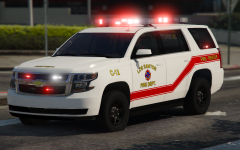 I was going to add siderunning freedoms too. Then we will be all good.
 -
-
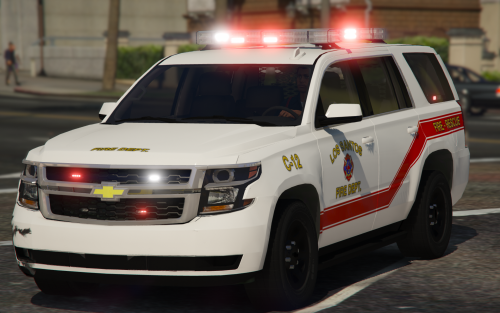 Hi ladies. So this is a 2015/16 Los Santos Fire Department Tahoe I made, my first 2015 Tahoe made with @thegreathah's edited Tahoe. I hope you ladies enjoy, this is the most lights I have ever put on a single car so I hope you enjoy, comes with two different color liveries as well. DETAILS: Title: [ELS] Los Santos Fire Department Battalion Chief Tahoe Models: 2015/16 Tahoe Lightbar(s): Whelen Freedom, Whelen Freedom Mini, Whelen Dominator, Whelen IONs INSTALLATION: Models: Mods - Update - x64 - DlcPacks - Patchday15/14(Most recent in your game) - dlc.rpf - x64 - levels - gta5 - vehicles.rpf (Replace/Drag and drop) VCFs: Grand Theft Auto V Directory - ELS - pack_default (Replace/Drag and drop) .Meta: Mods - Update - Update.rpf - Common - Data - Levels - Gta5 (Replace/Drag and drop) REQUIRED!!! CREDITS: FREQUENTLY ASKED QUESTIONS: Q: Why r ur lights so shiny pls help :( A: I use RadianceV to make my lights bright, you will need something like this or another mod like it to make your lights as bright as mine. Q: Can you please make an ELS pack for my own personal town? A: Not even a little sorry bb Q: How do I install X? A: I tried including the most in depth installation instructions I could find, but I know when I was new to LSPDFR didnt know anything about installing stuff, so if you have any questions you are feel free to comment with it. There are also instructions though which again, I tried making as in depth as possible to help you out. Q: X isn't working why? A: You may be doing something wrong, or I may have fucked something up. If you do find a bug or have a question please comment with a screenshot or video to give me a better idea of what is wrong and I will get back to you. Q: My lightbar and windows are tinted :( A: So there is a way to remove the tint from automatically spawning on most vehicles, which ive done for almost every model but sometimes it doesnt work like for example in the pranger or FBI slots, so you will need to use the vehicles.meta to turn that off, it also includes better handling. Made by @Slendis Please do not redistribute this pack, or any part of it including the liveries, or models, or screenshots, or use them in clans or public/private servers. Please do not upload this file or a part of it to any other site unless given explicit credit. Thanks for downloading ;) Please report the bugs in the comments before posting a review about them, it may be a misunderstanding or just an easy fix. Enjoy!
- 13 comments
- 7 reviews
-
-

- 14
-
-
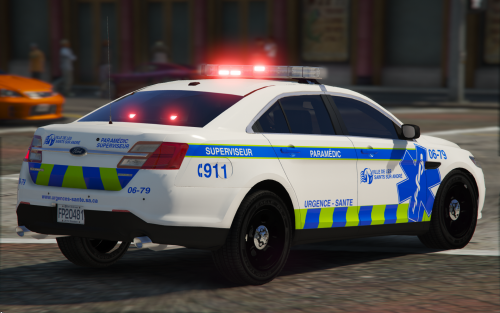 Hi there folks. So this is my Los Santos EMS Paramedic pack consisting of just two vehicles. The graphics/liveries are based off of Montreal and Urgence Sante which is french, and this was originally going to be a part of my French Canadian pack so all of the words and stuff are in French, but I translated Los Santos into french so it is technically Los Santos just a different language. Anyway enjoy these, my first pack with no CVPI! DETAILS: Title: [ELS] Los Santos Emergency Medical Services Pack Models: 2013 Tahoe, 2016 FPIS Lightbar(s): Whelen Freedom, Whelen Freedom Mini INSTALLATION: Models: Mods - Update - x64 - DlcPacks - Patchday15/14(Most recent in your game) - dlc.rpf - x64 - levels - gta5 - vehicles.rpf (Replace/Drag and drop) VCFs: Grand Theft Auto V Directory - ELS - pack_default (Replace/Drag and drop) .Meta: Mods - Update - Update.rpf - Common - Data - Levels - Gta5 (Replace/Drag and drop) REQUIRED!!! CREDITS: DEMO: FREQUENTLY ASKED QUESTIONS: Q: Why r ur lights so shiny pls help :( A: I use RadianceV to make my lights bright, you will need something like this or another mod like it to make your lights as bright as mine. Q: Can you please make an ELS pack for my own personal town? A: Not even a little sorry bb Q: How do I install X? A: I tried including the most in depth installation instructions I could find, but I know when I was new to LSPDFR didnt know anything about installing stuff, so if you have any questions you are feel free to comment with it. There are also instructions though which again, I tried making as in depth as possible to help you out. Q: X isn't working why? A: You may be doing something wrong, or I may have fucked something up. If you do find a bug or have a question please comment with a screenshot or video to give me a better idea of what is wrong and I will get back to you. Q: My lightbar and windows are tinted :( A: So there is a way to remove the tint from automatically spawning on most vehicles, which ive done for almost every model but sometimes it doesnt work like for example in the pranger or FBI slots, so you will need to use the vehicles.meta to turn that off, it also includes better handling. Made by @Slendis Please do not redistribute this pack, or any part of it including the liveries, or models, or screenshots, or use them in clans or public/private servers. Please do not upload this file or a part of it to any other site unless given explicit credit. Thanks for downloading ;) Please report the bugs in the comments before posting a review about them, it may be a misunderstanding or just an easy fix. Enjoy!
- 12 comments
- 6 reviews
-
-
-

- 15
-
-
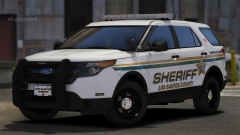
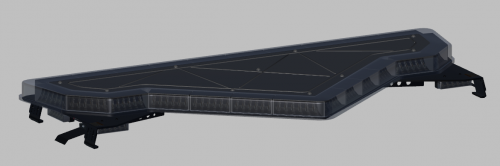
No. Thanks! Maybe suburban is next :D A Whelen Liberty has a single level of lighting, these are Whelen Freedoms which are older, but are double levels of lighting basically a Liberty stacked on top of a Liberty.
-
-
-
 I don't get it, I think it is funny but I dont understand please assist
 -
From the album: t0y's Projects
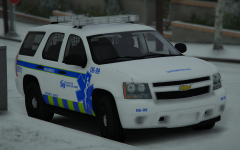
Another addition to my french-canadian inspired pack. This time, a tahoe with a double freedom. The freedoms are a tiny bit different the main one is carper's and the mini is someone who edited evi's so I had to do a lot of texture edits on the mini but it is the best I could do. Livery is based on the urgence sante cars in real life, and yeah... Thanks.© t0y
-
-
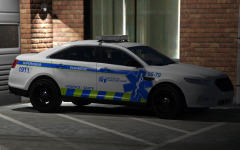 Thanks fella, most of it was from the Montreal paramedic cars but I did put my own twist on it lol
 -
-
Slendis is gross
-
From the album: t0y's Projects
So... This is an addition to my french canadian inspired game. The car itself is based a bit on the Montreal Paramedic car, but it is basically the FPIS from my most recent pack but with no police gear, red lights, no hubcaps, and less exterior gear. The livery is also kinda based on Montreal but I threw my own touches on it.© t0y
-
 Deal. I just ordered a large meal from Taco Bell, so they will arrive when I release and you will get to work. You promised too, no going back now. Heads up: I am aggressive. Hmm maybe, like SQ with whatever lightbar they use not the MX7000, but still a rotary. I will try.
 -
Thanks. A majority of the liveries dont have the stickers, but I thought they would give it some character. Yes it will be a pack, probably very small though as I want to keep all the cars with the same lightbar and that is hard to do because it is so old.
-
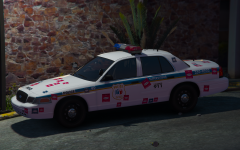
From the album: t0y's Projects
For those wondering, the livery is based on a French Canadian QC police car, but I translated Los Santos into french so the badge says Los Santos-San Andreas, and the rest is french as well. The stickers are a little protest quebec departments were having because their retirement pension was decreased and they had to pay their salary deficit, it is still going on in Montreal and some other QC towns so I added it in, the car has 2 liveries with stickers and 3 without. They say "ON N'A RIEN VOLE. (NOUS) PROJET DE LOT 3 SUR LES RETRAITES, LIBE NEGO" And I made a red version, a blue version, and worn/peeled versions for both of them. Enjoy the pic :D© t0y

