


t0y
Members
-
Joined
-
Last visited
Everything posted by t0y
-
 Don't pull a Matt sir, no one likes Matt.
 -
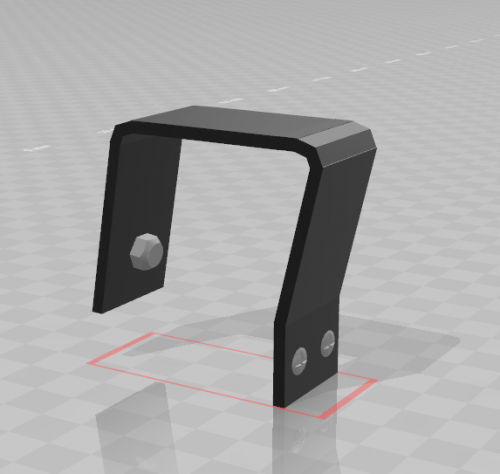 These look great, especially those RCMP mounts, maybe when I get back into that pack they will be in use.
 -
#PAPD
.thumb.png.aa2689d0293b4aa92cfd7424e1ea0e70.png)
.thumb.png.d4d83f4ddda91ee3676975668bec1368.png)
-
Terrible
-
 I am not sure, there may be a way to do it in the .meta though but you would need to ask around. They are support/non police units, they can direct traffic, do community policing patrol around areas for a police presence, etc. but they cannot do actual police work.
- 283 comments
- 95 reviews
-
-

- 1
-
-
Those are very nice, although I am past adding to this pack sorry, maybe in the future I will add a Harley to a pack but no plans as of yet.
- 283 comments
- 95 reviews
-
-
- 1
-
-
Sorry, haven't really been checking the comments lol. Thanks, I will fix that. What do you mean? We'll see. You would need to ask @Problematic as he took the screenshots
- 283 comments
- 95 reviews
-
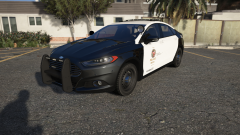 Because the NYPD has a $2.5b budget and can afford the constant switching out of vehicles, they've already decommissioned plenty of cars that other departments still use every day like CVPIs. We have the concept, and the way to get it done, they look nice, and are dependable but departments that still run the CVPIs or older cars probably just cant afford the upgrade. Also the fact that they arent PPVs, the NYPD has plenty of non-PPV cars, but, and correct me if im wrong most departments dont seek out non-PPV cars, nor do upfitters normally even offer that, as it is harder to set up and run especially in places that arent almost strictly a city.
 -
I mean we have plenty of attractive, workhorse-level hybrid police vehicles. The 2013 fusions for example are very nice, and dependable seeing as they are some of the oldest vehicles in the NYPD fleet but are still actively used and in service. Idea we need, have, and want.
-
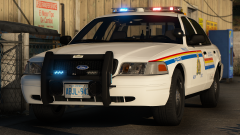
From the album: t0y's Projects
So here is a little pack I am working on it is half lore, and half real. The basis around the pack is that San Andreas, instead of being a state in the US is now a province in Canada, meaning it has its own RCMP detachments with some fictional equipment. Well, little is an understatement I have almost 30 cars planned, 5 vics which I have finished but only a few are pictured, that includes the RCMP MD CVPI, RCMP MD Unmarked CVPI, RCMP MD Slicktop CVPI, RCMP IRSU CVPI, and RCMP Airport CVPI, as well as three silverados, but only two are pictured, the ERT silverado and the S&R silverado, which is fully fictional. Here are some more pictures, MUCH more to come. Screenshots by @Problematic Plates by @Slendis and AP screenshots by Slendis© t0y, Problematic, Slendis
-
Make sure your PostFX is on ultra, and something else in the graphics settings that I cant remember to be honest, so this isn't a very helpful response. But maybe make a thread about it and ask, it should be an easy fix.
- 283 comments
- 95 reviews
-
-
- 1
-
-
In your trainer go to Vehicles Options then Components and hit enter on 12 or 10 whichever extra you want. I am fairly sure that should work although I haven't played GTA in about a month so I am just basing it off of memory.
- 283 comments
- 95 reviews
-
What's your error? They just wont turn on when triple pressing J? Do you have ELS? Do you have ELS? Hmm weird, well they all have the same .meta so it may be a different issue. Maybe, but I think I am pretty much done with adding stuff into this pack, just bug fixes from now on for the most part.
- 283 comments
- 95 reviews
-
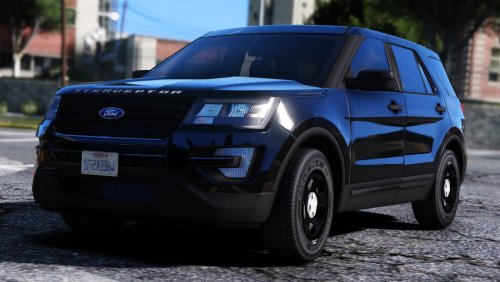 Looks great :)
 -
Hmm not sure, seems like your ELS isn't working for that car, maybe you dont have the correct VCF in? No idea to be honest, I am not a great troubleshooter but for me, and all of my testers the meta worked fine. @Slendis made the meta edits though so maybe he knows more than me. Thanks :) I think TC would look great with the Legacy as well, so I am going to try it out.
- 283 comments
- 95 reviews
-
I was thinking of doing a Tarrant County pack, but couldn't think of a lightbar, any suggestions? Thanks :)
- 283 comments
- 95 reviews
-
-
- 2
-
-
Ok thank you for letting me know, I will take a look. I'll see, it's a lot of liveries though I think over 30 and since they are in 4k right now it would take a while to save them all in 2k, but we'll see. Thanks! And the Silverado takedowns I knew about, I tried everything to fix them but they wouldn't get fixed so sorry about that, and about the lightbar I will fix that soon hopefully in the next update. And the CVPI is Underwood's, it is a sort of WIP, but the final base will eventually be released to the public and will be a new dev model.
- 283 comments
- 95 reviews
-
-
- 1
-
-
Thanks! And the tint part should be fixed with the meta, and the breakable windows and hand positions I will look at, do you remember which vehicles? I believe at least for me I fixed the unbreakable glass for all of them but I could be wrong. I didn't take the screenshots, you'll have to ask @Problematic Nope, sorry I don't have a very decent base atm. No, sorry I dont really know how to do non-els plus I think ELS is much better.
- 283 comments
- 95 reviews
-
Takedowns yes, scene lighting, no. I used the extra for lojacks + at least on the vic the scene lighting wouldn't work after several tries so I just gave up and gave the extra to the lojacks.
- 283 comments
- 95 reviews
-
-
- 1
-
-
-
-
Hi ladies. So now that ScriptHook has updated it's release time. This is a pack I have been working on for the better part of the last month in a half, and I am actually very proud of it. The pack is based on Fort Worth, but the actual cars are not accurate to those, just the liveries, window templates, and lightbar are equal to Fort Worth and some of the pushbar setups. The pack comes with 13 different vehicles ranging from SUVs like FPIUs and Tahoes, Pickup trucks like Silverados and Sedans like the CVPIs and Chargers, among many other cars. I hope you guys enjoy and feel free to leave your criticism and issues you find down below. Details/Pack Overview: Title: Los Santos Police Department Mega Pack [ELS] Lightinig: Whelen Liberty, Whelen Freedom, Whelen M4s Version: V.1.0.0 12/18/2017 Released: 12/18/2017 This pack includes 13 vehicles, with various extras, here they are: 2006 Crown Victoria Police Interceptor (Marked) - Pushbar (extra_10) Lojack (extra_12) 2006 Crown Victoria Police Interceptor (Slicktop) - Pushbar (extra_10) Lojack (extra_12) 2006 Crown Victoria Police Interceptor (Unmarked) - Pushbar (extra_10) Lojack (extra_12) 2006 Crown Victoria Police Interceptor (Auxiliary) - Pushbar (extra_10) 2010 Chevy Silverado (Marked) - Lojack (extra_12) 2010 Chevy Silverado (Auxiliary) - No extras 2010 Chevy Silverado (Public Works) - No extras 2013 Chevy Tahoe (Marked) - Pushbar (extra_10) Lojack (extra_12) 2014 Dodge Charger (Marked) - Pushbar (extra_10) Lojack (extra_12) 2015 Dodge Charger (Marked) - Pushbar (extra_10) Lojack (extra_12) 2016 Ford Police Interceptor Sedan (Marked) - Pushbar (extra_10) Lojack (extra_12) 2014 Ford Police Interceptor Utility (Marked) - Pushbar (extra_10) Lojack (extra_12) Installation Instructions: Models: Mods - Update - x64 - DlcPacks - Patchday15/14(Most recent in your game) - dlc.rpf - x64 - levels - gta5 - vehicles.rpf (Replace/Drag and drop) VCFs: Grand Theft Auto V Directory - ELS - pack_default (Replace/Drag and drop) Vehicles.Meta: Mods - Update - Update.rpf - Common - Data - Levels - Gta5 (Replace/Drag and drop) REQUIRED!!! Frequently Asked Questions: Q: Why r ur lights so shiny pls help :( A: I use RadianceV to make my lights bright, you will need something like this or another mod like it to make your lights as bright as mine. Q: Can you please make an ELS pack for my own personal town? A: Not even a little sorry bb Q: How do I install X? A: I tried including the most in depth installation instructions I could find, but I know when I was new to LSPDFR didnt know anything about installing stuff, so if you have any questions you are feel free to comment with it. There are also instructions though which again, I tried making as in depth as possible to help you out. Q: X isn't working why? A: You may be doing something wrong, or I may have fucked something up. If you do find a bug or have a question please comment with a screenshot or video to give me a better idea of what is wrong and I will get back to you. Q: My lightbar and windows are tinted :( A: So there is a way to remove the tint from automatically spawning on most vehicles, which ive done for almost every model but sometimes it doesnt work like for example in the pranger or FBI slots, so you will need to use the vehicles.meta to turn that off, it also includes better handling. Made by @Slendis Credits: Great video by @mroxplay Please do not redistribute this pack, or any part of it including the liveries, or models, or screenshots, or use them in clans or public/private servers. Please do not upload this file or a part of it to any other site unless given explicit credit. Thanks for downloading ;) Please report the bugs in the comments before posting a review about them, it may be a misunderstanding or just an easy fix. Enjoy!
- 283 comments
- 95 reviews
-
-
-

- 104
-
-
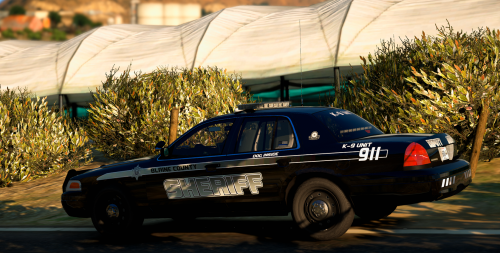 Looks fantastic! Glad to see some OCSO love here finally, top quality as usual. 5/5
- 25 comments
- 9 reviews
-
-
- 1
-
-
 It's a vent that the CHP uses on their K9 cars:
 -
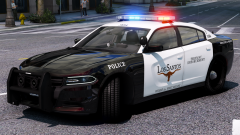 Thanks Indeed Problematic did a great job with the pics Yessir Posted some pics of those a few days ago

.png.a21bdec6cd7c7ff1ce08a66e59ac8103.png)
.png.6574e178841d337265b6d62ceee69a14.png)
